





Online Photobook Version 4.4
At OnPrintShop, we are continuously evolving our solution capabilities to help you deliver the best services to your customers and grow your online business. We are releasing OnPrintShop Version 4.4 which includes new features and enhancements to meet the changing requirements of our clients.
List of Upgrades
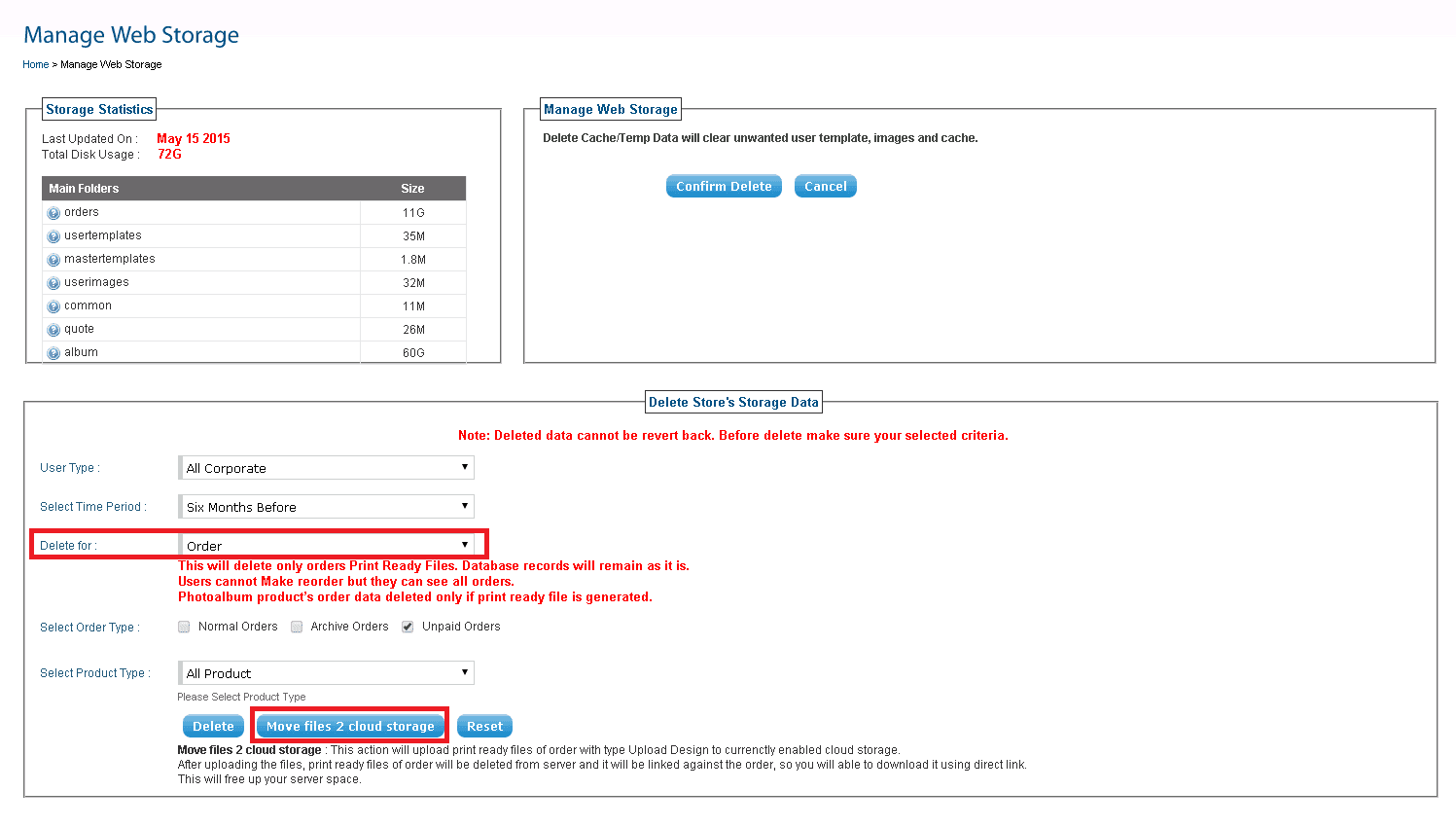
1 Move Order Files to cloud Storage: Print-ready files of customers’ orders can be moved to cloud storage. Even after moving to cloud storage you can see preview of the album.
2 Display Binding Margin in Designer Studio: You can set bind margin for Photo album products. While personalizing photo album in the Photobook Designer Studio, the bind margin will display as green-dotted line.
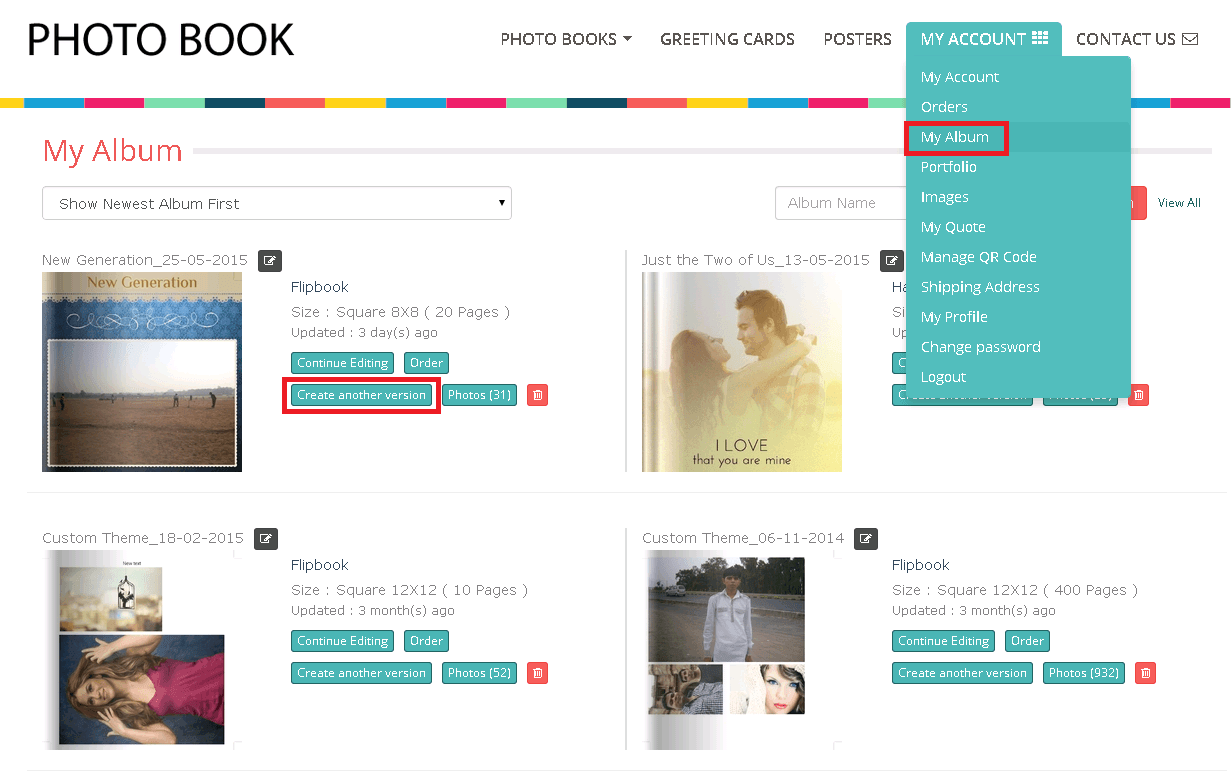
3 Duplicate User Album: Your customers now have the option in their My Account to quickly duplicate any of their orders from My Album using Create Another Version option.
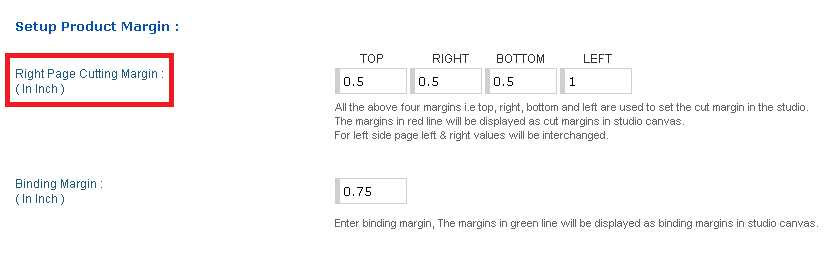
4 Right Page Cutting Margin: Now you need to set cutting margin of right pages only. Left page cutting margin will be automatically interchanged and taken by the system.
5 Vendor Price Enhancement: Along with vendor price markup on the product, you can now assign vendor price and your percentage markup for every additional page.
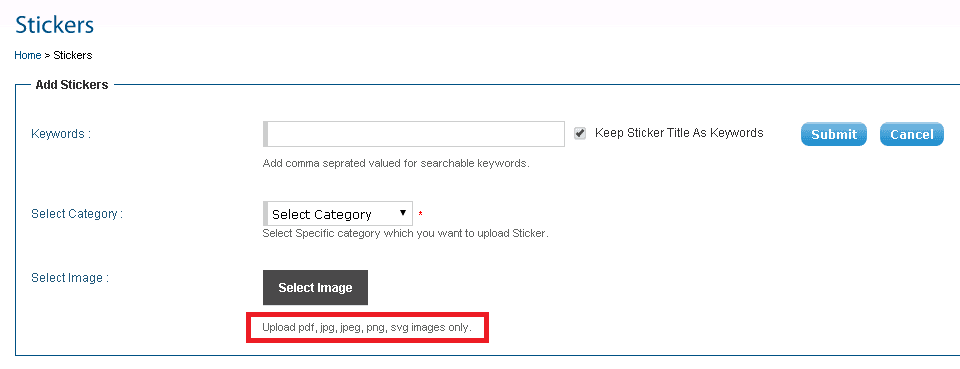
6 Upload SVG Images for Stickers: You can upload sticker images in SVG format, apart from pdf, jpg, jpeg and png.
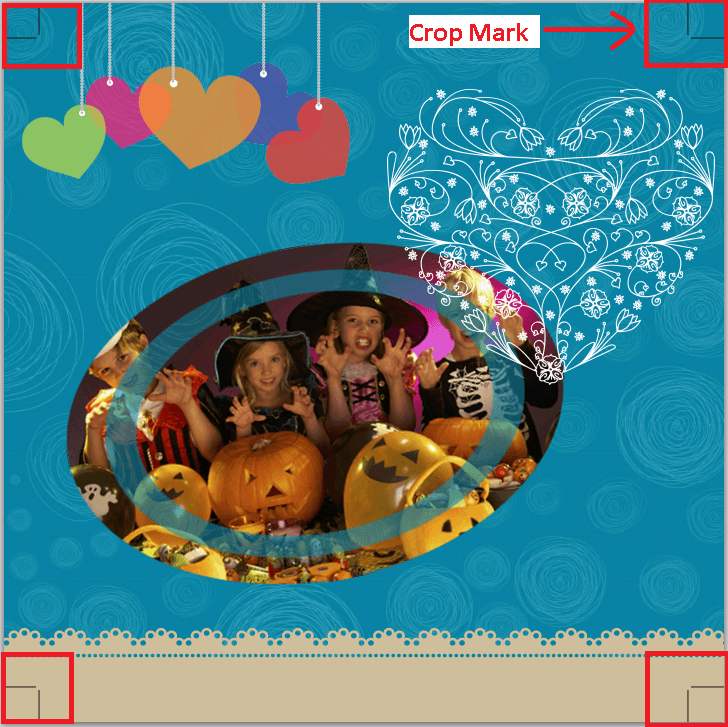
7 Crop Marks in Print-Ready File: Now you can set crop marks in the photobook print-ready PDF files generated from the admin panel & preview files based on the configuration.
8 Enhanced Block Template Personalization tool (HTML):
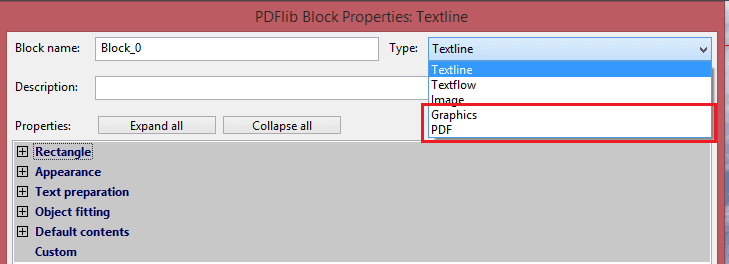
Block Templates enhancement: 2 new options added – PDF and GRAPHICS (SVG Support) to select and create the block template.
TEXT Pattern Customization in Designer Studio (HTML): We provide custom properties in PDFLIB Block template for different text pattern customization, Bullets, Require validation, and drop down, etc. in HTML Designer Studio for text and text area elements.
Mask Images & Curve Text with Block Template: Easily create curve text and image masking also in PDF block template using SVG path. We created Video tutorial and Help for how to export SVG path from Illustrator or Corel, and apply in Block Templates.
9 Shipment Tracking Enhancements: API upgrade of third party shipping methods, auto generation of label and track details of order for UPS, FedEx and USPS in My account.
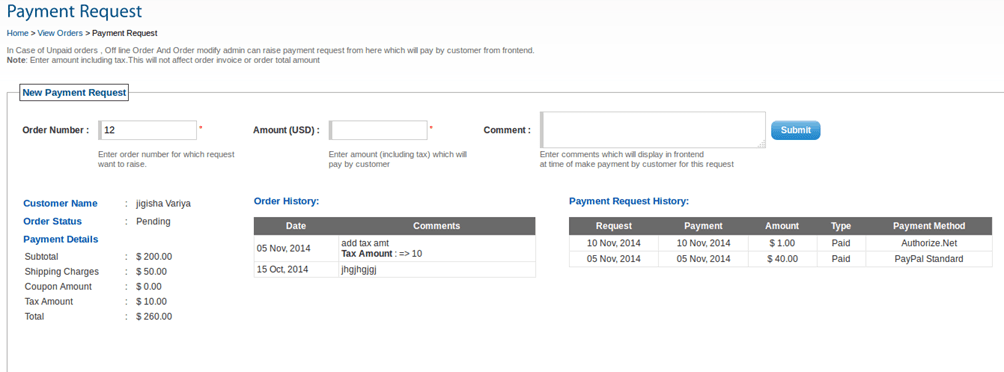
10 Order’s Partial Payment Option: We have added new capabilities to easily take payment online for unpaid orders, offline orders and modify orders. Admin can raise payment request to specific customers, and the customers can make payment from their My Account.
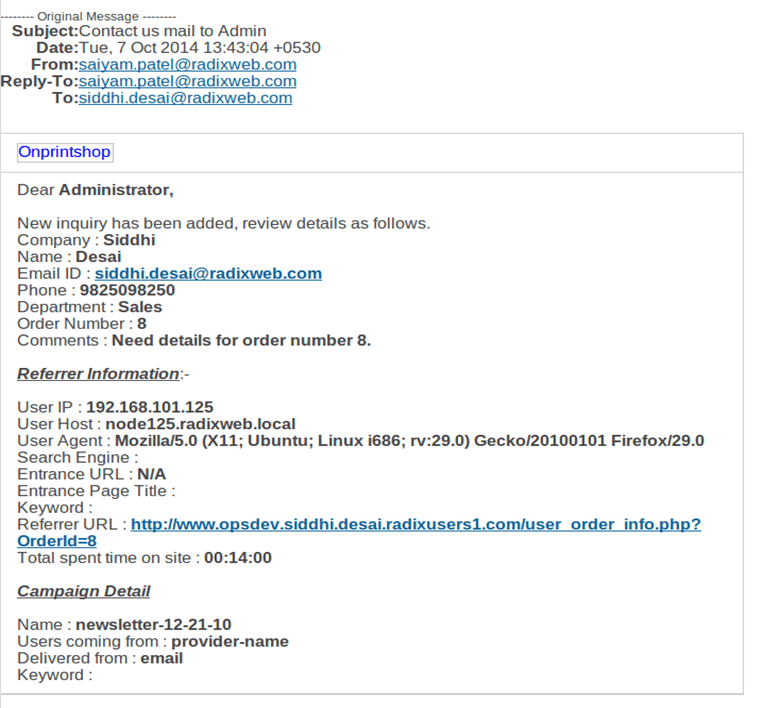
11 Capture Customers’ Inquiry Source: We have made an advancement in helping you identify your customers’ referrer information. Whenever new inquiry is generated, admin receives information such as browser used, redirected from which URL, IP address, etc.
12 Other Enhancements and Bug Fixes: Meta-tag setting enhancement, Separate Job Ticket inside folder while multiple download orders & hot folder, display file name in Job Ticket, semi-transparent mask images with .PNG format, minor enhancement & bug fixes.
1 Move Order Files to cloud Storage:
Print-ready files of customers’ orders can be moved to cloud storage. Even after moving to cloud storage you can see preview of the artwork. This option is available to you in the Manage Web Storage Section, only when you choose Order in the Delete for field. You can select the customer type as retailer, corporate or specific corporate whose orders you wish to move to cloud storage. You can further specify which order type and product type orders should be moved to cloud storage.
2 Display Binding Margin in Designer Studio:
You can set bind margin for Photo album products. While personalizing photo album in the Photobook Designer Studio, the binding margin will display as green-dotted line. In your admin panel, you can set the binding margin for photo album products from the specific product’s Edit Designer Option.
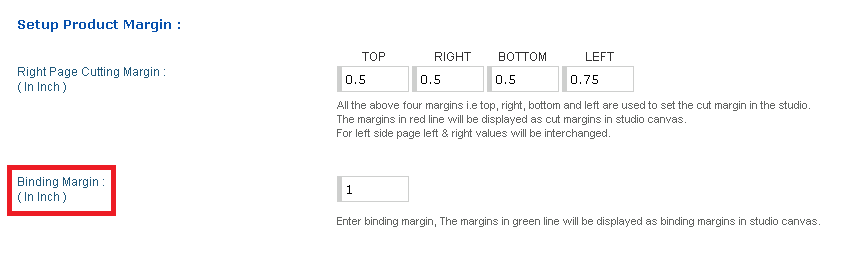
On your storefront, when your customer personalizes the photo album for which binding margin is set, it will show in the Designer Studio.
3 Duplicate User Album:
Your customers now have the option in their My Account to quickly duplicate any of their orders from My Album using Create Another Version option. This facilitates your customers to replicate an existing order, make minor changes as required and place new order within minutes.
4 Right Page Cutting Margin:
Now you need to set cutting margin of right page only. Left page cutting margin, both horizontal cutting margin (left & right), will be interchanged. In your admin panel, you can set Right Page Cutting Margin for photo album products from the specific product’s Edit Designer Option.
5 Vendor Price Enhancement:
Along with vendor price markup on the product, you can now assign vendor price and your percentage markup for every additional page as well.
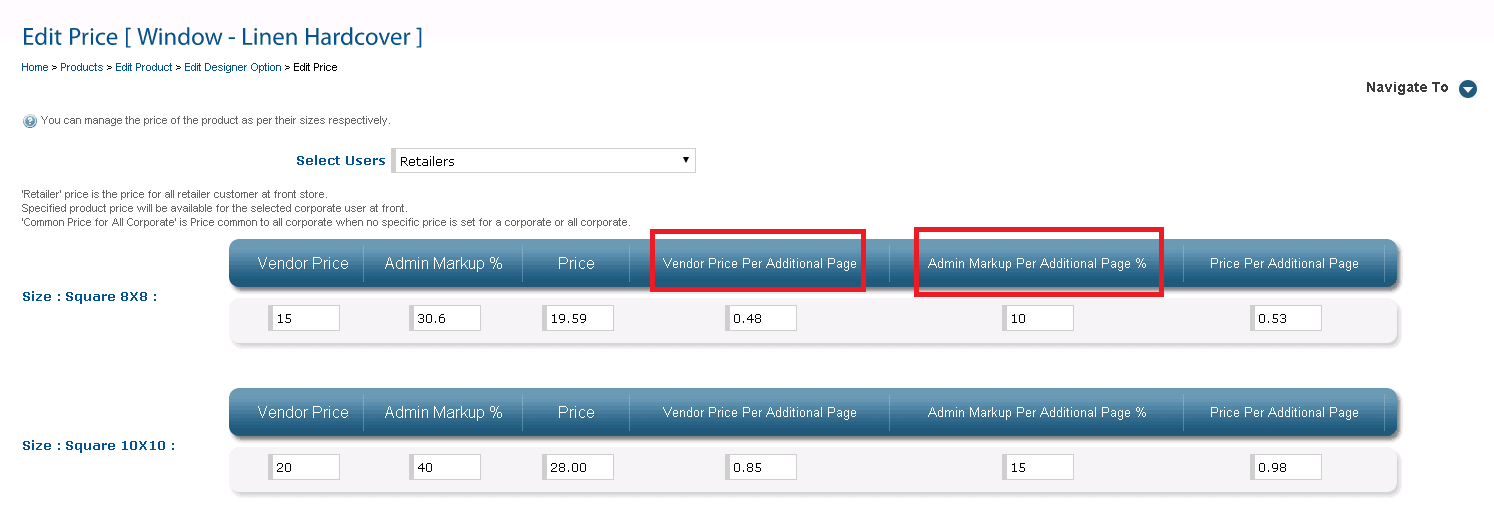
- Admin mark-up is the commission in percentage that admin charges
- Retail price will be calculated automatically based on vendor price and markup
- In case if Vendor price and Admin mark-up is not set then vendor price = 0.00 and admin mark-up = 100%
- Price calculation formula is applied on additional option price and bulk price
- Vendor commission report can be generated to view the history
6 Upload SVG Images for Stickers: You can upload sticker images in SVG format, apart from pdf, jpg, jpeg and png. You can instantly Add Stickers from PhotoAlbum section in your admin panel.
7 Crop Marks in Print-Ready File: Now you will find crop marks in the photobook print-ready PDF files generated from the admin panel based the configuration.
8 Enhanced Block Template Personalization tool (HTML):
a. More Options with Block Templates: PDF block files now have two more options PDF and GRAPHICS (SVG). User can also upload PDF if created Block type is PDF. In case user uploads SVG, Block type is Graphics (SVG).
b.TEXT Pattern Customization in Designer Studio (HTML): We provide custom properties in PDFLIB Block template for different text pattern customization, Bullets, Require validation, drop down, etc. in HTML studio for text and text area elements. We provide help to how to setup the custom properties in Admin >> Templates >> PDF Block Templates >> Help (Top Right Corner).
Horizontal and Vertical Block Mapping to Remove Spacing Between Blocks: If a Block has blank content, then the second Block besides the first block will automatically move to the place of the first block.
Text Pattern and Validation: Admin can inbuilt pattern list for some of text element so whenever admin creates any Block PDF, it contains:
Label , Phone No. formats
Bullets
Menu (leader)
Text Transformations
Validation
Input Options: We have enhanced it to give Selection Drop down and Radio Buttons so that user can choose only from those options.
c. Mask images and curve text with block template: Added new capability to create curve text and image masking also in PDF block template using SVG path. We have created Video and Help for how to export SVG path from Illustrator or Corel and apply in Block Templates.

9 Shipment Tracking Enhancements:
We have added new configuration settings for orders in shipment from UPS, FedEx and USPS.
- Label Generation: Third party shipping company provide the shipping label generation service and we have integrated with OnPrintShop solution. Admin can download third party label from order listing page. Admin can regenerate label from modify order section as well if any information change for specific order.
- Tracking Number: In admin, configuration setting for tracking customer order details for specific shipping method is provided. If tracking is enabled, then end user can track their order from his My Account’s order detail page. Admin can also track order from order detail page from admin panel.
For formula based shipping method (Weight and Quantity), we have provided option for add tracking URL and tracking number. If tracking URL is set from admin and tracking number is set for a specific order, then tracking number will automatically update and link will set. On clicking that link, customer will be redirect to the URL which is set by the admin and can see the shipping details for that particular order.
10 Order’s Partial Payment Option:
We have added new capabilities to easily take payment online for unpaid orders, offline orders and modify orders. Admin can raise payment request to specific customers, and the customers can make payment from their My Account. This option available only as online payment.
New generated request will be shown in ‘Raised Request’. If payment is done by customer successfully then it will show in the ‘Completed Request’. Requests which are cancelled either by Admin or by customer will show in ‘Cancelled Request’.

Customer can make payment of raise Request from Order Details Page. Payment Request Details will be available for those orders whose request is raised by the admin. Customer can see the details of payment request.
When customer clicks on ‘Pay Now’ button, he is redirect to payment method selection page.
In case of unpaid order, there is no need to raise a payment request by the admin as system will show a link for all unpaid orders on Order Details Page automatically.

11 Capture Customers’ Inquiry Source:
Admin can now capture & track details of the visiting customer in email. Information will be embedded with all emails which are sent from the system before the customer is logged in. If admin wants to receive visiting customer’s information then admin can set the variable in the email template. It is available for contact us, tell a friend, new quote and signup registration.
12 Other Enhancements and Bug Fixes:
a. Meta-tag setting enhancement: You can add meta-tags for additional pages of photo album.
b. Separate Job Ticket inside folder while multiple download orders & hot folder: If admin downloads multiple orders using checkbox in order listing page, separate job ticket is provided for each order inside the order folder in zip file. Now during the transfer of files, admin can separate job ticket for each order using hot folder option.
c. Display File name in Job Ticket: Admin will also be able to see the name of the print ready file uploaded by the customer in job ticket. Admin can set the variable of print ready file anywhere in the email template of Job Ticket Format where he wants to print the name of the print ready file in job ticket.
If in an order any product has more than one print ready files, then multiple print ready file names will also display in job ticket separated by a semi-colon.
d. Semi-transparent mask images with .PNG format: Converted all mask images to semi-transparent images with .PNG format which are provided to the customers at the time of store setup. So now text element will not hide behind the mask image in Designer Studio. We are allowing store admin to upload semi-transparent mask images with .PNG format for the product that admin wants.
e. Bug Fixes OnPrintShop 4.3: We have tracked and fixed several major, minor and trivial bugs across the admin panel, storefront and Photobook Designer Studio of previous released version.
- 16 May, 2026 OnPrintShop Version 13.0
- 28 December, 2025 OnPrintShop Version 12.3
- 7 September, 2025 OnPrintShop Version 12.2