





Version 12.3
From easier logins and a refreshed Quick Design interface to intelligent personalization tools and enhanced admin utilities, the OnPrintShop v12.3 minor release is designed to make both storefront and backend operations smoother, faster, and more intuitive. You’ll also find major enhancements in Quotes, Designer Studio, shipping price accuracy, tax handling for custom products, and search performance—along with new integrations like HubSpot order sync.
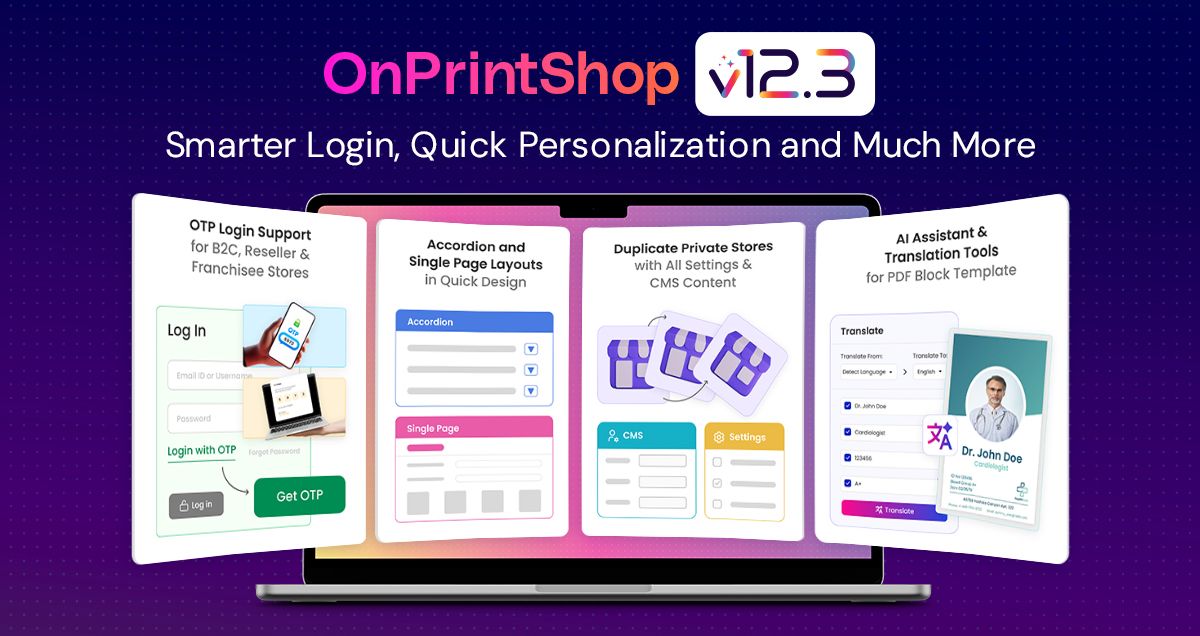
What’s New:
1. OTP-Based Login for B2C Public Stores
Customers across B2C, Reseller, and Franchisee stores now have the option to log in using OTP in addition to the standard Email and Password login. OTP can be used with email and, if an SMS gateway is integrated, with mobile numbers as well. Store owners can enable or disable OTP login per store, providing flexibility to offer a convenient and secure login experience.
The existing registration process and password login remain unchanged, ensuring smooth adoption without affecting current workflows.
2. Improved Quick Design UI With New Layout Options
The Quick Design section has been enhanced to offer a cleaner and more intuitive user experience. Admins now have the flexibility to choose from three layout options for the Quick Design page.
In addition to the existing tab layout for complex templates, admins can select an Accordion layout with collapsible sections featuring Next/Previous navigation or a Single Page layout that displays all inputs at once. These layouts help reduce clicks, enhance personalization flow, and provide a smoother design experience for both admins and customers.
3. Mass Template Personalization for Quick Design Products
Mass Template Personalization is now supported for the Quick Design products, allowing customers to apply personalization across multiple records, just like standard products.
Additionally, customers can now exclude specific personalization fields when uploading XLS or CSV files, in addition to the existing manual data option. This makes managing personalization data easier and more consistent across all input methods, providing a smoother and more user-friendly experience.
4. Submit Ideas Button for Suggestions and Feedback
Admins can now easily share ideas, suggestions, and feedback directly from the platform without contacting the support team separately. This feature allows them to report bugs, request new features, suggest third-party integrations, or recommend improvements to documentation and overall user experience. By simplifying the feedback process, businesses can communicate their needs faster, helping the development team better understand real-world requirements and continuously enhance the software with updates that truly matter to users.
Enhancements for an edge:
1. Enhanced Store Duplication with Expanded Configuration Options
Store duplication now covers additional configurations such as CMS content, links, and key settings, along with new options to define the Store Name, Email, Password, and Directory/Subdomain during setup. This improvement reduces manual effort, speeds up the creation of new stores, and ensures a more complete, ready-to-use duplication process.
2. Advanced Folding Options with 3D Preview Support
Folding options have been enhanced to support custom fold positions based on either percentage or fixed measurements, in addition to the existing “number of folds” method. This allows precise placement of fold lines relative to product size, giving the admin greater control over folding for complex products.
Based on the configured fold settings and the assigned model, the system will now generate a corresponding 3D preview, offering a clearer and more realistic visualization of the final product.
3. Improved Tax Application for Quotes & Offline Orders
We’ve enhanced the tax application behavior across Quotes and Offline Orders to ensure taxes are applied more accurately and with greater flexibility. The system will now correctly consider product-specific taxes wherever configured, instead of applying only the global tax rate.
Additionally, admins can choose between default tax or custom tax for configurable and custom products in Offline Orders, giving them better control without needing manual adjustments.
4. AI Assistant & Text Translation Support for PDF Block Templates
We are extending the AI Assistant and Text Translation capabilities to PDF Block Templates within Block Studio. With AI-powered writing assistance, real-time translation, and image editing tools like background removal and enhancements, now available for PDF blocks.
This will maintain consistency across multilingual designs, reduce manual editing effort, and streamline the template creation process. These options appear in the Property Panel whenever a PDF block contains editable text or images, providing a unified and seamless experience across all block types.
5. Image Cropping and Scaling Made Easier
We are introducing on-canvas image cropping with scaling in Designer Studio to simplify and speed up the image adjustment workflow. With this enhancement, customers can now crop and scale images directly on the canvas using the middle handles of the bounding box, providing a more intuitive, efficient, and seamless editing experience without switching tools or screens.
6. Minor Enhancements
Storefront:
- Redeem Rewards During Quote Conversion: Customers can now redeem their reward points while converting their Quote to Order in the cart. This enhancement ensures customers can take full advantage of their rewards during checkout, improving their purchasing experience and encouraging repeat engagement.
- Local Pickup Added for Free Shipping Products: Products with Free Shipping enabled will now also display the Local Pickup option on the Product Info Page, allowing customers to choose express pickup from an offline store if desired. This improvement provides more flexibility for customers while maintaining the Free Shipping workflow.
- Improved Shipping Option Sorting: When Local Pickup is available, it will now appear first in the shipping options if it has a lower sort order than other methods on the Cart page. Additionally, if only one shipping method or pickup location is available, that option will be automatically selected. This ensures a quick and easy checkout experience for customers.
- Auto-Fill Customer Info for Pickup Orders: To simplify the checkout process and reduce duplicate data entry, the system now auto-fills customer information for pickup orders during guest checkout. With this enhancement, missing customer details like name, phone number, or company will be automatically filled with the existing billing or shipping addresses whenever possible. This ensures a smoother and faster checkout experience while reducing errors and improving overall usability.
- Thumbnail Display for Artwork Options: The system now displays thumbnail images and labels for “Upload Artwork Later” and “Hire Designer” options on the product’s additional info page, shopping cart, and order listing pages. This improvement helps customers clearly understand which artwork workflow they have selected, enhancing clarity and reducing confusion during the ordering process.
Designer Studio Section:
- Smarter Preview Models Based on Selected Option Combinations: Admins can now create and assign 2D and 3D preview models, Option Combinations-wise, by linking specific product options with sizes. For example, admins can create combinations for different colors (e.g., red, blue) and sleeve types (e.g., short sleeve, long sleeve) for a T-shirt product. When a customer selects a specific color and sleeve combination, the correct 2D or 3D model for that combination is shown, providing a more accurate and customized preview.
- Enhanced Mask & Die Line Color Management: Previously, die lines and masks could only use default or border colors, which sometimes caused printing issues, misinterpretation of die lines, or color mismatches. With Pantone support added to package product masks and die-cut product die line in print-ready files, printers can clearly distinguish die lines and masks using standardized spot colors, reducing errors and ensuring the final product matches the intended design.
- Layered Foreground & Background Mask Support: Admins can now upload and display both foreground and background masks for products and options, creating layered previews for a more accurate visual representation. For example, sticker products can show the sticker shape as the foreground and a metallic or patterned layer as the background. Masks are also clearly displayed on the preview listing page, making management easier and improving the design experience.
- Use All Images from Multi-Page PDFs in Canvas: Customers can now upload multi-page PDFs and use images of all pages in the design canvas. Previously, only the first page was converted to an image. This enhancement ensures a consistent and intuitive experience when uploading and using PDFs, allowing designers to access and work with each page individually, while maintaining seamless print-ready file generation.
- Import Multiple PDF Block Rules at Once: Admins can now import multiple dependency rules for PDF block templates at once using a structured Excel file. This eliminates the need to define rules individually, saving time and reducing errors.
- Interactive 3D Product Preview in My Account: Customers can now view a 3D preview of their product in the My Account order listing page when proof-cycle is enabled. This allows customers to visualize their final product more accurately, improving confidence and reducing errors.
- Persistent Object Controls Outside Canvas: It is now possible to easily reposition and resize objects even when they extend beyond the canvas, as their selection and control handles always remain visible and accessible, allowing customers to adjust oversized or partially placed elements more easily and efficiently.
- Always-Visible Print Area for Promotional Products: We’ve improved the design experience for promotional products by keeping the print-area border visible whenever an item is selected. This helps customers clearly see the safe printable area and avoid placing content outside it.
Product Section:
- Expanded File Upload Support for Document Prints: Customers can now upload additional file types for Document Print Products, including JPG, JPEG, PNG, DOC, DOCX, PPT, and PPTX. All uploaded files are automatically converted into PDFs for processing, ensuring consistent print-ready output. This allows customers to use a wider range of file formats, making it easier to submit their designs without manually converting files.
Order Module Section:
- Safe Deletion and Disabling of Statuses: Admins can now delete or disable order statuses and order product statuses even if they are already assigned to orders or payment methods. By switching the assigned status to a new one, the system allows greater flexibility in managing workflows and ensures that outdated or unnecessary statuses can be safely removed or disabled without affecting existing orders.
- Automatic Tax Recalculation for Partial Refunds: During partial refunds, admins can now automatically recalculate taxes based on the current tax rules. This ensures that subtotal, shipping, tax, and discount amounts are accurate and consistent with updated tax settings, reducing manual effort and minimizing errors.
- Streamlined Workflow with Order Filters: Workflow admins can now filter orders using a Payment Status dropdown and a Product filter. This allows quicker access to orders based on payment completion or specific products, improving order management efficiency.
- Retain Source File Names for Print-Ready Files: The system now supports adding the original uploaded file name to the print-ready filename generated through the Upload Center. This enhancement gives admins greater flexibility and control over file naming conventions, improves traceability, and makes it easier to identify files during production and communication workflows.
- Transparent PDF Previews for Offline Orders: Offline orders now support transparent PDF previews, showing accurate designs including transparent areas per page for multi-page uploads, making verification easier and more reliable.
- Enhancements in the Hire Designer Form: The Hire Designer functionality has been enhanced to give administrators greater control and flexibility. Admins can now configure the position of form fields on the Additional Info page for a cleaner layout, handle designer details consistently during offline orders and Modify Order processes, and update the Hire Designer value within the Price Calculator to verify pricing with or without the service.
Admin Utility:
- Enhanced Package Calculator & Shipping Costs: The Package Calculator has been upgraded to simplify and improve shipping cost accuracy. Instead of manually entering order weight, admins can now select product options through the price calculator, apply them, and proceed with package creation using auto-calculated values. The system also provides clearer package suggestions with a refined “Best Package Summary” and an improved, more intuitive configuration interface. These enhancements reduce manual effort and make the packaging process faster, easier, and more reliable.
- LLMs.txt Support for Better AI Visibility: To strengthen your presence across leading Gen-AI systems, we’ve added support for the LLMs.txt standard. This file helps AI models identify and prioritize your key website content, ensuring more accurate citations and improved visibility whenever customers use AI tools to search for or reference your offerings.
- Charge Customers Based on Actual Cuts: Admins can now charge the cutting costs dynamically based on the number of rows and columns on the printed sheet. Customers are billed only for the actual cuts required to separate each product, ensuring accurate pricing and fairer charges while improving transparency in billing.
Quote Module:
- Improved Quote Search & Filter: Customers can now efficiently search and filter quotes by title/label and quote ID and apply status filters on both the Quote Listing and My Account pages. This improvement allows customers to quickly locate specific quotes, saving time and enhancing overall usability when managing multiple quotes.
- Modify Custom Size Product Dimensions: Admins can now modify custom product sizes for items in quotes directly via the Modify Order section in the Admin Panel. This enhancement provides greater control over product specifications, ensuring accurate order fulfillment and reducing errors caused by mismatched product dimensions.
- Rejection & Cancellation Comments: Admins can add rejection or cancellation comments when updating the status of a quote. This addition improves communication with customers by providing clear reasons for quote rejections or cancellations and ensures that quote history remains transparent and traceable.
Third Party Integrations:
Sync Your OnPrintShop Orders to HubSpot
OnPrintShop orders can now be synced to HubSpot, allowing sales and marketing teams to track them as deals directly within their CRM. This ensures better visibility in customer activity, simplifies follow-ups, and helps teams manage pipelines more efficiently.
With this enhancement, admins can manually sync orders from OnPrintShop to HubSpot, including customer details, company information, and line items. The system also avoids duplicate entries and allows mapping of OnPrintShop fields to HubSpot fields, including linking order statuses to deal stages.
Smart Shipping for 4over + OnPrintShop Products
To ensure accurate shipping charges and a smoother checkout experience, the system will now automatically enable multi-shipment whenever a cart contains both 4over and standard OPS products. This intelligent behavior applies only when multi-shipment is disabled or optional, and ensures each product receives the correct shipping method and cost—preventing under-charging and improving overall order accuracy.
Upgrades to The Core Solution
- Our hot transfer capabilities have been enhanced to make file processing faster, more structured, and more reliable. The updated setup also offers improved flexibility in how folders are created and organized, while remaining fully compatible with existing workflows.
More Fixes:
We have identified and resolved some bugs in OnPrintShop to enhance its performance and user experience.
- 13th September, 2026 OnPrintShop Version 13.1
- 16 May, 2026 OnPrintShop Version 13.0
- 28 December, 2025 OnPrintShop Version 12.3