



Blog Summary: Web-to-print software (also called W2P or web2print software) is an online platform that gives print businesses a fully automated order-to-production system, branded storefront, and production workflow integration. This guide walks you through everything, including what W2P software actually does, which features matter the most, how to evaluate and compare platforms, what it costs, and what mistakes to avoid before you choose a W2P software.
TL; DR● What it is: Web-to-print (W2P) software is an online platform that connects print ordering with production, letting customers browse, design, quote, and place orders through a branded storefront while automatically routing those orders into your print workflow.● What it does: Eliminates manual order entry, automates preflight and job routing, and enables 24/7 online ordering without staff intervention● Who it's for: Commercial printers, large format companies, packaging printers, trade printers, franchises, in-plant centers, and marketing agencies● Key features to look for: Online storefront, design studio, automated preflight, order management dashboard, workflow automation, VDP support, and MIS integration● Types available: All-in-one platforms, design-tool-only solutions, MIS with W2P modules, eCommerce plugins, and white-label solutions● What it costs: Roughly $3,000–$10,000/year for small shops; $10,000–$40,000/year for mid-market; $40,000+ for enterprise● Biggest mistakes to avoid: Choosing on price alone, underestimating integration depth, and skipping production staff in the evaluation● 2026 trends: AI-assisted design, deeper MIS integration, headless architecture, and real-time production visibility
Whether you run a commercial print shop, a large format operation, a packaging business, or a franchise network, a modern web-to-print solution is now central to how print businesses compete, grow, and retain customers in the digital era.
The global web-to-print market is projected to grow at a CAGR of 5.3% from 2025 to 2034, reaching USD 57.50 billion, driven by rising demand for personalized print products, the expansion of e-commerce, and the adoption of cloud-based print workflow automation software. Print businesses that leverage W2P platforms gain a measurable advantage in speed, accuracy, and scalability.
This guide covers everything you need to know about web to print software: what it is, how it works, which features matter, how to evaluate vendors, what it costs, and how to choose the best platform for your specific business model.
What Is Web-to-Print Software? (Complete Definition)
Web-to-print software is a platform that helps print service providers or business owners build their own eCommerce-like online storefront. Customers can select print products, personalize designs, get instant quotes, approve proofs, and place orders. It also allows print shop owners manage, automate, and streamline their print production workflows, all within a single platform.
Also referred to as web2print software, W2P platform, or online print ordering software, it serves as the operational backbone for print businesses that want to digitize and automate their order-to-delivery process.
What Web-to-Print Software Does
- Provides branded online storefronts for print buyers to browse and order print products
- Enables online design customization through a web-based design studio
- Generates instant, rule-based price quotes
- Automates preflight checks and file validation
- Routes orders into production without manual intervention
- Tracks order status from submission through shipment
Who It Is For
Web to print platforms are used by commercial printers, large format and signage companies, packaging printers, print franchises, trade printers, in-plant print centers, promotional products distributors, and marketing agencies managing brand-compliant print programs.
How It Differs from General eCommerce or Print Management Tools
A standard eCommerce platforms like Shopify, WooCommerce, BigCommerce is built for physical goods; it has very limited native understanding of print specifications, bleed settings, color profiles, or prepress. A print shop software built specifically for the print industry handles these requirements natively: it validates print-ready files, enforces brand guidelines, manages print-specific pricing variables (substrate, quantity, finishing), and connects directly to production equipment or MIS systems.
General print management tools, by contrast, handle the production side but not the customer-facing ordering experience. Web to print software bridges both.
Why Web-to-Print Software Exists: The Problem It Solves
Before W2P platforms, a typical print order required multiple back-and-forth emails, manual quote calculations, phone calls for approvals, and hand-keying data into production systems. Each touchpoint introduced delay, inconsistency, and human error. Web to print software was built to eliminate these friction points, creating a direct, automated path from customer intent to production output.

How Web-to-Print Software Works: A Technical Overview
Understanding how a W2P platform works helps print businesses evaluate whether a given solution will fit their operational requirements.
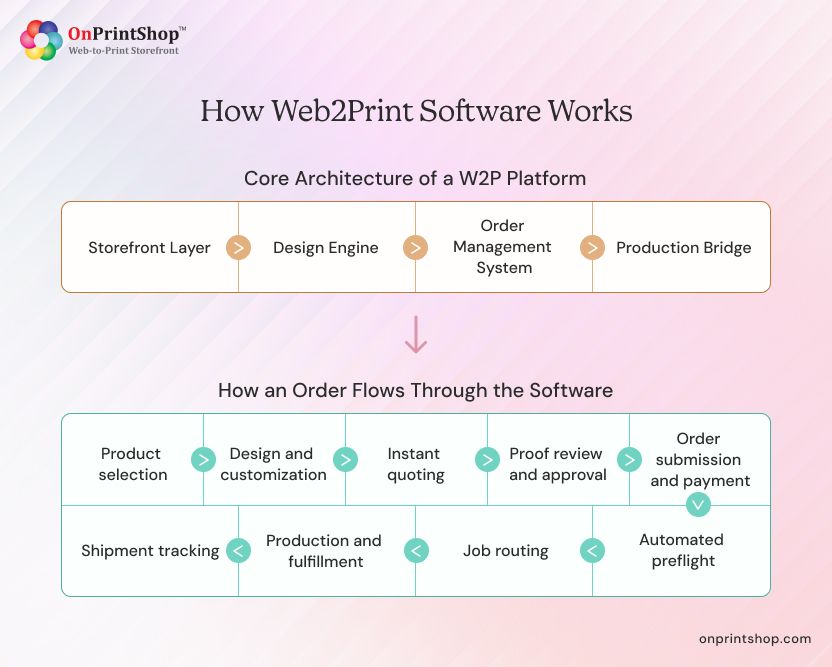
Core Architecture of a W2P Platform
A complete web to print platform typically consists of four interconnected components:
- Storefront Layer: The customer-facing interface where buyers browse products, configure options, and place orders. This may be a B2C public storefront, a private B2B corporate portal, or both managed from the same backend.
- Design Engine: A web-based tool that lets customers personalize products using templates, upload artwork, or create designs from scratch. Enterprise-grade platforms support variable data printing (VDP) and brand-lockdown templates.
- Order Management System: A centralized dashboard where print operators receive, review, manage, and track all incoming orders across channels. This includes pricing, proofing workflows, approval chains, and customer communication.
- Production Bridge: The integration layer that connects the W2P platform to production systems like MIS, accounts, shipping, and email automation tools. This is where automation delivers the most operational value.
How an Order Flows Through the Software
- Product selection: Customer selects a product (e.g., brochures, labels, banners) from the storefront
- Design and customization: Customer personalizes using templates or uploads print-ready files
- Instant quoting: Pricing engine calculates cost based on specs, quantity, substrate, and finishing
- Proof review and approval: Digital proof is generated; customer approves or requests changes
- Order submission and payment: Order is confirmed and payment is processed
- Automated preflight: File is validated for print readiness (resolution, bleed, color mode)
- Job routing: Order is automatically routed to the correct production queue or outsource supplier
- Production and fulfillment: Print job is produced, finished, packaged, and shipped
- Shipment tracking: Customer receives tracking information through the platform
Cloud (SaaS) vs On-Premise Deployment Models
Most modern web to print implementations use a SaaS model, which reduces infrastructure costs, enables faster deployment, and ensures continuous updates. See OnPrintShop's SaaS W2P solution for an example of a cloud-native platform.
Key Features of Web-to-Print Software
Web2print software comes with a list of essential features designed specifically for print businesses. The following is a comprehensive breakdown of W2P features, from essential to advanced.
1. Online Product Catalog and Pricing Engine
The product catalog is the foundation of any web to print storefront. A capable platform allows print businesses to define product types, substrates, sizes, quantities, finishing options, and pricing rules, and present them in a structured, searchable catalog for customers.
A sophisticated print estimating software engine should support:
- Dynamic pricing based on quantity, substrate, and configuration
- Tiered pricing and customer-group-specific rates
- Real-time quote generation without staff involvement
- Multi-currency support for international operations
Explore OnPrintShop's print estimating software
2. Web-Based Design Studio / Online Editor
The online design tool is the customer's primary creative interface. For B2C customers, this means an intuitive, drag-and-drop design experience. For B2B clients, it often means template-based personalization with restricted editing zones.
Key capabilities to look for in a web-to-print online designer:
- Pre-built template library
- Drag-and-drop design elements (text, images, shapes)
- Font management and brand color enforcement
- Real-time 3D product preview
- AI-powered tools: background removal, image enhancement, text generation
3. Template Management and Brand Lockdown
For B2B corporate portals, brand control is critical. The platform should allow administrators to lock specific design elements (logos, fonts, colors, legal disclaimers) while allowing end users to personalize permitted fields (names, addresses, contact details).
This is especially important for print franchise management and multi-location brand programs.
4. Automated Preflight and File Validation
Manual file checking is one of the most time-consuming prepress tasks in a print shop. A W2P platform with automated preflight eliminates this bottleneck by checking uploaded files for:
- Resolution (minimum DPI thresholds)
- Bleed and safe zone compliance
- Color mode (CMYK vs RGB)
- Font embedding
- File format compatibility
Files that fail preflight can be flagged automatically, with clear customer-facing error messages and options to re-upload or request assistance.
5. Order Management Dashboard
A centralized print order management system gives operators visibility into every order across all storefronts and channels. Essential capabilities include:
- Real-time order status tracking
- Batch order processing
- Offline (CSR-entered) order management
- Automated customer notifications at each status update
- Invoicing and accounting integration
Learn more about print order management software
6. Workflow Automation and Job Routing
Print workflow automation software is what separates a W2P platform from a simple online ordering form. Workflow automation capabilities should include:
- Customizable job routing rules (by product type, customer, or SLA)
- Automated job ticketing
- Role-based task assignments
- Integration with MIS for production scheduling
- Exception handling and escalation triggers
Effective workflow automation reduces manual touchpoints, accelerates turnaround times, and allows print operations to scale without proportional headcount increases. Explore OnPrintShop's print workflow automation software.
7. Variable Data Printing (VDP) Support
Variable data printing allows personalized content like names, addresses, images, or promotional codes to be merged into print templates and produced at scale. A W2P platform with variable data printing software support enables print businesses to offer personalized direct mail, event materials, ID cards, and loyalty programs at volume.
8. Multi-Storefront Management (B2B + B2C from One Platform)
Enterprise print operations often need to serve multiple customer segments simultaneously. Like in most cases; a public retail storefront alongside private corporate portals for business clients. A capable W2P platform manages all storefronts from a single backend, with independent branding, pricing, product catalogs, and access controls per storefront.
9. White-Label and Private Label Storefronts
White-label W2P solutions allow resellers, marketing agencies, or franchise networks to offer print ordering under their own brand. The underlying platform is invisible to end customers.
10. Customer Account Management and Approval Workflows
For B2B use cases, the platform must support multi-level approval chains, where a marketing manager, for example, must approve an order before it enters production. User roles, budget controls, and order history should all be accessible at the account level.
11. Reporting and Analytics
Data is a competitive asset. A W2P platform should provide dashboards and reports covering:
- Sales by product, customer, and channel
- Order volume trends
- Quote conversion rates
- Production turnaround times
- Customer retention and reorder rates
12. API and Third-Party Integrations
A web to print solution without strong integration capability is an island. The platform should connect to:
- Print MIS systems (EFI Pace, Printstream, Optimus)
- Payment gateways (Stripe, PayPal, Authorize.net)
- Shipping carriers (UPS, FedEx, USPS)
- eCommerce platforms (Shopify, WooCommerce, Magento)
- CRM and ERP systems
- Trade printer APIs for outsourced fulfillment
Feature Comparison: Must-Haves vs. Nice-to-Haves

Types of Web-to-Print Software
There are multiple types of web-to-print software available, each with its own unique features or specialties. Understanding the different types helps you match platform capabilities to your operational model.
1. All-in-One W2P Platforms (Storefront + Production + Automation)
These platforms cover the entire order lifecycle, from customer-facing storefront and online design to order management, automated preflight, and production routing. They are the most complete option for web to print for commercial printers and established print service providers.
Examples: OnPrintShop, EFI MarketDirect StoreFront, Pressero (Aleyant)
2. Online Design Tool / Editor-Only Solutions
Some vendors offer standalone design editors that can be embedded into existing eCommerce sites. These do not include order management or production automation, they solve only the design customization problem.
Examples: Customer's Canvas, Canva (limited print integration)
3. Print MIS with W2P Modules
Some print management information systems (MIS) include a W2P ordering module as an add-on. These are better suited to production-centric operations that want to extend their MIS with basic online ordering, rather than building a full customer-facing storefront experience.
4. eCommerce Platforms with Print Plugins
General eCommerce platforms like Shopify or WooCommerce can be extended with print-specific plugins. This approach is accessible and low-cost, but typically lacks deep print-specific features like automated preflight, VDP, or native MIS integration.
5. Trade Printer API and Fulfillment Platforms
These platforms enable print resellers and brokers to offer print products fulfilled by trade printers, without operating their own production. The platform manages the storefront and passes orders to wholesale print suppliers via API.
Having said that, there are also sub types when it comes to selling wholesale printing products. You only chose the right one if you know the difference between trade printer, print broker, and print reseller.
6. White-Label W2P Solutions for Resellers
Designed for print resellers, agencies, or franchises that want to offer print services under their own brand. The platform infrastructure is provided by the vendor; the reseller owns the brand experience.
See OnPrintShop's custom web-to-print solution for white-label options.
Web-to-Print Software for Enterprise and Multi-Location Businesses
Enterprise print operations, corporate reprographics departments, franchise networks, national PSPs, require additional capabilities beyond what SMB platforms offer: role-based access across hundreds of users, consolidated reporting across locations, centralized brand asset management, and the ability to support thousands of concurrent storefronts. Purpose-built enterprise W2P platforms support these requirements natively.
Who Uses Web-to-Print Software?
Web-to-print software is primarily used by print business owners, print service providers, and commercial printers who want to launch their own eCommerce-style storefront where customers can customize designs and place print orders online. Print businesses who wants to streamline and automate existing print estimation to fulfillment lifecycle, implement web to print software.
Below is a breakdown of the primary user types and how each one leverages W2P to run more efficiently.
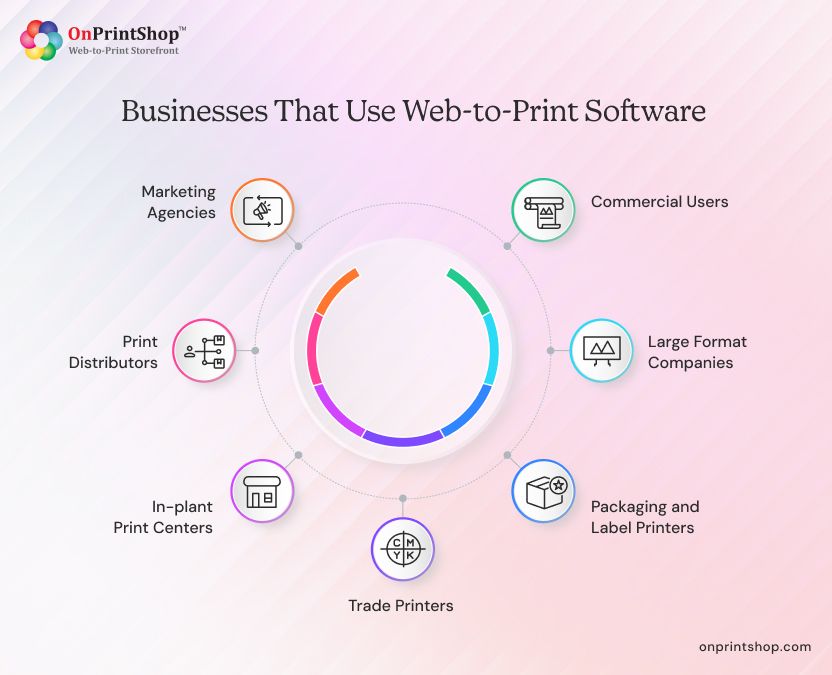
Commercial Print Service Providers (PSPs)
Commercial printers are the primary users of web to print platforms. W2P software allows them to accept orders online, eliminate manual intake processes, and route jobs directly into production, increasing throughput without increasing headcount.
Large Format and Signage Companies
Large format printers deal with complex product configurations, custom sizes, substrates, mounting options, finishing. A W2P platform built for this segment handles these variables in the pricing engine and storefront, making it easy for customers to configure and order without a sales call.
Packaging and Label Printers
Packaging printers use W2P to manage complex artwork requirements, regulatory compliance (ingredient lists, nutrition facts), and version control across SKUs. The ability to lock certain print zones while allowing updates to others is critical in this segment.
Print Franchises and Multi-Location Print Networks
Franchise networks use W2P platforms to standardize the ordering experience and enforce brand compliance across locations while giving individual franchisees flexibility to manage local products and pricing.
Trade Printers and Wholesale Suppliers
Trade printers use W2P to give their reseller network 24/7 ordering access, automated pricing, and real-time order tracking, without dedicating CSR resources to manual order intake.
In-Plant Print Centers and Corporate Reprographics
In-plant operations within universities, hospitals, government agencies, and large corporations use W2P to serve internal customers (departments) with a structured, approval-based ordering system that enforces budget controls and brand standards.
Promotional Products Distributors
Distributors offering branded merchandise use W2P to enable clients to browse, personalize, and order promotional items through a branded online portal. PromoStandards API integration is a key requirement for this segment.
Marketing Agencies Managing Brand Print Programs
Agencies managing print procurement for brands use W2P to build brand-compliant print portals for their clients, ensuring every printed item meets brand guidelines, regardless of who places the order.
Web-to-Print Software for Specific Use Cases
Understanding how a W2P platform works, helps print businesses, evaluate whether a given solution will fit their operational requirements.
B2B Corporate Print Portals
A B2B web to print portal is a private, password-protected storefront built for a corporate client's internal users. Key requirements include:
- Multi-level user roles and permissions
- Budget management and cost center allocation
- Pre-approved templates with locked brand elements
- Approval workflows before order enters production
- Custom catalog limited to approved products and quantities
B2C Online Print Shops
A B2C storefront serves the general public and requires a different emphasis: intuitive UX, broad product variety, real-time pricing, self-service design tools, and seamless checkout. Key platform requirements include:
- Mobile-responsive design experience
- Guest checkout and account creation
- Upsell and cross-sell product suggestions
- Promotional pricing and coupon support
- Integrated review and rating system
Large Format and Wide Format Print
Wide format print introduces unique product configuration challenges, custom dimensions, roll vs. flat media, mounting options, and installation requirements. W2P platforms serving this segment must handle non-standard product configurations in both the pricing engine and the online design tool.
Print Franchise Management
Multi-location franchise operations need centralized control with localized flexibility. The W2P platform must support corporate-level brand enforcement while giving franchise owners the ability to manage location-specific products and local promotional pricing. See OnPrintShop's web-to-print storefront for franchise capabilities.
Variable Data and Personalized Print Campaigns
High-volume personalized print campaigns, direct mail, transactional print, and loyalty cards require VDP capabilities: data file upload, field mapping, template variable binding, and per-record proof generation. Platforms supporting this use case must integrate with CRM or marketing automation tools for data sourcing.
White-Label Print Storefronts for Resellers
Resellers and brokers use white-label W2P platforms to offer print services under their own brand, with the fulfillment handled by a trade printer partner. Though there are many similarities, there are significant differences between a print reseller, a print broker, and a trade printer. Thus, each of them needs a custom w2p personalized for their workflow requirement. The platform must support seamless API integration with the fulfillment partner and allow full brand customization of the storefront.
Benefits of Web-to-Print Software for Print Businesses
Adopting a web to print platform is an operational investment, and like any investment, the case for it comes down to measurable returns. For print businesses, those returns show up across multiple dimensions: fewer errors, faster turnaround, lower cost per order, and stronger customer retention. The following benefits reflect what print operations consistently experience after replacing manual workflows with a well-implemented W2P solution.
1. Eliminate Manual Order Entry and Reduce Errors
Every manual data entry step is a potential error point. W2P software eliminates order re-keying by capturing structured data at the point of customer submission and passing it directly into production systems. This reduces errors, reprints, and customer disputes.
2. Accept and Process Orders 24/7 Without Staff
An online print ordering platform never closes. Customers can browse, design, quote, and order at any time, including outside business hours, on weekends, or across time zones. Print businesses gain revenue opportunities that simply don't exist with phone and email-only ordering.
3. Automate Prepress and Production Routing
Automated preflight checks validate files the moment they're uploaded. Jobs that pass preflight are automatically routed to the correct production queue based on product type, SLA, and equipment availability, without a CSR reviewing each job manually.
4. Reduce Turnaround Time
With manual steps removed from the order-to-production path, jobs move faster. Automated preflight, instant approvals, and direct production routing can reduce turnaround time significantly compared to traditional manual workflows. Platforms like OnPrintShop have helped print businesses cut turnaround times for standard jobs from days to hours.
5. Scale Order Volume Without Scaling Headcount
This is one of the most significant ROI drivers of W2P adoption. Because the platform handles order intake, pricing, proofing, and routing automatically, print businesses can handle a higher order volume with the same or smaller operations team.
6. Improve Customer Retention Through Self-Service
Customers who can manage their own accounts, reorder from history, track shipments, and manage brand assets independently are more likely to remain loyal. Self-service reduces the friction of doing business and positions the print provider as a modern, easy-to-work-with partner.
7. Measurable ROI: What Print Businesses Achieve
Print businesses adopting web to print platforms commonly report outcomes including reduced order intake time per job, lower reprint rates due to automated preflight, increased order volume handled per CSR, and higher customer reorder rates due to easy reorder functionality. Exact results vary by business size, workflow complexity, and implementation quality, which underscores the importance of selecting the right platform and implementation partner.
How to Choose Web-to-Print Software: A Complete Buyer's Guide
Choosing the wrong W2P platform is expensive in time, money, and disruption. The following structured approach helps print businesses make an informed, confident decision. For a deeper dive into selection strategy, below section showcases steps on how to choose the best web-to-print solution partner.
Step 1: Define Your Business Model (B2B, B2C, Trade, Franchise)
Your business model determines every downstream platform requirement. A B2B-focused operation needs approval workflows, corporate portals, and budget management. A B2C shop needs public storefronts, self-service design tools, and frictionless checkout. A trade printer needs reseller portals and API-based order intake. Define your model first.
Step 2: Identify Your Must-Have Features vs. Nice-to-Haves
Use the feature comparison table in the Key Features section above as a starting point. Separate the features your operation cannot function without from features that would be beneficial but aren't essential on day one.
Step 3: Evaluate Deployment Model (SaaS vs. Self-Hosted)
SaaS platforms offer faster implementation, lower upfront cost, and automatic updates. Self-hosted platforms offer deeper customization and full data control. Most print businesses are better served by SaaS unless they have specific security or infrastructure requirements that mandate on-premise deployment.
Step 4: Assess Integration Requirements (MIS, Payment, Shipping)
List every system your W2P platform will need to connect to: your MIS, accounting software, payment gateway, shipping carriers, and any design tools. Verify that your shortlisted platforms support these integrations natively or via API, and understand the implementation effort required.
Step 5: Review Pricing Structure and Total Cost of Ownership
Initial licensing cost is rarely the full cost. Account for setup fees, integration development, staff training, ongoing support, and per-transaction or per-storefront fees that may apply as you grow.
Step 6: Evaluate Vendor Support and Implementation Process
A W2P platform is a mission-critical system. Your vendor's support quality matters as much as the software itself. Ask about SLAs, response times, implementation methodology, and whether they have print industry expertise on their support team.
Step 7: Request a Demo and Run a Structured Evaluation
Never shortlist a platform based on marketing materials alone. Run structured demos using your actual use cases, upload your products, simulate a real customer workflow, test the design tool, and review the order management interface from an operator perspective.
For a detailed implementation roadmap, see the web-to-print implementation guide.
Buyer's Checklist: 25 Questions to Ask Every Vendor
Platform Capabilities
- Does the platform support both B2B and B2C storefronts from a single backend?
- How many storefronts can be managed simultaneously?
- Is variable data printing supported natively?
- What preflight and file validation capabilities are included?
- Does the design tool support locked template zones?
Order and Workflow Management
- How are orders routed to production automatically or manually?
- Can workflow rules be customized by product type or customer?
- Is multi-level approval workflow supported?
- How does the platform handle rush orders and priority routing?
- Can offline (CSR-entered) orders be managed in the same system?
Integrations
- Which MIS systems does the platform integrate with natively?
- What payment gateways are supported?
- How are shipping carrier integrations managed?
- Is there a public API for custom integrations?
- Can the platform connect to eCommerce platforms like Shopify or WooCommerce?
Pricing and Cost
- What is the pricing model (subscription, license, usage-based)?
- Are there per-storefront or per-transaction fees?
- What is included in the base price vs. add-ons?
- What are the setup and implementation costs?
- How are pricing increases handled at contract renewal?
Support and Implementation
- What is the typical implementation timeline for a business like mine?
- What training resources are available for staff and customers?
- What are the SLA commitments for platform uptime and support response?
- Is there a dedicated implementation manager or project lead?
- What does the product roadmap look like for the next 12 months?
Red Flags to Watch For During Evaluation
- Vendor is unable to demonstrate your specific use case in a live demo
- No native MIS integration, only CSV export workarounds
- Pricing that becomes significantly more expensive as you add storefronts or order volume
- Limited or offshore-only customer support
- No clear implementation methodology or timeline
- Platform hasn't had a significant feature update in the past 12 months

Web-to-Print Software Pricing: What Does It Cost?
W2P software costs vary widely depending on the deployment model, feature set, number of storefronts, and the level of implementation support required. Rather than a single number, it helps to think in terms of pricing models and total cost of ownership. The below table breakdown gives you a realistic framework for budgeting and comparing vendors on an apples-to-apples basis.
Common Pricing Models
What Factors Affect the Price
- Number of storefronts
- Order volume tiers
- Features included (VDP, advanced analytics, API access)
- Number of user seats
- Level of implementation and support services
- Integration complexity
Typical Price Ranges by Business Size
Note: These are illustrative ranges. Actual pricing varies significantly by vendor and configuration. Always request a detailed quote based on your specific requirements.
Hidden Costs to Account For
- Platform setup and configuration fees
- Custom integration development
- Staff training and onboarding
- Customer migration from legacy systems
- Ongoing support tier upgrades
- Per-transaction fees on high-volume orders
How to Calculate Total Cost of Ownership (TCO)
TCO = Annual platform license + Implementation costs + Integration development + Training + Support + Estimated staff time for platform management
Compare this against the operational savings from reduced manual order entry, fewer reprints, and increased order throughput to calculate your expected ROI.
Top Web-to-Print Software Platforms: Overview and Comparison
With dozens of W2P platforms available today, narrowing down your options requires more than reading feature lists. Each platform has a design philosophy, a target customer profile, and strengths in specific areas, whether that's design tool quality, MIS integration depth, B2B portal capabilities, or deployment flexibility.
First, define your evaluation criteria while comparing web2print platforms: deployment model preference, required integrations, storefront management needs, design tool requirements, and budget range. A platform that ranks highly for a trade printer may be entirely wrong for a B2B corporate portal operator.
The overview below covers the leading web2print platforms in the market, what each does well, and which type of print business each is best suited for.
Overview of Leading Web to Print Platforms
- OnPrintShop: A comprehensive all-in-one W2P platform serving commercial printers, large format operations, packaging printers, and franchise networks. Offers B2B and B2C storefronts, an advanced online design tool, workflow automation, VDP support, and extensive integration capabilities. Available as a SaaS and custom deployment. Learn more
- EFI MarketDirect StoreFront: Enterprise-grade W2P platform from EFI, tightly integrated with EFI MIS/ERP systems. Strong fit for large commercial printers and in-plant operations already using EFI infrastructure.
- Pressero (Aleyant): Cloud-based W2P platform known for B2B corporate portal capabilities and strong MIS integration. Popular with mid-market commercial printers and franchise networks.
- Customer's Canvas: A specialized web-to-print editor / design engine, typically embedded into existing eCommerce or W2P platforms. Best used as a design component within a larger platform architecture, not as a standalone W2P solution.
- DesignNBuy: W2P platform with strong design tool capabilities and multi-storefront management. Serves commercial printers and promotional products companies.
- PrintXpand: A full-featured W2P platform with a focus on customization and integration flexibility. Available as SaaS and self-hosted options.
Side-by-Side Platform Comparison

How to Automate Print Order Management with W2P Software
Print automation is the highest-value outcome of a well-implemented W2P platform. For a comprehensive look at how automation addresses workforce and capacity challenges, see the role of W2P automation in solving print workforce challenges.
What Print Automation Looks Like End-to-End
Before W2P automation:
- Customer emails artwork and order details → CSR receives email
- CSR manually logs order in spreadsheet
- CSR manually checks file quality
- CSR generates quote and emails customer
- Customer approves via email
- CSR re-enters order data into MIS
- Job enters production manually
After W2P automation:
- Customer submits order and uploads file through storefront
- System automatically validates file (preflight) and confirms pricing
- Digital proof sent to customer automatically
- Customer approves online; order auto-enters production queue
- MIS receives job data via API integration
- Shipping label generated automatically upon production completion
The reduction in manual steps translates directly to faster turnaround, fewer errors, and lower operational cost per job.
Automating Preflight, Job Ticketing, and Routing
Automated preflight runs the moment a file is uploaded. It includes checking resolution, bleed, color mode, and dimensions. Jobs passing preflight receive automated job tickets with full production specifications. Routing rules then direct each job to the correct equipment, operator, or outsource partner based on product type, deadline, and production capacity.
Connecting W2P to MIS for Job Tracking
A W2P platform connected to a Print MIS creates a closed-loop production visibility system. Job status updates in the MIS are reflected in real-time on the customer's order tracking interface, eliminating the need for customers to call or email for status updates, and reducing inbound customer service volume.
Why Integrations Matter in Web-to-Print and What to Look For?
The value of a W2P platform is amplified by how well it connects to the rest of your technology stack. For a comprehensive look at why integrations matter, see why printers need online ordering and workflow automation.
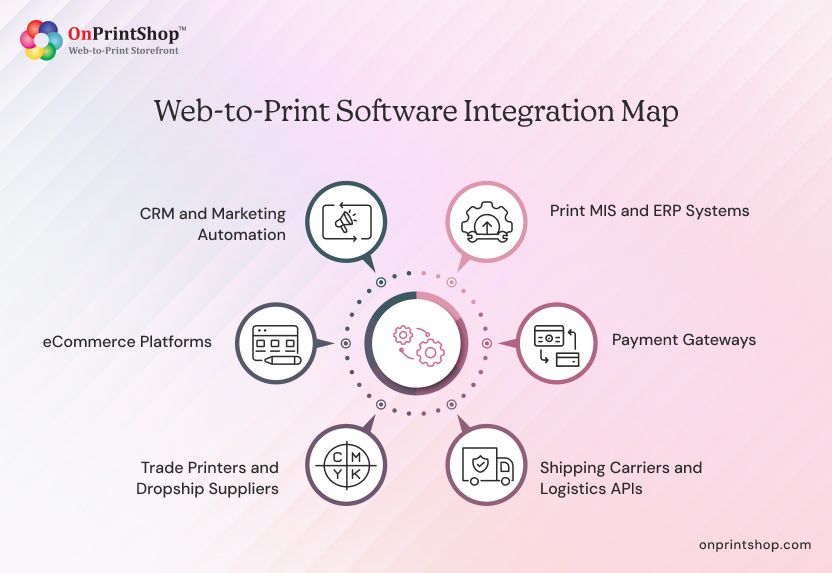
Core Integration Categories
Print MIS and ERP Systems Integration with MIS platforms (EFI Pace, Printstream, Optimus) enables automated job ticketing, production scheduling, and inventory management. This is the most operationally critical integration for commercial print operations.
Payment Gateways Secure payment processing via Stripe, PayPal, Authorize.net, or regional payment providers. PCI-DSS compliance at the payment layer is non-negotiable.
Shipping Carriers and Logistics APIs Real-time rate calculation, automated label generation, and shipment tracking integration with UPS, FedEx, USPS, DHL, and regional carriers.
Trade Printers and Dropship Suppliers For operations that outsource production, API integration with trade printer networks (4over, S&S Worldwide, PrintingForLess) allows automatic order forwarding without manual re-entry.
eCommerce Platforms Integration with Shopify, Magento, or WooCommerce enables print businesses to list products on existing eCommerce storefronts while handling print-specific fulfillment through the W2P backend.
CRM and Marketing Automation Integration with CRM systems enables customer data synchronization, personalized marketing, and reorder campaign automation.
Integration Checklist for Evaluating a Platform
- Does the platform integrate natively with your current MIS?
- Are payment gateway integrations PCI-DSS compliant?
- Can shipping rates be calculated in real time at checkout?
- Is there an open API for custom integrations?
- Are eCommerce platform connectors available?
- Does the platform support PromoStandards for promotional products?
- Can design tools (Customer's Canvas, Adobe Express) be embedded?
- Is webhook support available for real-time event-based automation?
Web-to-Print Software Security and Compliance
A W2P platform sits at the intersection of customer data, financial transactions, and proprietary brand assets, which makes security and compliance non-negotiable considerations during vendor evaluation. Many print businesses underweight this area until a problem surfaces. The following covers the key security and compliance requirements you should verify before signing a contract with any W2P vendor.
Data Protection and GDPR Compliance
Any W2P platform processing orders from EU-based customers must comply with GDPR requirements: data minimization, right to erasure, privacy-by-design architecture, and documented data processing agreements with the vendor.
PCI-DSS Compliance for Payment Processing
The platform must either be PCI-DSS certified or route all payment processing through a compliant payment gateway (removing cardholder data from the platform's scope entirely). Verify this explicitly during vendor evaluation, it is not safe to assume compliance.
Brand Asset Security in B2B Portals
Corporate clients need assurance that their brand assets like logos, design templates, and brand guidelines, are stored securely and accessible only to authorized users. Role-based access control, encrypted asset storage, and audit logs are essential.
User Access Control and Audit Trails
Enterprise W2P deployments require granular user permissions: who can place orders, who can approve them, who can edit pricing, who can access reports. Complete audit trails of all order and system activity support compliance and dispute resolution.
SLA and Uptime Expectations
For production-critical platforms, uptime matters. A W2P platform outage directly impacts revenue. Look for SLA commitments of 99.9% or higher, with documented incident response processes and communication protocols.

Common Mistakes When Buying Web-to-Print Software
Even well-intentioned buying processes go wrong. Print businesses of all sizes, from independent shops to large commercial operations, make predictable mistakes when evaluating and selecting W2P platforms. Most of these mistakes are avoidable with the right evaluation framework. The following are the most common pitfalls, and what to do instead.
1. Choosing on Price Alone Without Evaluating Fit
The cheapest platform that doesn't meet your operational requirements will cost more in workarounds, manual labor, and eventual re-platforming than a higher-priced solution that fits well. Evaluate fit first; negotiate price second.
2. Underestimating the Importance of Integration Depth
Surface-level integrations (CSV export, manual sync) are not the same as real-time API integrations. A platform that claims MIS integration but requires daily CSV imports will create as many problems as it solves.
3. Ignoring Implementation and Onboarding Support
A powerful platform poorly implemented delivers poor results. Prioritize vendors with a structured implementation process, dedicated project management, and print industry experience on their implementation team.
4. Choosing a Design Tool When You Need a Full Platform (or Vice Versa)
A design editor solves one problem. If you need order management, workflow automation, and production integration, a design-tool-only solution leaves most of your operational challenges unaddressed.
5. Failing to Involve Production Staff in the Evaluation
CSRs and production operators are the primary daily users of a W2P platform. Their input on workflow fit, usability, and operational requirements is essential. Platforms evaluated only by management or IT often fail at the floor level.
6. Not Planning for Customer Adoption and Training
A W2P platform only delivers ROI when customers use it. Budget for customer onboarding, training materials, and a transition period during which you actively guide customers from old ordering methods to the new platform.
Web-to-Print Software Trends in 2026
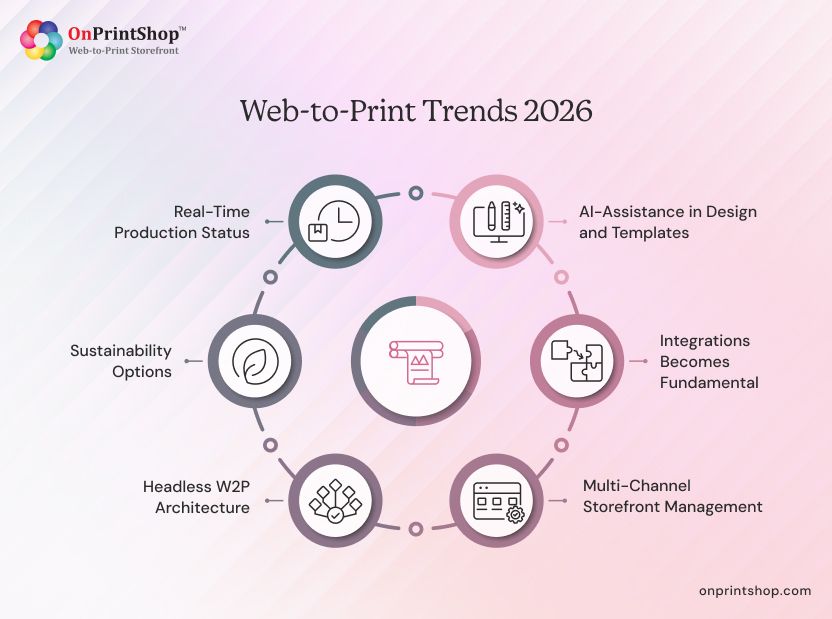
The W2P landscape is evolving faster than at any point in the technology's history. AI, deeper system integrations, headless architecture, and sustainability requirements are all reshaping what print businesses expect from their platforms and what leading vendors are delivering.
Staying ahead of these trends helps print operations make platform investments that remain relevant as the industry continues to shift.
1. AI-Assisted Design and Template Generation
AI capabilities are moving from novelty to operational standard in W2P platforms. Background removal, image enhancement, text generation, and AI-assisted layout suggestions are becoming expected features. For a deeper look at AI's role, see how AI and web-to-print are transforming printing with automation.
2. Deeper MIS and ERP Integration Becoming Standard
The gap between W2P storefront and production MIS is narrowing. In 2026, deeper, real-time bidirectional integration between W2P platforms and MIS/ERP systems is becoming a baseline expectation, not a premium feature.
3. Multi-Channel Storefront Management (Web + Mobile + API)
Print buyers interact with their print suppliers across multiple channels, like web browser, mobile app, and increasingly via API integrations with their own procurement systems. W2P platforms are evolving to serve all three channels from a single backend.
4. Headless W2P Architecture for Custom Deployments
Headless architecture decouples the frontend storefront from the backend platform logic, allowing print businesses and developers to build fully custom ordering experiences while leveraging the platform's production automation capabilities via API.
5. Sustainability Reporting and Eco-Print Options
As sustainability becomes a customer requirement, W2P platforms are adding eco-friendly product options, carbon footprint estimators, and sustainability reporting allow print buyers to make environmentally conscious purchasing decisions.
6. Real-Time Production Status Visibility for Buyers
Customers increasingly expect Amazon-like visibility into their orders during production, not just after shipment. W2P platforms are pushing real-time production milestone updates to customer portals and mobile notifications.
The Future of Web-to-Print Software: 2026–2030 Outlook
The next four years will bring more change to the W2P space than the previous decade. AI is maturing from a feature add-on into a core platform capability. Buyer expectations are rising. And the boundaries between print, marketing, and commerce technology are converging.
Print businesses that understand where the market is headed can make platform decisions today that position them for growth; rather than forcing a costly re-platforming exercise in three years.
How AI Will Reshape the W2P Buyer Experience
Over the next four years, AI will move beyond individual tool features into core platform intelligence. Expect AI-driven product recommendations based on buying history, AI-assisted design feedback ("this file's resolution is too low for this product size"), and natural language ordering interfaces where customers describe what they want and the platform configures it automatically.
Predictive Reordering and Demand-Based Inventory
W2P platforms will increasingly leverage purchase history data to predict when customers are likely to reorder, surfacing proactive reorder prompts before customers even think to initiate. For operations managing inventory (pre-stocked items, warehouse fulfillment), demand-based inventory replenishment will become a native W2P capability.
Deeper Connection Between Design, Marketing, and Print Platforms
The boundaries between marketing asset management (DAM), marketing automation, and print ordering are converging. Future W2P platforms will be tightly connected to the broader marketing technology stack, enabling seamless print-on-demand triggered by marketing campaigns, CRM events, or customer lifecycle milestones.
What the Next Generation of W2P Platforms Will Look Like
By 2030, leading W2P platforms will be AI-first, headless-capable, deeply integrated with production systems, and connected to the broader marketing and commerce ecosystem. The distinction between "print software" and "commerce platform with print capabilities" will blur significantly. Print businesses that invest in scalable, integration-rich platforms today will be better positioned to leverage these advances as they arrive.
ConclusionWeb to print software has fundamentally changed how print businesses operate. From automating order intake and preflight to enabling 24/7 self-service ordering and real-time production visibility, a new-age W2P platform eliminates the manual friction that limits print business growth and profitability.Whether you're a commercial printer looking to scale throughput, a franchise network standardizing brand compliance across locations, or a trade printer enabling reseller self-service, there is a web to print platform built for your specific operational model.The key is choosing with intention, defining your business model, required integrations, and feature priorities before evaluating vendors. Use the buyer's checklist and red flags in this guide to structure your evaluation, and request structured demos using your real use cases before making a decision.If you're ready to see what a modern web to print platform looks like in practice, explore OnPrintShop's web-to-print software for print shops or request a demo to see the platform in action against your specific workflow requirements.