



Summary - Print shop management software is the operational engine that keeps a print business running, automating orders, scheduling production, tracking inventory, and managing fulfillment from a single platform. If your shop still relies on spreadsheets and manual handoffs, this guide will show you exactly what you are missing, what to look for, and how to choose right.
Print businesses today manage multi-channel orders, variable data print jobs, multi-location production, real-time inventory, and customer-facing storefronts, often simultaneously. Without a unified management platform, errors compound, margins compress, and growth stalls.
Manual workflows, siloed systems, and paper-based job tracking are increasingly incompatible with the speed and complexity of modern print demand. The global print shop management software market is projected to reach USD 2.03 billion by 2035, growing at a compound annual growth rate (CAGR) of 4.1% from 2026 to 2035. This acceleration is not incidental; it reflects a structural shift in how commercial printing businesses operate.
This guide walks you through everything you need to know about a modern print shop management software, including what it is, how it works, who needs it, what to look for, and how to implement it successfully. It is designed to support decision-makers, operations managers, and technology evaluators across commercial, large-format, in-plant, and on-demand print environments.
TL;DR● Print shop management software is an integrated platform that automates and centralizes order management, production scheduling, inventory, invoicing, and customer communication.● Adoption reduces manual task volume by up to 90%, shortens production turnaround, and cuts operational costs significantly.● Cloud-based (SaaS) solutions offer the fastest deployment, lowest upfront cost, and best scalability for most print businesses.● Key buyer criteria include scalability, integration capability (shipping, CRM, MIS, payment gateways), ease of use, and vendor support quality.● Web-to-print (W2P) and print MIS software are adjacent categories, not interchangeable. Understanding the distinction is critical before purchasing.● Implementation typically takes 4–12 weeks depending on business complexity, data migration needs, and team readiness.
What is Print Shop Management Software?
Print shop management software is a centralized digital platform designed to manage, automate, and optimize the end-to-end operations of a print business. It serves as the operational backbone for print companies of all sizes, from single-location commercial printers to multi-site print-on-demand networks.
At its core, the working of a web-to-print software is that it integrates every stage of the print production lifecycle: order intake, job estimation, prepress workflow, production scheduling, inventory management, shipping, invoicing, and customer communication. Rather than managing these functions across disconnected tools or manual processes, print shop management software consolidates them into a single, connected system.
The term is often used interchangeably with related categories, including:
- Print MIS (Management Information System): Focused on job costing, estimating, scheduling, and reporting. Typically used by larger commercial printers.
- Print workflow management software: Emphasizes production routing, prepress automation, and job queue management.
- Web-to-print management software: Adds a customer-facing online print storefront layer with product configuration, proofing, and online ordering.
- Print order management software: Centers on the order lifecycle, from submission through fulfillment.
Modern print shop management systems typically combine elements of all four into an integrated suite. The most advanced platforms also incorporate analytics dashboards, B2B print portals, multi-store management, and third-party API integrations to create a fully connected print business ecosystem.
In practice, the software answers a fundamental operational question for print businesses: How do we efficiently take an order from a customer, route it through production, and deliver it on time, without losing data, duplicating effort, or missing deadlines?

Key Features of Print Shop Management Software
A high-quality print shop management system delivers a comprehensive feature set that covers every operational domain, from order capture to post-delivery analytics. Below are ten foundational capabilities to evaluate:
1. Automated Order Management
Definition: A system that manages the complete order lifecycle, from intake through fulfillment, with minimal manual intervention.
Automated print order management software captures print orders from multiple channels (online storefront, email, phone, B2B portal), validates them against product specifications, generates job tickets, and routes them through the appropriate production workflow. It eliminates manual re-entry, reduces errors, and provides real-time status visibility to both staff and customers.
Quick Tip: Look for platforms that support multi-channel order intake and automatically trigger production routing upon order approval, this alone can cut processing time by 40–60%.
2. Production Scheduling and Job Queue Management
Definition: Tools that plan, prioritize, and assign print jobs to production resources based on capacity, deadlines, and job complexity.
Effective production scheduling software maps each job to the right press, operator, and time slot, factoring in setup time, substrate requirements, and finishing steps. It provides a visual job board or Gantt-style interface that helps production managers identify bottlenecks, resequence jobs in real time, and maintain on-time delivery rates.
Quick Tip: Choose a system that supports drag-and-drop job rescheduling. Dynamic rescheduling is critical when rush jobs arrive or equipment goes down unexpectedly.
3. Print Estimating and Quoting
Definition: Automated calculation of job costs, including materials, labor, press time, and finishing, to generate accurate customer quotes rapidly.
Print estimating software eliminates manual spreadsheet-based quoting, which is slow and error-prone. What an integrated print estimating software does is that it calculates costs based on predefined pricing formulas, substrate costs, and production variables. It allows sales teams to generate professional, accurate quotes in minutes rather than hours, improving close rates and margin consistency.
Quick Tip: Ensure the estimating module supports variable-data and custom job configurations, not just standard catalog items. This is especially important for commercial printers handling complex specifications.
4. Inventory Management
Definition: Real-time tracking of stock levels for substrates, inks, consumables, and finished goods, with automated reorder triggers and usage reporting.
Inventory management in a print context means tracking paper, media, ink, finishing materials, and print-ready stock simultaneously. The system provides running totals of credited (received), debited (consumed), and remaining stock, and can trigger purchase orders when thresholds are breached. This prevents production delays due to stock-outs and reduces over-purchasing.
Quick Tip: Integration between inventory and job scheduling is essential, the system should validate stock availability before scheduling a job to production.
5. Customer Relationship Management (CRM) Integration
Definition: Tools to manage customer accounts, communication history, order history, pricing agreements, and relationship data within the print management platform.
A built-in or integrated CRM capability allows print businesses to segment customers, manage corporate account pricing, track reorder patterns, and automate follow-up communications. This is particularly valuable for operations of an advanced B2B print storefront where contract pricing, volume tiers, and account management are central to retention.
Quick Tip: Look for platforms that integrate with your existing CRM (e.g., Salesforce, HubSpot) via API, rather than requiring a full migration.
6. Invoicing, Billing, and Payment Processing
Definition: Automated generation of invoices upon job completion or delivery, with support for multiple payment methods and accounting system integration.
An integrated billing module helps throughout the scope of order management software including, job costing, and customer invoicing, eliminating the need to re-enter data into a separate accounting system. It supports partial payments, credit terms, deposit collection, and automated payment reminders. Integration with platforms like QuickBooks or Xero ensures financial data stays synchronized.
Quick Tip: Verify that the software supports tax calculation for multiple jurisdictions if you operate across state or national borders.
7. Shipping and Fulfillment Management
Definition: Tools that automate shipment booking, rate comparison, label generation, and delivery tracking across multiple carriers.
Print fulfillment software connects production output to shipping logistics. It can automatically select the most cost-effective carrier based on package dimensions and destination, generate shipping labels, send tracking information to customers, and log delivery confirmation. Multi-location shipping, where a single order ships to multiple addresses, is a key requirement for print-on-demand and corporate print programs.
Quick Tip: Ensure the platform integrates with major carriers (UPS, FedEx, DHL, USPS) and regional last-mile providers if applicable to your market.
8. Web-to-Print Storefront Integration
Definition: A customer-facing online ordering interface that integrates directly with the print shop management system for seamless order flow.
A web-to-print storefront allows customers to configure, proof, and submit print orders online, 24/7, without sales staff involvement. When integrated with the management system, orders flow automatically into the production workflow without manual re-entry. This capability is increasingly expected by both B2B buyers and B2C consumers in the print market.
Quick Tip: Look for platforms that support a B2B print portal with role-based access, account-specific pricing, and approval workflows, these are high-value features for corporate print programs.
9. Reporting, Analytics, and Business Intelligence
Definition: Dashboards and reporting tools that provide visibility into order volumes, production efficiency, revenue, inventory levels, and customer behavior.
Print reporting and analytics tools convert operational data into actionable business intelligence. Key metrics include job profitability by product type, on-time delivery rate, press utilization, top customer performance, and reorder frequency. These insights support better pricing decisions, capacity planning, and sales strategy.
Quick Tip: Prioritize a W2P platform with customizable dashboards and exportable reports, pre-built static reports are rarely sufficient for decision-making across different roles.
10. Third-Party Integration and API Connectivity
Definition: The ability to connect the print management platform with external systems, including trade printers, MIS platforms, ERP, CRM, shipping, and payment tools.
Modern print operations rely on an ecosystem of tools. Integration capability determines how well the management software functions as the hub of that ecosystem. Key integrations in a flexible web-to-print solution for trade printers include shipping carriers, payment gateways, accounting software, and MIS systems. Open API connectivity allows custom integrations for specialized workflows.
Quick Tip: Evaluate both the breadth of native integrations and the quality of the API documentation. Poor API coverage limits future extensibility.
Benefits of Print Shop Management Software
Implementing a print management platform delivers measurable improvements across operations, finance, and customer experience. The following seven benefits represent the most consistently reported outcomes across the industry:
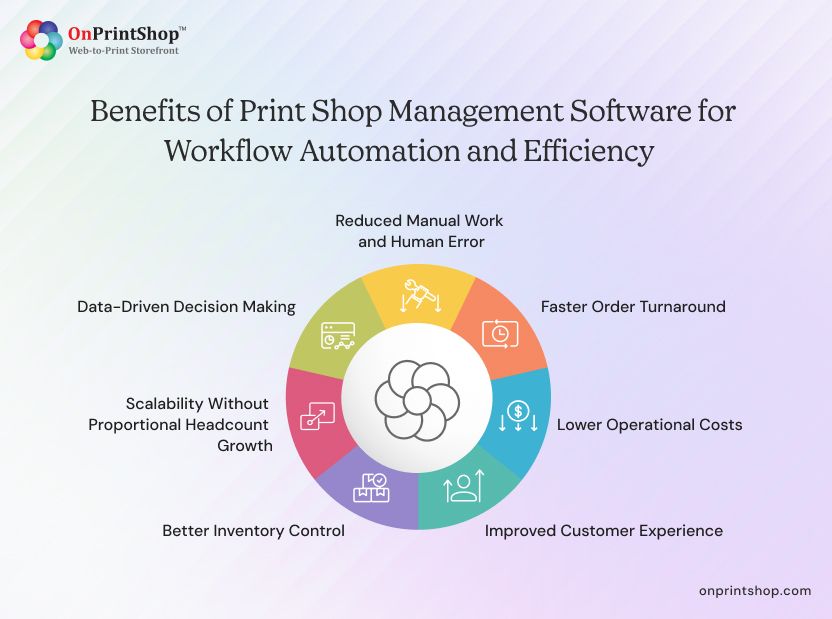
1. Reduced Manual Work and Human Error
By automating data entry, job routing, invoicing, and order status updates, print shop automation software can design 100% automate print workflows. This direct decrease in manual administration eliminates costly errors, such as incorrect specifications sent to press, duplicate orders, or missed deadlines, that result in reprints and customer dissatisfaction.
2. Faster Order Turnaround
Automated production routing eliminates the bottleneck of manual job assignment. Orders are validated, scheduled, and queued for production immediately upon approval. Print businesses that implement an automated workflow management solution typically report a 50-80% reduction in order-to-delivery cycle time for standard jobs.
3. Lower Operational Costs
Consolidating multiple disparate tools, estimating spreadsheets, separate CRM, manual shipping booking, standalone invoicing, into a single platform reduces software licensing costs, eliminates redundant data entry, and frees staff for higher-value tasks. Businesses also benefit from more accurate job costing, which prevents underpricing and margin erosion.
4. Improved Customer Experience
Customer-facing capabilities such as online ordering, real-time order tracking, design proofing tools, and automated status notifications significantly improve customer satisfaction. It is generally observed in the print sector that customers who receive proactive status updates are less likely to contact support for order inquiries, reducing inbound communication volume.
5. Better Inventory Control
Real-time inventory visibility prevents production stoppages due to stock-outs and reduces over-purchasing by providing accurate consumption data. Print businesses told us that reducing inventory carrying costs by 15–25% after implementing integrated inventory management, primarily by optimizing reorder points and supplier lead time alignment.
6. Scalability Without Proportional Headcount Growth
Cloud-based print shop software allows businesses to increase order volume, add product lines, and expand into new markets without requiring proportional increases in administrative staff. The system absorbs volume growth through automation rather than manual scaling, a critical advantage for print-on-demand businesses managing thousands of SKUs.
7. Data-Driven Decision Making
Centralized reporting and analytics give print business owners and managers visibility they cannot achieve with fragmented systems. Insights into job profitability, customer lifetime value, press utilization, and seasonal demand patterns support smarter pricing, staffing, and capacity investment decisions, measurably improving long-term business performance.
Who Needs Print Shop Management Software?
Print shop management systems are not one-size-fits-all, but they deliver value across a wide spectrum of print business models. Below are five primary user segments:
Commercial Printers
Commercial printers handling sheet-fed, offset, or digital print production manage high job volumes with diverse specifications. They require robust print MIS software for estimating, job costing, press scheduling, and detailed production tracking. Integration with prepress automation tools (PDF workflow, color management) is a key priority.
Large-Format Printers
Wide-format and grand-format print shops manage complex substrate types, custom finishing, and installation services. Their management software needs support unique pricing models (by square footage or linear foot), specialized inventory tracking (roll media, substrates), and production scheduling that accounts for cutting, mounting, and laminating steps.
Print-on-Demand Businesses
Print-on-demand (POD) operations fulfill individual orders, often integrated with e-commerce platforms, with no pre-printed inventory. They require tight integration between the web-to-print storefront, order management, production automation, and drop-shipping fulfillment. Speed, scalability, and API connectivity are paramount.
In-Plant Print Departments
Corporate in-plant print departments serve internal business units rather than external customers. They require job submission portals for internal requesters, approval workflows, chargeback reporting by department, and often integration with enterprise systems (ERP, procurement). A B2B print portal with role-based access is typically the core requirement.
Franchise Print Networks
Multi-location print franchises require centralized print management of brand standards, pricing templates, and product catalogs, while allowing location-level customization and reporting. The ideal W2P platform for print franchises provides a master admin console with location-level operational dashboards and consolidated performance reporting across the entire network.

Print Shop Management Software vs. Manual Operations
The following comparison illustrates the operational gap between software-managed and manually operated print businesses across key functional areas:
What Types of Print Shop Management Software Exist?
Understanding distinct deployment models helps print businesses align their technology selection with their operational requirements, IT capabilities, and long-term growth plans. The four primary categories are outlined below.
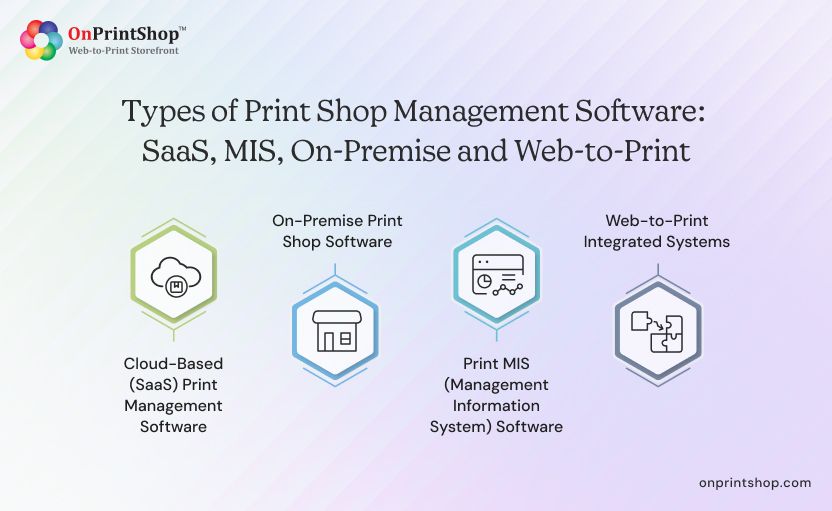
Cloud-Based (SaaS) Print Management Software
The latest cloud-based or Software-as-a-Service (SaaS) web-to-print platform hosted by the vendor and accessed via a web browser. It requires no on-premise installation, offers automatic updates, and scales elastically. Subscription pricing (monthly or annual) reduces upfront capital expenditure. SaaS print management software is the dominant deployment model in 2026, particularly for small-to-mid-size print businesses and print-on-demand operations.
Advantages: Rapid deployment, lower TCO, automatic feature updates, remote accessibility, no hardware management.
Considerations: Ongoing subscription cost, dependency on internet connectivity, data residency requirements for regulated industries.
On-Premise Print Shop Software
On-premise solutions are installed locally on the customer's servers and managed by internal IT. They offer maximum control over data and customization but require higher upfront investment, IT resources for maintenance, and a longer implementation timeline.
Advantages: Full data control, deep customization, one-time licensing model, functionality independent of internet connectivity.
Considerations: Higher CapEx, IT maintenance burden, slower update cycles, less suited to rapid scaling.
Print MIS (Management Information System) Software
Print MIS software is a specialized category focused on the financial and operational management of print production. Core capabilities include detailed job costing, estimating, press utilization tracking, profitability reporting, and purchasing management. Print MIS is often deployed alongside a separate web-to-print platform or ERP system in larger commercial print environments.
Advantages: Granular job costing, accurate estimating, detailed profitability reporting, purchasing management.
Considerations: Narrower functional scope, typically requires a separate web-to-print or order management platform to handle customer-facing operations.
Web-to-Print Integrated Systems
Web-to-print integrated platforms combine a customer-facing online ordering interface with the back-end print management system. This integration eliminates the data gap between customer order submission and internal production management. For print-on-demand, retail print, and corporate print programs, this is often the most critical system architecture decision.
Advantages: Eliminates manual order re-entry, enables 24/7 customer self-service ordering, accelerates order-to-production flow.
Considerations: Integration quality varies significantly between vendors, a poorly connected front-end and back-end can create data gaps rather than eliminate them.
How Does Print Shop Management Software Work?
Print shop management software operates as an interconnected system across four key workflow stages:
Stage 1: Order Capture
A customer submits an order through an online storefront, B2B print portal, email, or direct entry by staff. The system validates the order against product specifications, customer account data, and pricing agreements. A job ticket is automatically created.
Stage 2: Pre-Production
The system also works as a real-time print price quoting software. It generates a production estimate, routes the job for customer approval (if required), and initiates the prepress workflow. File validation, color profile assignment, and imposition may be handled automatically or flagged for operator review.
Stage 3: Production Scheduling
Approved jobs are queued in the production schedule based on priority, deadline, and press availability. The scheduler assigns the job to the appropriate equipment and operator. Inventory is checked and reserved for the job. Status updates are triggered automatically.
Stage 4: Production and Quality Control
Operators receive job instructions via digital job tickets or a production console. Job completion is logged, triggering QC checkpoints if configured. Finished goods are registered in inventory or marked for fulfillment.
Stage 5: Shipping and Fulfillment
The fulfillment module selects the appropriate carrier, generates labels, books shipments, and sends tracking information to the customer. For multi-location orders, split shipments are managed automatically.
Stage 6: Invoicing and Reporting
Upon delivery confirmation, the system generates an invoice and updates financial records. Job cost actuals are compared to estimates, contributing to profitability reporting and pricing calibration.
Print Shop Management Software vs. Web-to-Print Software
These two categories are frequently confused but serve distinct functions. Understanding the difference is essential before evaluating vendors:
The most effective print technology stacks integrate both: a web-to-print storefront for customer order submission, connected to a custom print management system for internal production and fulfillment management. Many modern platforms offer this integration natively.
Common Use Cases of Print Shop Management Software
The following use cases illustrate how specific platform capabilities translate into tangible business outcomes.
Use Case 1: Automating Repeat Corporate Orders
A commercial printer manages a corporate customer who orders branded collateral quarterly, business cards, brochures, and letterheads. With a B2B print portal, the customer submits orders using pre-approved templates, which flow automatically into production. No sales staff involvement is required, and billing is automated against a pre-negotiated rate card.
Use Case 2: Managing Rush Job Prioritization
A same-day print shop receives a rush order while the press schedule is full. The management system provides a visual job board, allowing the production manager to identify and reschedule a lower-priority job to accommodate the rush order, while automatically notifying affected customers of revised timelines.
Use Case 3: Multi-Location Fulfillment for a Nationwide Campaign
A marketing agency orders 10,000 event banners to be delivered to 50 locations across the country within 72 hours. The fulfillment system automatically splits the order by destination, assigns production to regional facilities based on capacity, generates location-specific shipping labels, and provides a single consolidated tracking dashboard for the customer.
Use Case 4: Scaling a Print-on-Demand Business
An e-commerce print-on-demand business processes thousands of individually customized orders daily. The management platform integrates with Shopify, automatically receives order data, routes each job to the appropriate printer (in-house or trade printer), and triggers shipping without manual intervention, enabling sub-24-hour fulfillment at scale.
Use Case 5: In-Plant Department Chargeback Management
A corporate in-plant print facility serves 12 internal departments. The management software tracks all print requests by department, applies internal pricing rules, and generates monthly chargeback reports for finance, replacing a manual spreadsheet-based process that previously took three days per reporting cycle.
Use Case 6: Inventory-Triggered Purchasing Automation
A large-format print shop monitors media inventory via the management system. When roll stock for a high-demand substrate falls below a configured threshold, the system automatically generates a purchase order to the preferred supplier, preventing stock-outs that would otherwise halt large campaign productions.

How to Choose the Best Print Shop Management Software
Selecting the right print management platform requires structured evaluation across multiple dimensions. The following criteria framework provides a decision-ready approach:
Key Evaluation Criteria
- Scalability: Confirm the platform can handle growth in order volume, product SKUs, and user count without performance degradation or requiring expensive tier upgrades.
- Integration Ecosystem: Map all required integrations, shipping carriers, payment gateways, CRM, accounting software, trade printers, MIS, and verify native support or API availability.
- Ease of Implementation: Assess the effort required for data migration, staff onboarding, and system configuration. Cloud-based systems generally deploy faster than on-premise.
- Total Cost of Ownership (TCO): Compare subscription fees (SaaS) vs. licensing costs (on-premise) alongside implementation, training, and ongoing support costs.
- Support Quality: Evaluate vendor support responsiveness, available channels (email, chat, phone), SLA terms, and domain expertise in the print industry.
- Security and Compliance: For businesses handling customer payment data or operating in regulated sectors, verify PCI-DSS compliance, data encryption standards, and backup protocols.
- Customer References: Request references from businesses with a similar size, model, and product mix to validate real-world performance.
SaaS vs. Licensed Software: Comparison Table
Red Flags to Avoid
- Vendors who cannot demonstrate print-specific functionality (not generic project management or ERP tools)
- Lack of a clear implementation roadmap or customer onboarding process
- Poor or absent API documentation, limiting future integration capability
- No references from businesses of comparable size and model
- Pricing models with large hidden costs (per-order fees, integration add-ons, mandatory professional services)
Questions to Ask Vendors
- What is the typical implementation timeline for a business of our size and complexity?
- Which integrations are native vs. requiring custom development?
- How is customer data protected, and what are your SLA uptime commitments?
- What does the onboarding process include, and who owns training?
- How frequently is the platform updated, and how are updates communicated?
- Do you have references from businesses with a similar product mix to ours?
Common Mistakes When Choosing Print Shop Software
Software selection mistakes typically stem from rushed evaluation processes, incomplete requirements gathering, or over-reliance on vendor marketing rather than validated operational fit. Awareness of these patterns significantly improves the likelihood of a successful long-term implementation.
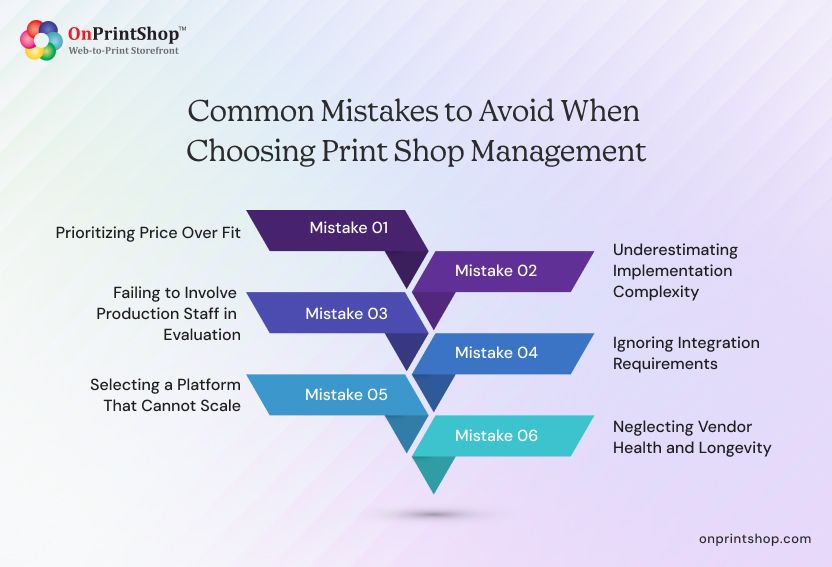
Mistake 1: Prioritizing Price Over Fit
Selecting the cheapest available platform without validating that it covers the specific workflows, product types, and integrations required for the business. The cost of an ill-fitting system, in lost productivity, workarounds, and eventual re-implementation, typically far exceeds the savings from a lower subscription fee.
Mistake 2: Underestimating Implementation Complexity
Many buyers assume implementation is a simple installation or account setup. In reality, data migration, process mapping, staff training, and integration configuration require significant time and planning. Underestimating this leads to rushed go-lives, low adoption, and poor initial results.
Mistake 3: Failing to Involve Production Staff in Evaluation
Purchasing decisions made exclusively at the management or ownership level, without input from press operators, estimators, and customer service staff, result in software that management approves but frontline staff cannot or will not use effectively. Include end users in demos and pilot testing.
Mistake 4: Ignoring Integration Requirements
Buyers often focus on core features (order management, scheduling) without thoroughly mapping integration requirements. Discovering post-purchase that the platform does not integrate natively with a critical shipping carrier, accounting system, or trade printer creates expensive custom development work or forces manual workarounds.
Mistake 5: Selecting a Platform That Cannot Scale
Choosing a platform sized for current operations, without evaluating whether it can handle 3x or 5x current order volume, additional product lines, or multi-location expansion, forces a disruptive re-platform exercise within 12–24 months as the business grows.
Mistake 6: Neglecting Vendor Health and Longevity
Selecting a niche vendor without assessing their financial stability, customer base size, and product roadmap creates risk. A vendor that discontinues the product, reduces support quality, or is acquired mid-contract can leave a print business without a functioning management system at a critical time.
How Does Print Shop Software Support Multi-Location Businesses?
Multi-location print operations, whether a franchise network, a commercial printer with multiple production facilities, or a large-format chain, require centralized management with location-level operational flexibility. Print shop management software supports this model through:
- Centralized Order Routing: Incoming orders can be automatically assigned to the optimal production facility based on capacity, proximity to the customer, equipment availability, and product capability.
- Consolidated Reporting: Performance dashboards aggregate data across all locations, enabling comparison of output, efficiency, profitability, and quality metrics by site.
- Shared Product Catalog Management: A master admin console allows central management of product templates, pricing rules, and brand standards, with the ability to enable location-specific variations.
- Location-Level User Access: Role-based access control ensures that staff at each location see only the data, orders, and tools relevant to their site, without visibility into other locations' confidential pricing or customer data.
- Inventory Visibility Across Sites: Stock levels are tracked per location, enabling transfer requests when one site has excess, and another has a shortage, reducing emergency purchases.
What Integrations Should Print Shop Software Support?
The integration ecosystem is one of the most important and most frequently underestimated aspects of print management software selection. The following categories represent the integration requirements most commonly needed by print businesses:
- Shipping and Logistics: UPS, FedEx, DHL, USPS, and regional carriers for rate shopping, label generation, and delivery tracking.
- Payment Gateways: Stripe, PayPal, Braintree, Square, and bank transfer for online payment collection with PCI-compliant processing.
- Accounting Software: QuickBooks, Xero, Sage for automated invoice posting and financial reconciliation.
- E-Commerce Platforms: Shopify, WooCommerce, Magento for print-on-demand businesses receiving orders from consumer storefronts.
- Trade Printers: 4Over, PromoStandards-compatible vendors for outsourcing overflow or specialty jobs directly from the management platform.
- CRM Systems: Salesforce, HubSpot, Zoho for synchronizing customer data, communication history, and account management.
- MIS and ERP Systems: SAP, Oracle, and print-specific MIS platforms for businesses requiring deep financial and operational integration.
- Design and Prepress Tools: Adobe Creative Cloud (PDF handoff), Enfocus Switch, and preflight automation tools for file validation and production readiness.
How to Implement Print Shop Management Software
Successful implementation requires structured planning, cross-functional involvement, and realistic timeline management. The following six-step framework applies to most print business deployments:
Step 1: Discovery and Requirements Mapping (Weeks 1–2)
Document all current workflows, identify pain points, and define the functional requirements the new system must address. Map all required integrations and establish success metrics (e.g., target reduction in processing time, error rate, turnaround improvement).
Step 2: Platform Configuration (Weeks 2–4)
Work with the vendor to configure the platform, setting up product catalogs, pricing rules, user roles, production workflows, and integration connections. For SaaS platforms, this phase is significantly faster than on-premise configuration.
Step 3: Data Migration (Weeks 3–5)
Migrate customer records, order history, product specifications, and pricing data from existing systems. Validate data integrity after migration and resolve any mapping discrepancies.
Step 4: Staff Training (Weeks 4–6)
Conduct role-specific training sessions for each user group: production staff, customer service, estimators, and management. Utilize vendor-provided documentation, video tutorials, and sandbox environments to support learning.
Step 5: Pilot and Parallel Running (Weeks 6–8)
Run the new system in parallel with existing workflows for 2–4 weeks before full cutover. This allows staff to validate outputs, identify configuration gaps, and build confidence without operational risk.
Step 6: Go-Live and Continuous Optimization (Week 8+)
Cut over fully to the new platform. Monitor key metrics weekly during the first 60 days. Schedule regular reviews to expand feature utilization, tune configurations, and address emerging requirements as the business grows.
Typical implementation timeline: 6–12 weeks for SaaS platforms; 12–24 weeks for on-premise or highly customized deployments.
Best Practices for Using Print Shop Management Software
Implementing print shop management software is a starting point, not a finish line. The following practices reflect what high-performing print operations do differently after go-live.
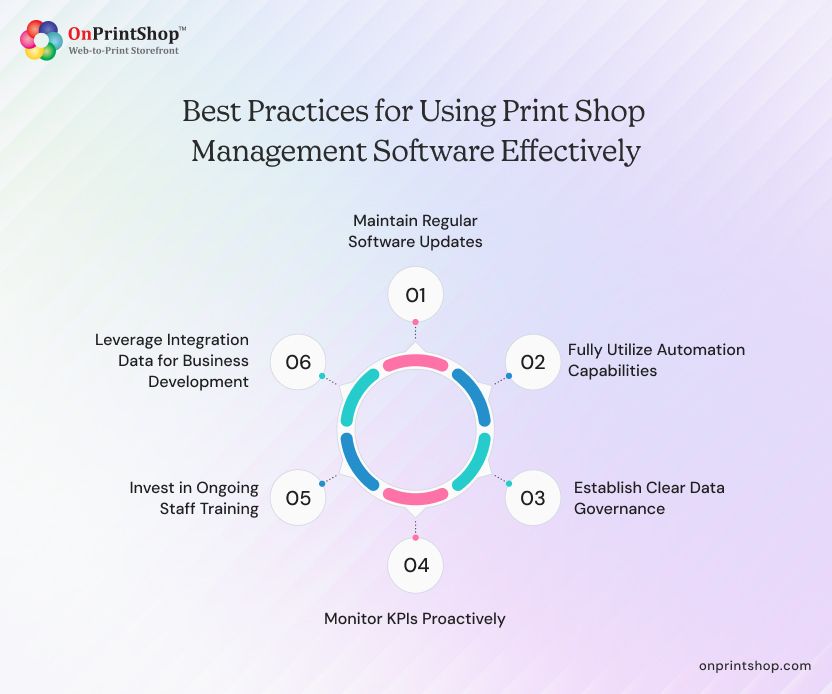
1. Maintain Regular Software Updates
For SaaS platforms, ensure that system updates are reviewed and any new features are evaluated for adoption. For on-premise installations, establish a patch and update schedule. Outdated software creates security vulnerabilities and misses efficiency improvements introduced in new versions.
2. Fully Utilize Automation Capabilities
We commonly see most print businesses underutilize their management platform, operating with 40–60% of available features active. Conduct a feature audit every six months to identify underused automation capabilities. Expanding automation use directly reduces manual work and error rates.
3. Establish Clear Data Governance
Define standards for how orders, customers, products, and jobs are entered and categorized in the system. Inconsistent data entry, abbreviations, duplicate customer records, non-standard product naming, degrades reporting quality and increases processing errors over time.
4. Monitor KPIs Proactively
Establish a weekly or monthly review process for key operational metrics: on-time delivery rate, reprint rate, average order value, press utilization, and stock-out incidents. Use the software's reporting tools to surface trends before they become problems.
5. Invest in Ongoing Staff Training
Staff turnover is a reality in print production. Maintain updated training materials and designate a system administrator who can onboard new users, manage configuration changes, and serve as the internal point of contact with the vendor's support team.
6. Leverage Integration Data for Business Development
The order, customer, and production data flowing through the management system is a strategic asset. Use integrated analytics to identify top customers by revenue and profitability, seasonal demand patterns, and product mix shifts, and apply these insights to sales outreach, pricing strategy, and capacity planning.
Future Trends in Print Shop Management Software
The print shop management software market is evolving rapidly, shaped by advances in artificial intelligence, shifts in consumer and B2B buyer behavior, and growing pressure on print businesses to operate more sustainably and efficiently. Understanding where the market is heading allows print business owners and technology decision-makers to evaluate platforms not just against current needs, but against the operational requirements they are likely to face in the next three to five years.
1. AI-Powered Job Estimation and Pricing
Machine learning algorithms are being integrated into print estimating software to analyze historical job data and automatically optimize pricing. Early-adopter of our platforms observed estimation time reductions of 60–70%, with improved margin consistency as the AI learns from actual job cost outcomes vs. estimates.
2. Intelligent Production Scheduling
AI-assisted scheduling engines can predict press bottlenecks, recommend job sequencing to maximize press utilization, and dynamically rebalance schedules when equipment or staff changes occur. This moves print workflow management from reactive to predictive, reducing overtime costs and improving on-time delivery rates.
3. Print-on-Demand Market Expansion
The print-on-demand model continues to grow, driven by e-commerce proliferation and consumer demand for personalized products. The vendors of robust web2print software for personalized products are investing in deeper e-commerce integrations (Shopify, Etsy, Amazon Merch), automated fulfillment orchestration, and global trade printer networks to support POD businesses at scale.
4. Sustainable Print Operations
Environmental compliance and ESG reporting are becoming business priorities for corporate print buyers. Software platforms are adding carbon footprint tracking, substrate waste reporting, and digital proofing capabilities that reduce material waste. Some platforms now support certified sustainable substrate sourcing workflows integrated into the inventory management system.
5. Hyper-Personalization at Scale
Variable data printing (VDP) and mass personalization capabilities are moving from niche to mainstream. Modern print management platforms are integrating with customer data platforms (CDPs) and marketing automation tools to support print campaigns where every piece is individually customized, at production volumes previously achievable only through full offset runs.
6. Unified B2B and B2C Commerce Platforms
The historical divide between B2B print portal software and B2C web-to-print storefronts is dissolving. Next-generation platforms provide a unified architecture that serves both customer types, with the appropriate pricing rules, approval workflows, and self-service capabilities for each, from a single management back-end.
7. API-First Architecture and Open Ecosystems
Vendors are investing in API-first platform architectures that allow deep, flexible integration with any external system. This reduces the cost and complexity of connecting print management platforms to ERP, CRM, logistics, and e-commerce ecosystems, and enables print businesses to build custom workflows without modifying core software.

ConclusionPrint shop management software has moved from a helpful tool to essential infrastructure for modern print businesses. It streamlines operations, reduces errors, and enables scalable growth without increasing complexity. Choosing the right platform means aligning it with your workflows, integration needs, and long-term business goals.Adopting a leading AI-powered print management solution ensures your print business stays competitive by improving efficiency, enhancing customer experience, and supporting automation at every stage.If you’re evaluating the next step, focus on solutions that deliver flexibility, scalability, and real business impact. Book a demo now.