



Blog Summary: A web-to-print storefront is an online platform that lets customers browse, customize, and order print products, without a single phone call or email. But knowing what it is and knowing how to use it to grow your print business are two very different things. This guide covers everything: how it works, key features, setup steps, use cases, and optimization strategies.
The print industry is in the middle of a structural shift toward digital ordering, and the numbers confirm it. According to SkyQuest reports, the global web-to-print market was valued at USD 2.22 billion in 2025 and is projected to reach USD 7.87 billion by 2033, expanding at a CAGR of 17.1% during the forecast period (2026–2033). For print businesses still relying on manual quoting, email-based artwork submissions, and phone orders, that trajectory represents both a warning and an opportunity.
An advanced web-to-print storefront puts print businesses on the right side of this shift, enabling 24/7 self-service ordering, automated workflows, and scalable client management from a single platform. Whether you run a commercial print shop, a trade printing operation, or a multi-location franchise, this guide covers everything you need to know; how it works, what to look for, and how to make it drive real results.
What Is a Web-to-Print Storefront?
A web-to-print storefront is a browser-based ecommerce platform purpose-built for print businesses. It enables customers to browse print products, customize designs using an online design tool, calculate pricing, submit print-ready files, and place orders, all without leaving the platform or contacting a sales representative.
Unlike a generic ecommerce website, a web-to-print storefront includes print-specific infrastructure: variable data printing support, automated preflight checks, dynamic pricing calculators, proofing workflows, and direct integration with print production systems.
The term is used interchangeably with "online print storefront," "W2P storefront," and "print ordering system online." The underlying function is consistent: moving the print ordering process from offline, manual touchpoints to a structured, automated digital channel.
Why Print Businesses Need a Web-to-Print Storefront
The print industry's customer expectations have shifted permanently. Corporate buyers expect self-service portals. Retail customers expect instant pricing and 24/7 ordering. Franchise networks require brand-controlled ordering across dozens of locations.
A traditional print shop model, phone quotes, email artwork submissions, manual invoicing, cannot scale to meet these demands efficiently.
A web-to-print storefront addresses these operational gaps directly:
- Eliminates repetitive manual tasks such as quoting, file collection, and order entry
- Extends selling hours to 24/7 without staffing costs
- Standardizes brand and product quality across customer segments
- Reduces order errors through guided customization and automated preflight
- Enables scalable growth by managing more orders without proportional overhead
For print businesses evaluating digital investment, the deployment model matters as much as the decision to invest. SaaS-based web-to-print platforms offer the fastest path to market, typically live within weeks, with lower upfront cost and automatic updates.
On-premise deployments suit organizations with strict data sovereignty requirements or complex custom integration needs, though they require greater internal IT capability and longer implementation timelines. Most small to mid-size print businesses find SaaS the more practical starting point.
A web-to-print storefront is no longer optional infrastructure, it is the operational baseline for competing in a digitally-driven print market.
Who Uses Web-to-Print Storefronts
Web-to-print storefronts serve a diverse range of users across the print supply chain. Let’s discuss each of them with a quick overview:
Print Service Providers (PSPs)
Commercial printers, digital print shops, and marketing services companies use storefronts to move order intake online, reduce sales cycle time, and manage multiple client accounts from one platform.
Corporate Buyers (B2B)
Marketing managers, procurement teams, and brand managers at enterprise companies use dedicated portals to order branded collateral, business cards, brochures, signage, promotional items, while maintaining brand consistency and staying within pre-approved templates. Enterprise deployments often require centralized brand governance, hierarchical account structures, and consolidated spending reports across departments or locations.
Retail Consumers (B2C)
Individual customers purchasing personalized products, photo books, calendars, apparel, canvas prints, through a self-service online interface.
Trade Printers
Wholesale printers serving resellers use storefronts to onboard multiple reseller accounts, manage blind shipping, and consolidate reporting across their reseller network.
Print Franchise Owners
Multi-location franchise operations require centralized brand control while giving individual franchisees access to localized ordering and client management tools. Enterprise-grade platforms support the simultaneous operation of multiple storefronts, each with its own branding, product catalog, and pricing, managed from a single administrative interface.
In-Plant Print Departments
Internal print operations within universities, hospitals, or government agencies use storefronts as internal procurement portals for departmental ordering. Cost codes assigned at login route spending data automatically to accounting systems.

How a Web-to-Print Storefront Works
A web-to-print storefront follows a structured workflow that connects customer ordering to print production without manual intervention at each step.
Step 1: Storefront Configuration
The print service provider sets up the storefront by configuring the product catalog, pricing rules, design templates, payment gateways, shipping options, and access controls. B2B portals may include customer-specific pricing, approved product libraries, and multi-user account hierarchies.
Step 2: Customer Access and Browsing
Customers access the storefront via a public URL or a private branded portal. They browse the product catalog, view specifications, and select the product they want to order. B2B portals may restrict the product catalog to pre-approved items relevant to that account.
Step 3: Design and Customization
Customers use the integrated online design tool to personalize their selected product. This may include uploading artwork, editing pre-loaded templates, applying variable data (names, addresses, personalized text), selecting colors and fonts, or generating AI-assisted designs.
Step 4: Pricing and Proofing
The platform calculates pricing dynamically based on product specifications, quantity, turnaround time, and shipping method. Customers can preview a soft proof, including a 3D product preview in advanced platforms, before submitting for approval. Collaborative proofing tools allow back-and-forth communication with a designer or print coordinator when needed.
Step 5: Order Placement and Payment
Customers confirm their order and complete payment through a secured gateway. The system captures all order details, artwork files, and specifications automatically.
Step 6: Production and Fulfillment
The order flows directly into the print workflow automation system, triggering automated preflight checks, job ticketing, and production scheduling. The customer receives real-time order status updates and tracking information through the platform.
Step 7: Reordering and Account Management
Customers access their order history, retrieve saved designs, and place reorders without re-entering specifications or artwork. This creates a significant efficiency advantage for repeat buyers.
Key Features of a Web-to-Print Storefront
Today print buyers don’t just expect easy customization and ordering; with AI-powered web to print storefront features already available, the expectations have grown 3 folds. The following features define a production-grade web-to-print storefront:
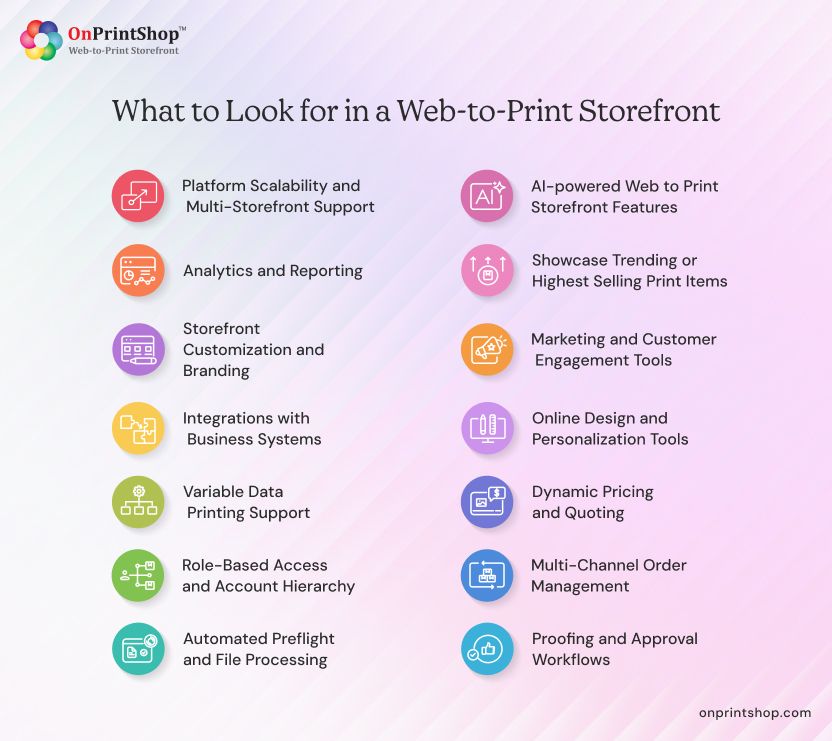
AI-powered Web to Print Storefront Features
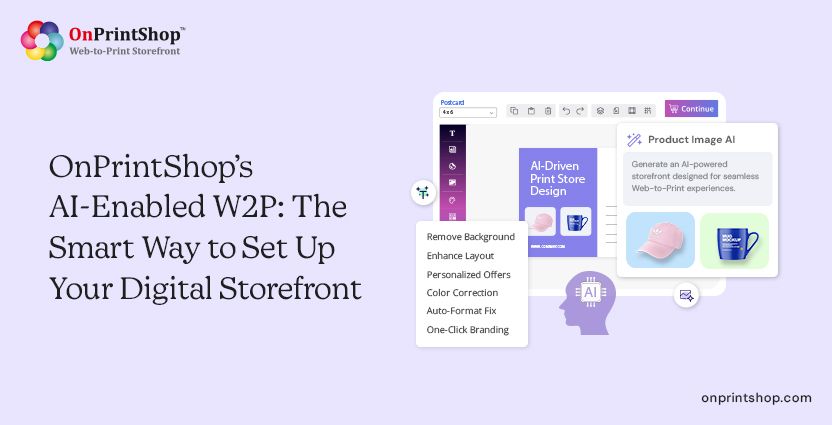
With AI-integrated features in place, print buyers can quickly customize their designs by providing just prompts. Customers can remove/enhance background, create product images from scratch, or update design instantly. On the business side, printers or print owners can draft high-quality content for their web to print storefront using AI prompts and publish them right away.
Showcase Trending or Highest Selling Print Items
Many web to print today displays most sold or trending print products on their online storefront. This feature boosts product sales by highlighting high-demand items, increasing visibility, and encouraging quicker conversions.
Storefront Customization and Branding
The platform should allow full white-label customization, domain, logo, colors, fonts, and layout, so the storefront aligns with the print business's brand or the corporate client's brand (for private portals).
Online Design and Personalization Tools
A built-in web-to-print online designer enables customers to customize products using pre-approved templates, uploaded artwork, or AI-assisted design tools. Advanced platforms support variable data printing for personalized direct mail and versioned collateral.
Dynamic Pricing and Quoting
Automated pricing calculators factor in substrate, quantity, finishing options, turnaround, and shipping to generate instant, accurate quotes. This eliminates manual quoting delays and improves conversion rates.
Multi-Channel Order Management
A centralized print order management system aggregates orders from B2B portals, B2C storefronts, reseller accounts, and franchise locations into a single dashboard with unified reporting.
Proofing and Approval Workflows
Soft proofing tools, including 3D previews and collaborative annotation, allow customers and designers to review and approve artwork before production. This reduces costly reprints and miscommunication.
Automated Preflight and File Processing
The platform performs automated file checks (resolution, bleed, color mode) before accepting files for production, reducing operator intervention and print errors.
Role-Based Access and Account Hierarchy
B2B implementations require granular access control: procurement managers may have approval authority while individual users can only submit requests. Enterprise-grade platforms extend this further, supporting corporate parent accounts with subsidiary or location-level child accounts, allowing procurement consolidation while maintaining location-level operational autonomy. Single Sign-On (SSO) integration with corporate identity providers (SAML, OAuth) is a common requirement at this scale.
Variable Data Printing Support
Integration with variable data printing software enables the production of personalized print at scale, a critical requirement for direct mail, loyalty programs, and personalized marketing campaigns.
Integrations with Business Systems
The storefront should connect with ERP, CRM, accounting platforms (QuickBooks, Xero), shipping providers, and marketing tools. This eliminates data silos and enables end-to-end automation.
Marketing and Customer Engagement Tools
Built-in marketing automation, email campaigns, promotional pricing, abandoned cart recovery, birthday offers, helps print businesses increase repeat purchases and customer lifetime value.
Analytics and Reporting
Storefront operators need visibility into order volume, revenue by product or channel, customer acquisition metrics, and production performance. For multi-location or franchise operations, cross-location reporting provides consolidated visibility into spending, volume, and product usage across the entire network. Granular reporting at both the account and enterprise level enables data-driven decisions.
Platform Scalability and Multi-Storefront Support
When evaluating web-to-print storefront software, confirm that the platform can grow with your business. Key scalability criteria include support for multiple concurrent storefronts, high order volume handling, multi-currency and multi-language capabilities, and the ability to add new business models (B2B, trade, franchise) without migrating to a different platform. Total cost of ownership, including setup, customization, training, and ongoing integration, should be factored into any platform comparison alongside the subscription or license fee.
Types of Web-to-Print Storefronts
Not every print business operates the same way, and neither should their storefront. Web-to-print platforms are built to serve distinct business models, each with its own workflows, customer types, and operational requirements.
B2B Web-to-Print Storefront
A B2B storefront serves corporate clients who order branded print materials in volume. Key characteristics include private portals per client, role-based user access, pre-approved design templates, account-specific pricing, and purchase order support.
B2B storefronts are particularly valuable for managing enterprise print programs, ensuring brand compliance, controlling approval workflows, and consolidating ordering across multiple departments or office locations.
B2C Web-to-Print Storefront
A B2C storefront is a public-facing ecommerce platform for retail consumers. It prioritizes intuitive self-service design tools, a broad product catalog, secure consumer payments, and a streamlined checkout experience.
B2C storefronts compete on product selection, customization quality, turnaround time, and user experience. They are well-suited for photo product companies, promotional merchandise sellers, and consumer print brands.
Trade Printer Storefront
A trade printing solution enables wholesale printers to manage multiple reseller storefronts from a master account. Each reseller receives a branded storefront, while the trade printer controls production, pricing margins, and blind shipping.
This model allows trade printers to scale their reseller network without increasing administrative overhead per account.
Print Franchise Storefront
A print franchise storefront gives franchise networks centralized brand control while enabling individual franchise locations to manage their own customers and orders. Features include master-level template management, localized pricing, and consolidated corporate reporting.

Web-to-Print Storefront Use Cases
Understanding how other print businesses have deployed web-to-print storefronts makes it easier to identify the right approach for your own operation. The following real-world scenarios cover the most common and high-impact applications across B2B, B2C, trade, and franchise print models.
Corporate Brand Management
A national retailer with 200 locations uses a B2B portal to allow store managers to order locally-relevant marketing collateral, flyers, banners, POS displays, using pre-approved brand templates. The corporate marketing team controls template content; store managers control quantity and delivery address. Multi-level approval workflows and custom cost-code assignments ensure budget compliance across every location.
Direct Mail Personalization
A regional insurance company uses a W2P platform to produce personalized direct mail campaigns. Variable data printing merges customer name, policy details, and agent information into each piece at the point of production, eliminating manual file preparation.
Trade Reseller Network
A commercial printer operates a wholesale business serving 50 independent print resellers. Each reseller has a white-labeled storefront. Orders flow to the trade printer's production facility automatically, with blind shipping under the reseller's brand. The master dashboard provides consolidated reporting across all reseller accounts.
Photo Product eCommerce
A consumer brand sells personalized photo products, books, canvases, ornaments, through a B2C storefront. Customers upload their photos, customize layouts using an online editor, and receive finished products at home.
In-Plant Procurement Portal
A university's internal print department deploys a private ordering portal for faculty and administrative departments. Departmental cost codes are assigned at login, and orders route to the campus print center automatically.
Multi-Location Franchise Program
A print franchise operator deploys dedicated storefronts for each franchise location while managing brand templates, approved product libraries, and marketing assets from a central headquarters account. Each franchisee serves their own B2B and B2C clients independently, while the franchisor maintains full visibility through consolidated reporting.
Benefits of Web-to-Print Storefronts
Deploying a web-to-print storefront delivers measurable improvements across operations, revenue, and customer experience. These benefits apply whether you are running a single print shop or managing a network of locations.
Operational Efficiency
Automating order intake, quoting, file processing, and status communication removes labor-intensive manual steps from the fulfillment cycle. Print businesses report significant reductions in order processing time and customer service call volume after deploying a W2P storefront.
Revenue Scalability
A storefront generates orders around the clock without requiring additional sales or customer service staff. Volume growth is no longer constrained by workforce capacity. For trade printers and franchise operators, multi-storefront architecture means new revenue channels can be added without proportional increases in administrative overhead.
Brand Consistency
Pre-approved templates and brand lockdown controls ensure that printed materials meet corporate guidelines across every order, every location, and every channel. For enterprise and franchise clients, this is often the single most important business requirement driving adoption of a web-to-print platform.
Reduced Error Rate
Guided ordering flows, automated preflight, and digital proofing reduce the frequency of specification errors, wrong files, and miscommunications that lead to reprints.
Customer Self-Sufficiency
Self-service ordering, real-time quoting, and order tracking reduce customer dependency on phone and email communication. This improves the customer experience while reducing support burden on print staff.
Data and Insights
Centralized order data enables print businesses to identify top-selling products, high-value customers, seasonal patterns, and underperforming categories, enabling more effective product and pricing strategy.
Measurable Return on Investment
ROI from a web-to-print storefront is typically realized across several dimensions: reduced order processing labor, lower error and reprint costs, increased order volume from 24/7 availability, and faster quote-to-order conversion. Print businesses commonly report that storefront implementation pays back within 12 to 18 months through operational savings alone, with additional revenue upside from increased online order volume.
How to Set Up a Web-to-Print Storefront
Setting up a web-to-print storefront involves more than choosing a platform and going live. Following a structured process from goal definition to post-launch optimization ensures the storefront performs as intended from day one.
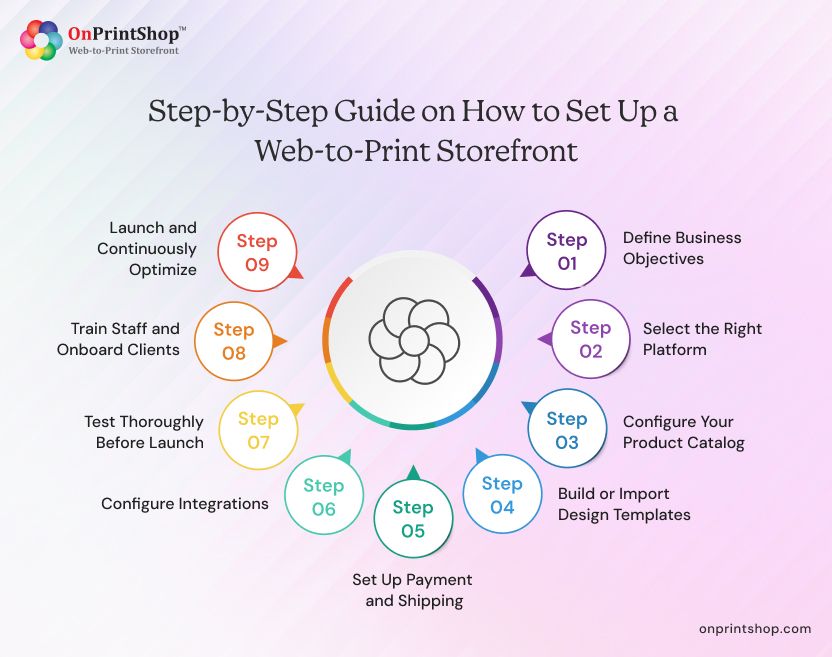
Step 1: Define Business Objectives
Identify whether you are serving B2B clients, retail consumers, resellers, or a mix. Determine the key outcomes: reducing manual quoting, enabling 24/7 ordering, consolidating franchise management, or scaling a reseller program. Clear objectives guide platform selection and configuration priorities.
Step 2: Select the Right Platform
Evaluate web-to-print storefront software against your business model, product mix, integration requirements, and growth plans. Consider whether a SaaS solution or on-premise deployment better suits your infrastructure and compliance needs. SaaS platforms deploy faster, update automatically, and require less internal IT investment, making them the practical choice for most print businesses. On-premise is better suited to organizations with specific data control or customization requirements that exceed what SaaS platforms support.
Key platform evaluation criteria include: print-specific feature depth (variable data, preflight, substrate options), supported business models (B2B, B2C, trade, franchise), integration ecosystem, online design tool quality, scalability and multi-storefront support, customer support quality, and total cost of ownership. Always request a live demonstration using your actual product types and business scenarios before committing.
Step 3: Configure Your Product Catalog
Set up your product range with accurate specifications, substrate options, finishing choices, and pricing rules. Define quantity price breaks, setup charges, and rush turnaround pricing within the platform's pricing engine.
Step 4: Build or Import Design Templates
Create print-ready design templates for your most common products. For B2B portals, lock brand elements and allow only specific fields to be edited by end users. For B2C storefronts, offer a broader range of starting templates across product categories.
Step 5: Set Up Payment and Shipping
Integrate your preferred payment gateways and configure shipping options, carriers, and rate calculation. For B2B accounts, enable purchase order and account billing options as appropriate.
Step 6: Configure Integrations
Connect the storefront with your MIS/ERP, accounting software, CRM, and production management systems. Automated data flow between systems eliminates double entry and accelerates fulfillment.
Step 7: Test Thoroughly Before Launch
Run end-to-end tests covering the full order lifecycle: product selection, design tool, quoting, checkout, production handoff, and order tracking. Test across devices and browsers. Conduct preflight validation with sample files.
Step 8: Train Staff and Onboard Clients
Ensure your internal team is equipped to manage the storefront, handle exception cases, and support customers. For B2B portals, develop an onboarding process that helps corporate clients set up user accounts and understand ordering workflows.
Step 9: Launch and Continuously Optimize
Monitor analytics post-launch. Track conversion rates, cart abandonment, order volume, and support ticket patterns. Iterate on product offerings, template libraries, and UX based on real usage data.
How to Optimize a Web-to-Print Storefront for Conversions
Conversion optimization for a web-to-print storefront focuses on reducing friction in the ordering process and building customer confidence at each decision point.
Simplify the Design Tool Onboarding
Complex design interfaces deter first-time users. Offer guided prompts, starter templates, and contextual help within the design tool. Reduce the number of steps between product selection and order confirmation.
Display Real-Time Pricing
Instant pricing feedback, updated as customers change quantity, options, or turnaround, reduces uncertainty and eliminates the need to request a manual quote. Transparent pricing is a primary conversion driver for both B2B and B2C customers.
Invest in Product Visualization
High-resolution mockups, 360-degree previews, and 3D product renders increase customer confidence before purchase. Customers who can visualize the finished product convert at a higher rate and return fewer orders.
Streamline Checkout
Minimize form fields, offer saved address books and saved payment methods for returning customers, and provide clear order summaries before payment. For B2B portals, pre-populate company information and cost codes.
Use Social Proof and Trust Signals
Display customer reviews, production quality certifications, and turnaround guarantees prominently. For B2B storefronts, case studies and client logos build credibility.
Enable Reordering
Make previous orders and saved designs easily accessible. Reordering should take seconds, not minutes. Automated reorder reminders, triggered by time since last purchase, drive repeat revenue with minimal effort.
Integrations for Web-to-Print Storefronts
A web-to-print storefront creates maximum value when connected to the broader technology ecosystem of the print business:
ERP and MIS Integration
Synchronizes order data, job costing, inventory, and production scheduling between the storefront and the core management system.
CRM Integration
Captures customer ordering behavior within the CRM for sales follow-up, segmentation, and lifetime value analysis.
Accounting Software
Connects with QuickBooks, Xero, or Sage to automate invoice creation, payment reconciliation, and revenue reporting.
Shipping and Logistics
Integration with FedEx, UPS, USPS, and regional carriers enables real-time shipping rate calculation, label generation, and tracking number delivery to customers.
Payment Gateways
Stripe, PayPal, Authorize.net, and regional payment providers handle secure transaction processing. B2B portals may also require ACH, purchase order, and net terms support.
Print Supplier Integration
For trade printers, integration with suppliers like 4Over enables automatic order routing to the appropriate supplier based on product type or capacity.
Marketing Platforms
Integration with Mailchimp, HubSpot, Klaviyo, or similar tools synchronizes customer data for automated marketing campaigns.
Automation in Web-to-Print Storefronts
Print workflow automation is one of the most significant operational advantages of a web-to-print platform. Key automation capabilities include:
Automated Quoting
Pricing rules calculate job costs instantly based on specifications, eliminating manual estimating for standard products.
Preflight Automation
Uploaded files are checked automatically for resolution, bleed, color mode, and dimensions. Non-compliant files are flagged for customer correction before reaching the production queue.
Order Routing
Orders are automatically assigned to the correct production department, machine, or supplier based on product type, urgency, or capacity rules.
Status Notifications
Customers receive automated email and SMS updates at key stages, order confirmed, in production, shipped, without any manual communication from staff.
Reorder Triggers
The system identifies customers approaching a typical reorder interval and sends automated prompts to drive repeat purchases.
Reporting Automation
Scheduled reports on order volume, revenue, production status, and customer activity are distributed automatically to relevant stakeholders.
Automation reduces the administrative load per order, enabling print businesses to increase throughput without proportional headcount growth.

Security and Compliance in Web-to-Print Storefronts
Security is a critical consideration for any print business handling customer artwork, payment information, and corporate brand assets.
Data Encryption
All data in transit should be encrypted using TLS 1.2 or higher. Stored data, including customer files and order records, should be encrypted at rest.
Payment Security
PCI DSS compliance is mandatory for storefronts processing card payments. Platforms should use certified payment gateway integrations rather than handling raw card data directly.
Access Control
Role-based permissions, strong password policies, and support for two-factor authentication reduce the risk of unauthorized access to customer accounts and administrative functions.
File Storage Security
Customer artwork and design files should be stored in access-controlled, redundant storage environments with defined retention policies.
GDPR and Regional Compliance
Storefronts serving customers in the EU must comply with GDPR requirements for data collection, storage, consent, and deletion. Regional regulations (CCPA, PIPEDA) apply in other jurisdictions.
Uptime and Disaster Recovery
Enterprise-grade platforms offer SLA-backed uptime guarantees (99.9% or higher) and documented disaster recovery procedures to ensure business continuity.
When evaluating platforms, request documentation of their security certifications, compliance posture, and incident response procedures.
Web-to-Print Storefront Mistakes That Slow Down Growth and How to Avoid Them
Even well-intentioned storefront implementations can fall short when key decisions are rushed or overlooked. Being aware of these common pitfalls before you begin can save significant time, cost, and frustration down the line.
Choosing a Platform Before Defining Requirements
Selecting a web-to-print platform based on price or marketing claims rather than fit to your specific business model leads to costly re-implementations. Define your requirements in detail before evaluating vendors.
Underestimating Template Setup
The quality of design templates directly impacts customer experience and order accuracy. Investing in professionally designed, production-ready templates at launch reduces support issues and reprints significantly.
Ignoring Mobile Experience
A significant portion of B2C and B2B print buyers access storefronts on mobile devices. Platforms with poor mobile responsiveness lose orders and damage brand perception.
Inadequate Integration Planning
Launching a storefront without connecting it to your MIS, accounting system, and production workflow creates manual data re-entry, negating much of the efficiency gain from going online.
Neglecting Post-Launch Optimization
A storefront launch is not the end of the project. Regular analysis of conversion rates, drop-off points, and product performance is necessary to maintain and improve commercial outcomes.
Overlooking Customer Onboarding (B2B)
Corporate clients adopting a new ordering portal need structured onboarding. Without training and guidance, low adoption rates undermine the ROI of the investment.
Web-to-Print Storefront Trends (2026)
The web-to-print industry is evolving quickly, shaped by advances in AI, changing buyer expectations, and deeper integration with broader business systems. These are the trends currently defining where the market is heading.
AI-Assisted Design Generation
Generative AI tools embedded within the online design interface allow customers to create print-ready designs from text prompts, reducing the skill barrier for print product personalization.
Hyper-Personalization at Scale
Advanced variable data printing combined with CRM data integration enables fully personalized print campaigns, individualized by name, imagery, offer, and regional content, produced at commercial scale.
Headless and API-First Architecture
Print businesses are integrating web-to-print functionality into existing websites, mobile apps, and enterprise procurement systems via APIs, rather than directing customers to a separate storefront URL.
Sustainable Printing Options
Customers increasingly request environmentally certified substrates and carbon-neutral shipping. Storefronts that surface these options at the product selection stage differentiate on sustainability.
Augmented Reality Product Previews
AR-based previews allow customers to visualize how signage, packaging, or branded merchandise will appear in their actual environment, improving purchase confidence and reducing returns.
Marketplace Integration
Print storefronts are connecting directly to third-party marketplaces (Amazon, Etsy, Shopify) as additional sales channels, with orders routing back to the central production workflow.

Future of Web-to-Print Storefronts
Web-to-print storefronts are evolving from order intake systems into comprehensive print commerce platforms. Several developments will shape the next generation of these platforms:
Predictive Reordering
AI analysis of historical ordering patterns will enable storefronts to proactively prompt customers to reorder before stock runs out, creating a subscription-like repeat purchase model.
Automated Print Program Management
Enterprise clients will expect storefronts to manage their entire print program, budget tracking, usage reporting, compliance monitoring, and supplier management, from a single interface.
Cross-Channel Production Orchestration
As print businesses operate across physical and digital channels, storefronts will coordinate production across multiple facilities, suppliers, and fulfillment partners automatically.
Deep Personalization Infrastructure
The convergence of CRM data, behavioral analytics, and variable data printing will enable individualized print marketing at a scale previously achievable only by the largest direct mail operations.
The web-to-print storefront is becoming the operational core of the digital print business, not just a sales channel, but the platform through which production, customer relationships, and business intelligence are managed end-to-end.
ConclusionA web-to-print storefront is no longer a luxury, it is the infrastructure modern print businesses need to compete, scale, and serve customers effectively. From automating order workflows and enabling 24/7 self-service ordering, to managing B2B portals, trade reseller networks, and franchise locations from a single platform, the right storefront transforms how your print business operates at every level.The AI-powered web-to-print software is mature, the ROI is measurable, and the market is growing. The only question is how quickly you act on it.If you are ready to put it into practice, explore the W2P technology and book a live demo with OnPrintShop today.