



Blog Summary: Corporate buyers expect print vendors to offer the same convenient self-service experience they receive across other online purchasing channels. This guide explores omnichannel ordering, procurement integrations, and account management tools that help convert one-time orders into lasting B2B revenue. Continue reading to understand how to prioritize digital capabilities effectively.
Corporate buyers expect print ordering to be as convenient as purchasing any other business service online. They want to explore products, request quotes, approve designs, reorder materials, and track deliveries without relying on lengthy phone calls or email exchanges.
For B2B printers, meeting these expectations requires more than launching an online storefront. It means connecting digital ordering with sales workflows, procurement systems, and account-specific experiences through an AI-powered B2B Web-to-Print solution.
A corporate print ordering portal helps printers simplify routine purchases, support large accounts, and create more opportunities for repeat business.
In this blog, discover how omnichannel ordering, procurement integrations, sales analytics, and personalized corporate storefronts can help your print business increase revenue and strengthen customer relationships.
Why Are B2B Print Buyers Now Buying Digitally First?
The corporate purchasing journey has moved from a relationship-first model toward a research-first approach. Buyers often evaluate suppliers independently before contacting a sales representative. They also expect print vendors to provide an experience comparable to what they receive from other B2B suppliers.
US B2B ecommerce site sales reached $2.297 trillion in 2024, representing a 10.5% year-over-year increase, according to EMARKETER. This figure includes web and portal orders but excludes EDI transactions. Although it does not represent print purchasing alone, it illustrates the growing volume of corporate buying activity taking place through digital channels (EMARKETER, 2024).
Self-Service Doesn't Replace Sales, It Redirects It
Digital ordering does not remove the need for a sales team. Instead, it changes where sales representatives spend their time. New accounts, complex specifications, and problem-solving still require personal support, while routine reorders and standard products can move through self-service workflows.
Printers should therefore position a corporate portal as an extension of the sales function rather than a replacement for it. When the portal handles repeatable transactions, sales teams can devote more attention to account development and situations that require expertise.
What This Means for Print Businesses Specifically
- Procurement teams want access to saved specifications, pricing details, and reorder history without contacting a representative.
- Buyers assess vendors based on ordering speed and transparency, in addition to the price per unit.
- When a printer does not offer self-service ordering, corporate buyers may move toward competitors that provide it.
What Does B2B Print Digital Transformation Mean for a Print Business?
Digital transformation in the print industry involves more than purchasing a new press or finishing machine. Production equipment determines the types of work a print business can produce. Digital transformation focuses on how customers place orders, approve artwork, make payments, and monitor the progress of those orders.
For a B2B print provider, this transformation can affect storefronts, quoting processes, proofing, payments, fulfillment visibility, and the customer data that connects these activities.
Core Components of a Connected Print Business
- Order intake: Storefronts, quoting tools, file uploads, and preflight capabilities
- Workflow: Proofing, approvals, and handoffs to production
- Account management: Saved templates, pricing rules, and reorder functionality
- Payments and fulfillment: Invoicing, shipping visibility, and order status updates
- Data: Customer history and account activity that support sales and operational decisions
These capabilities need to work together to deliver a consistent experience. For example, a storefront without integrated approval workflows may simply transfer an existing bottleneck to the online environment instead of resolving it.

How Does an Omnichannel B2B Ordering Experience Increase Online Sales?
An omnichannel ordering model is not limited to online transactions. It ensures that a corporate buyer's account information, pricing, and order history remain consistent whether the order begins with a sales representative, through a phone conversation, or on a flexible web-to-print storefront.
- Unified customer accounts and pricing
- Self-service reordering
- Sales-assisted purchasing
- Consistent ordering across channels
- Improved customer retention
- More opportunities for account growth
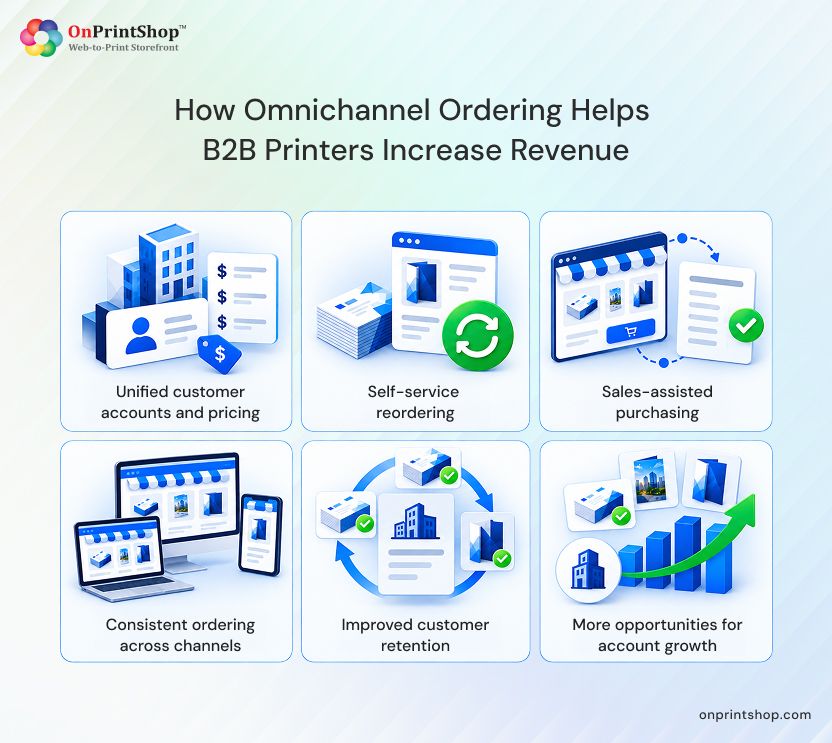
Sales-assisted orders and self-service reorders should use the same product catalog and account-level rules. When the information differs between channels, buyers may encounter inconsistent pricing or discover that certain products are available through one channel but not another. Such discrepancies can weaken confidence in the supplier.
What an Omnichannel Ordering Experience Typically Includes
- Account-specific product catalogs that display the products relevant to each buyer
- Saved quotes and approval records that remain accessible across channels
- Reordering shortcuts that eliminate the need to enter product details repeatedly
- Consistent pricing rules, regardless of whether the order begins online or with a sales representative
A consistent ordering experience supports customer retention beyond an individual transaction. When buyers can complete repeat orders within minutes, they have fewer reasons to look for another supplier because of an inconvenient purchasing process.
Why Do cXML and Punchout Procurement Integrations Matter for B2B Print Revenue?
Some corporate customers purchase print through their internal procurement platforms instead of visiting a supplier's website. cXML, or commerce eXtensible Markup Language, is a data format that allows procurement software and supplier ordering systems to exchange purchase orders, invoices, and catalog information automatically.
Punchout functionality supports this process by allowing buyers to access a supplier's catalog directly from their own procurement platform. They can browse products, configure an order, and send the completed cart back to their internal system for approval and payment without leaving their procurement environment.
This capability becomes particularly relevant when building a custom web-to-print integration for large corporate accounts. Many enterprises standardize purchasing through platforms such as SAP Ariba or Coupa. A printer without punchout capabilities may be excluded from approved vendor lists, even when its print quality and pricing meet the buyer's requirements.
Procurement integration serves a different purpose from a standard storefront. A conventional storefront supports customers who visit the printer's website, while procurement integration supports buyers who complete the purchasing process within their own systems. Implementing the latter often involves coordination with the customer's IT or procurement team.
Not every B2B customer needs procurement integration. Smaller accounts and departments without formal procurement software can generally use a standard storefront. Punchout capabilities are more relevant to large enterprise customers with centralized purchasing policies.
Printers that serve promotional product distributors may have a related integration requirement. PromoStandards integration-based ordering applies the same general automation principle by connecting supplier catalogs and order information directly with distributor systems.

How Can Print Business Sales Analytics Help Teams Manage Corporate Accounts?
Corporate accounts produce substantially more purchasing information than individual retail orders. That information becomes useful when sales and account management teams can access it in a centralized system. Consolidated reporting transforms dispersed order records into insights that help teams decide where to focus their account management efforts.
What Sales Teams Should Be Able to See
- Order history and reorder frequency by account and product
- Quote-to-order conversion rates that reveal where opportunities are getting delayed
- Dormant accounts that have not placed an order within a defined period
- Cross-selling and upselling opportunities based on each account's product mix
- Account-level profitability indicators rather than revenue totals alone
Sales representatives managing numerous corporate accounts cannot reliably monitor all these details manually. Analytics help identify which accounts may need a follow-up call and which customers continue ordering without additional assistance.
Leadership teams can use the same information for broader planning. By examining account-level trends, they can identify growing or declining customer segments and make capacity decisions before those changes become visible in quarterly revenue figures.
What Role Does Corporate Storefront Personalization Play in B2B Retention?
A generic storefront presents the same experience to every visitor. A personalized corporate storefront recognizes the buyer's account, applies negotiated pricing, and displays the products, templates, and locations relevant to that organization.
Personalization Features That Support Retention
- Account-specific catalogs and negotiated pricing
- Branded portals tailored to departments or locations for multi-site buyers
- Role-based access and approval rules that route purchases to the appropriate approver
- Saved templates for recurring branded print materials
- Recurring order schedules for ongoing print requirements
Personalization alone cannot guarantee that a customer will remain with a printer. It can, however, reduce the friction that may otherwise encourage buyers to explore other suppliers. A centralized print order management software setup also enables account managers to see which locations or departments continue placing orders and which have become inactive. This visibility supports account expansion discussions before a renewal or contract decision.

How Should B2B Printers Prioritize Digital Capabilities?
A print business does not necessarily need to implement every digital capability simultaneously. Before allocating budget and staff resources, decision-makers should assess several factors and determine which improvements address their most relevant customer and operational needs.
Factors to Weigh
- Buyer friction: Where do existing customers report problems or abandon orders?
- Revenue potential: Which accounts or customer segments stand to benefit most?
- Order volume and repeat frequency: Does the customer need a one-time job or recurring print services?
- Integration requirements: Does the account need punchout or cXML functionality, or would a storefront be sufficient?
- Operational readiness: Can production and fulfillment teams handle a more efficient order flow?
- Data availability: Is sufficient order history available to produce meaningful analytics?
- Implementation complexity and timeline
- Security and governance requirements, particularly for procurement integrations
- Measurement criteria: How will the business evaluate performance after launch?
Rather than introducing a company-wide rollout immediately, printers can begin with a specific customer segment or use case. They should establish a baseline for current order volume, response time, or reorder rate. After testing the selected capability, the business can measure the results and expand based on evidence.
This method helps prevent a common problem: investing in a broad collection of digital tools without clearly defining the corporate buyer problem each tool is intended to solve.
ConclusionLeading B2B web-to-print software helps print businesses address the changing expectations of corporate buyers by making ordering, reordering, and approvals more convenient. Omnichannel ordering, cXML and punchout procurement integrations, sales analytics, and personalized corporate storefronts each support a different part of the purchasing experience.Implementing these capabilities does not require printers to replace their existing systems all at once. A measured approach begins with a defined customer segment, tracks results, and expands investments over time. For many print businesses, a connected corporate storefront offers a practical starting point for pursuing additional corporate and enterprise revenue.Book a demo with OnPrintShop to explore how an AI-powered B2B Web-to-Print solution can support your business growth.