



Blog Summary: Print shops are dealing with tighter margins, smaller jobs, and rising customer expectations. Explore seven operational challenges facing print service providers in 2026, along with practical ways to address them and KPIs that help measure progress.
Print demand continues to expand globally, based on The Business Research Company's 2026 forecast, but many print service providers (PSPs) are finding it harder to maintain margins. In established markets such as the US, volume pressure combines with shorter runs, changing supplier prices, and customers who expect more from every order.
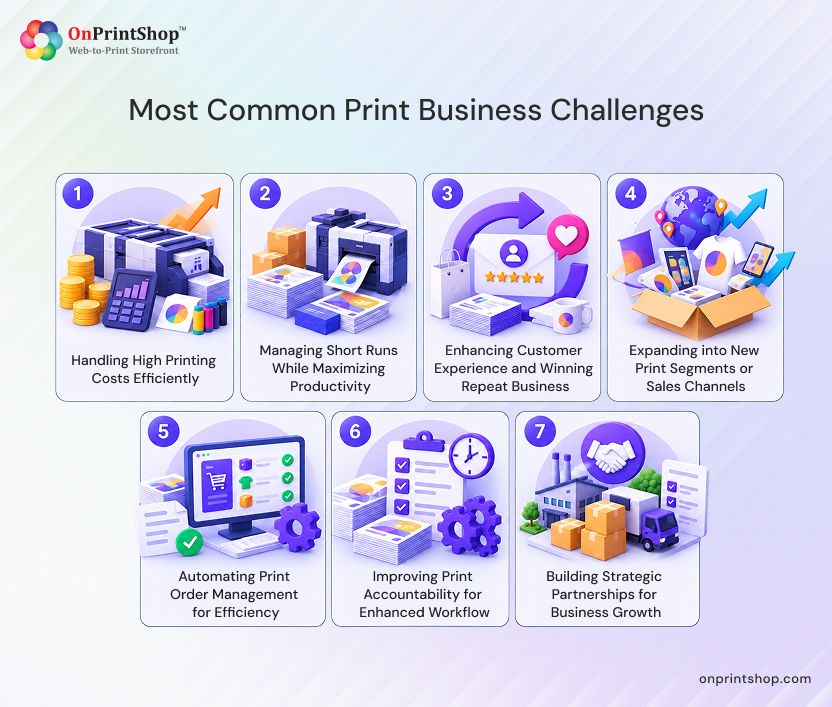
Many of the most pressing print business challenges come down to operations: controlling costs, making short runs viable, keeping customers, widening product offerings, managing orders, assigning responsibility, and coordinating with suppliers. The sections below outline each issue, actions a print shop can take, and useful performance indicators that a leading web-to-print solution can help with.
Quick Answer:What are the biggest challenges print businesses face?The main challenges include rising production costs and lost margin, making short runs profitable, retaining customers and earning repeat orders, entering new print categories and sales channels, managing orders, maintaining workflow accountability, and coordinating suppliers and business partners. Cost pressure and limited staff capacity make these issues more difficult. Consistent processes and KPI tracking can help print service providers address them.
Print Industry in 2026: Where the Pressure Is Coming From
The worldwide printing market is expanding at a measured pace, and that growth does not look the same in every region. The Business Research Company's Printing Global Market Report 2026 estimates the market at $343.63 billion in 2025 and $356.16 billion in 2026, representing a 3.6% compound annual growth rate (CAGR).
The US market faces a different outlook. According to IBISWorld's April 2026 report on printing in the United States (NAICS 32311), the industry is valued at roughly $79.4 billion in 2026. The report also estimates a 4.5% decline for the year and a 2.6% CAGR between 2021 and 2026.
The estimates cover different market scopes and should not be treated as direct comparisons. The global figure covers printing worldwide, while the US figure focuses on commercial lithographic, flexographic, and screen printing. Taken together, they point to continued demand for print alongside greater pressure on established markets to improve efficiency and maintain pricing discipline.
PSPs commonly face four sources of operational pressure:
- Supplier, freight, and tariff-related costs can shift before price lists are updated.
- Short, customized jobs often require nearly the same setup work as larger orders.
- Customers expect online ordering, prompt proof approvals, and clear order-status information.
- Small teams must still handle manual entry, customer follow-ups, and approvals.
Each challenge below includes actions that can be used with or without a web-to-print (W2P) platform, along with examples of where W2P features may help.
Major Print Business Challenges and Proven Tackling Strategies
The way print business operations are distinct in different parts of the world, and thus, the challenges faced by the North American PSPs might not be the same as those in Asia. So, to get a bird’s-eye view, let’s discuss the major global business challenges and impactive strategies to overcome them.
Challenge 1: How Can PSPs Reduce High Printing Costs and Protect Margins?
Print service providers can manage printing costs and protect margins by checking estimated costs against completed-job costs, recording waste and reprints, and revising prices when supplier rates change. Margin erosion often results from repeated small differences between the quoted amount and the actual cost of a job rather than a single major expense.
Why This Happens
Prices for paper, ink, substrates, energy, freight, and equipment can change frequently, leaving fixed estimating assumptions out of date. Manual quotes, reprints, and excess production can further increase the difference between the amount quoted and the cost of completing a job.
Tariffs can add to the pressure. The Business Research Company's Printing Global Market Report 2026 says tariffs are increasing the cost of imported presses, inks, plates, electronic components, and finishing equipment. It identifies PSPs in North America and Europe as especially exposed because they depend on imported machinery.
Practical Steps
- Compare each completed job's estimated cost with its actual cost, and review the biggest differences every week.
- Record why waste or reprints occurred, including artwork issues, color inconsistencies, setup errors, and damaged materials.
- Revise the cost assumptions for paper, ink, substrates, and freight whenever supplier pricing changes.
- Use common estimating rules for waste allowances, setup time, and finishing so quotes remain consistent across employees.
- Review job-cost records to identify products or customers that repeatedly fall below the desired margin.
How Technology Helps
Dedicated print estimating software can apply the same pricing logic to product options, quantities, finishing, and shipping. That consistency reduces reliance on the individual preparing a quote. The software supports these practices, but teams still need to compare estimates with actual costs regularly.
KPIs to Track
Monitor the difference between estimated and actual job margins, material waste, reprint frequency, and quote turnaround time. If the margin gap narrows over several months, it is a useful indication that estimating practices are becoming more accurate.
Challenge 2: How Can PSPs Manage Short-Run Printing Profitably?
To make short-run printing profitable, PSPs need to reduce the fixed work attached to every job, including setup, artwork checks, proof approvals, and scheduling. Standardizing these activities helps prevent small orders from consuming as much staff time as large ones and makes it easier to protect the contribution margin on each short run.
Why This Happens
Setup, file inspection, and approvals must be completed even when an order contains only a few units. Artwork revisions can lead to extra proof rounds, while frequent changeovers interrupt production planning. Although the quantity is small, the job still needs its own ticket, proof, and place in the production queue.
Practical Steps
- Use a consistent job-ticket format so order specifications are captured in the same way each time.
- Automate order intake to avoid entering the same information repeatedly across systems.
- Provide clear artwork specifications and check uploaded files with preflight tools before they reach prepress.
- Manage proof approvals centrally, and define how many revision rounds are included before a change requires a revised quote.
- Group compatible jobs by substrate, finish, or press setup when deadlines and production requirements permit.
- Apply print-on-demand automation to standard, repeatable products where the process is a good fit.
How Technology Helps
Customer-facing online design proofing allows buyers to review artwork and approve it online, with approval details kept alongside the order. OnPrintShop v13.0 also introduced preflight insights during file upload. These insights help users check important file details earlier and can reduce errors before prepress.
KPIs to Track
Track average setup duration, proof rounds per job, time from order placement to production, and contribution margin for short runs. Establish a baseline for each measure before comparing results from month to month.
Challenge 3: How Can PSPs Improve Customer Retention and Repeat Print Orders?
A practical way for PSPs to retain customers is to make standard orders straightforward to place again. Buyers are more likely to return when they can reorder without calling, access reliable pricing, approve artwork promptly, and check order progress without contacting the shop. Delivering consistent results on repeat jobs is just as important as providing a convenient ordering process.
Why This Happens
Print buyers increasingly compare their purchasing experience with the convenience of other online services. Even when print quality is strong, customers may take their business elsewhere if they must email for another quote, send the same artwork again, or contact staff to find out when an order will arrive.
Practical Steps
- Let customers repeat previous orders using saved specifications.
- Display accurate, real-time prices when product rules allow, while directing complex work to a quote request.
- Simplify artwork uploads and product customization with templates for frequently ordered items.
- Make proof review and approval steps easy to follow, with clear turnaround expectations.
- Provide order-status notifications so customers can stay informed without asking the team.
- Check repeat jobs against the original specifications and expected color output.
How Technology Helps
A AI-powered web-to-print storefront can support several parts of the repeat-order experience. OnPrintShop v13.1 introduced AI-powered templates in Designer Studio, allowing users to generate design templates from prompts. Version 13.0 also added AI image enhancement options for tasks such as removing backgrounds and changing colors.
Customization can create its own challenges, including template restrictions and lengthy approval cycles.
KPIs to Track
Measure repeat-order rate, successful reorder completion, customer complaints about the ordering process, and the time required to approve proofs.

Challenge 4: How Can PSPs Expand into New Print Segments and Sales Channels?
PSPs can enter new market segments more carefully by checking demand and operational fit before introducing additional products. A new category is more promising when customers want it, the shop or its partners can produce it, suppliers can be relied on, and pricing can be established without handling every order as a special case.
Why This Happens
A limited product portfolio can leave revenue dependent on a particular customer group or product type. New specialties, storefronts, and sales channels may introduce different specifications, pricing structures, and production steps. Each addition needs to fit the shop's real production and fulfillment capabilities.
Potential areas to assess include specialty printing, document printing, labels and stickers, pattern design, and web-to-pack.
How to Evaluate and Act
- Review each potential segment using five questions:
- Customer demand: have existing customers or prospective buyers requested these products?
- Production capability: can your own equipment or external partners meet the required quality standards?
- Supplier access: can you obtain the necessary materials and outsourced services at dependable prices?
- Pricing: can you establish clear, repeatable rules for calculating quotes?
- Operational fit: can the products move through your current job tickets, approvals, and shipping processes?
How Technology Helps
OnPrintShop supports multiple storefronts. Its web-to-print solutions for different print segments provide an overview of product types and workflows that a platform may support. Assess any option against your own specifications before making a commitment.
KPIs to Track
Review revenue by product category, concentration of revenue among products or customers, order volume by channel, and contribution margin for each segment.
Challenge 5: How Can PSPs Automate Print Order Management?
Print order management becomes easier to automate when all orders are captured in a central system and follow clearly defined stages. Entering details once and making status information visible across the team can reduce duplicate work, prevent missing information, and limit the follow-up required when orders arrive through several channels.
Why This Happens
Orders may come in by email, phone, storefront, or sales representative. Each transfer between sales, prepress, production, and fulfillment creates a chance for information to be lost. Shipping, invoicing, and accounting can introduce more manual tasks. In a small team, repeatedly entering order details or sending status updates takes time away from production and customer service.
Practical Steps
- Document the current order journey from the first customer contact through invoicing.
- Select one system to serve as the authoritative record for order information.
- Set required fields and workflow stages so missing details are identified when an order enters the process.
- Define consistent handoffs among sales, prepress, production, and fulfillment.
- Connect shipping and accounting tools where possible to reduce duplicate data entry.
How Technology Helps
Centralized print order management software brings order intake, job details, status information, and team handoffs together. Shipping and accounting connections, including QuickBooks, are examples of integrations worth evaluating. Confirm that the specific connections you need are supported in your environment. OnPrintShop v13.1 also introduced a rush-order indicator to help administrators identify and prioritize urgent jobs while processing orders.
Before and After: An Illustrative Order Workflow
This comparison is an example of a possible workflow, not a guaranteed outcome. Some steps may require configuration, and the results depend on how each business sets up its processes.
KPIs to Track
Measure order-processing time, order error rate, the number of orders handled per employee, and on-time fulfillment.
Challenge 6: How Can PSPs Improve Print Workflow Accountability?
PSPs can strengthen workflow accountability by giving each stage a clear owner, documenting approvals, and reporting on delays. Order management organizes the overall order journey; accountability makes it clear who handles each step, who approved a decision, and where work is being held up.
Why This Happens
Typical warning signs include tasks without clear owners, approvals buried in email, limited visibility into job progress, and difficulty assigning costs to a project or department. When similar jobs are handled differently by different employees, it also becomes harder to identify why delays occur.
Practical Steps
- Set role-based access so employees can view and update the information needed for their responsibilities.
- Assign a named owner to each stage in the workflow.
- Maintain an approval record that identifies who approved each item and when.
- Use consistent workflow stages for each product type.
- Allocate job costs to projects when the system allows it.
- Review delay and rework reports to spot repeated issues and their causes.
How Technology Helps
Tailored print workflow automation software can define product-specific stages and control available actions according to user roles. OnPrintShop v13.0 introduced secure email links for quote and order approvals, as well as structured order notes with access permissions. These features can help address common approval delays and communication gaps.
KPIs to Track
Track approval turnaround, overdue jobs, workflow-related rework, and differences between estimated and actual job costs by project.
Challenge 7: How Can PSPs Build Stronger Supplier and Business Partnerships?
Strong supplier and business relationships depend on sharing correct product, pricing, and order details in a consistent format. Clear specifications, agreed response times, and fewer manual transfers help limit delays and inconsistencies when work passes between separate companies.
Why This Happens
Coordinating suppliers becomes more complicated as the number of vendors grows. Product availability and prices can change, data may sit in disconnected systems, and reseller or partner orders need to meet the same specification and fulfillment standards as direct orders. Even small information gaps can lead to missed deadlines or exceptions that need manual attention.
OnPrintShop lists integrations with 4over, a wholesale print supplier, and PromoStandards, an industry standard used to exchange promotional product data. Connections of this kind can help PSPs offer a wider product catalog without manually entering supplier details for each order.
Practical Steps
- Agree on a standard specification template with each supplier and partner.
- Maintain a shared product catalog that includes supplier references.
- Document expected response times and fulfillment commitments.
- Record supplier-related order exceptions so recurring issues can be identified.
- Give resellers and partners clear instructions for order submission and approval.
- Assess supplier performance on a consistent schedule.
How Technology Helps
Supplier and third-party integrations can bring product information, order processes, and external-provider coordination into a more connected workflow. Available functions differ by supplier, marketplace, and reseller process, so verify the supported scope before building plans around a particular integration.
KPIs to Track
Measure supplier-related order exceptions, supplier response times, fulfillment discrepancies, and order volume originating from partners.
Challenge-to-Solution Summary Table

Which Print Business Challenges Are Affecting Your Operations?
For each question, choose yes or no. Multiple yes answers may indicate areas to investigate first. Use this list to guide an internal discussion; it is not a validated diagnostic tool or industry benchmark.
- Do actual job costs regularly come in above estimates? Yes / No
- Do short-run jobs get held up by repeated proofing or manual setup? Yes / No
- Do repeat customers need help from staff to place routine orders? Yes / No
- Is the same order information entered into more than one system? Yes / No
- Is it unclear who owns a job or where an approval stands? Yes / No
- Do supplier delays or price changes interfere with production? Yes / No
- Does the team spend excessive time on repetitive administrative tasks? Yes / No
ConclusionPrint business challenges in 2026 usually stem from several connected issues rather than a single cause. PSPs are better positioned to manage them when they combine reliable processes, regular KPI reviews, suitable technology, and careful decisions about new market segments and partners.Begin with the one or two issues highlighted by your self-assessment. Record the current baseline, make targeted changes, and monitor the results. For customer-facing improvements, a scalable web-to-print storefront may be one element of the broader plan.