




Blog Summary: Every re-keyed order, wrong-file reprint, and overdue invoice quietly shrinks your margin. This blog breaks down five hidden costs PSPs absorb in order management, how to measure them, and the fixes worth making. Keep reading to find where your profit is leaking.
Profit rarely disappears in one big mistake. It leaks through small, repeatable ones: an order typed in twice, a reprint from the wrong file, a client who keeps ordering while an invoice sits overdue. These are the hidden costs of print order management, and many PSPs absorb them without ever seeing a line item.
Fragmented order workflows quietly drain profitability. Independent research from the APQC shows that companies stuck with unoptimized order management spend $1.64 per $1,000 in revenue purely on administrative processing—nearly 50% more than automated peers who keep that cost at a lean $1.11.
Client satisfaction and profitability go hand in hand. Satisfied clients reorder, refer others, and pay on time, but only when intake, approvals, and billing hold up under volume. Adopting an effective print shop order management software is one way to tighten those steps. This blog covers five costly factors, the fix for each, and ways to measure the damage.
What Print Order Management Factors Cost PSPs Money?
Five factors typically cost PSPs money in order management: manual order intake, dependence on key people, reorder and file errors, client loss after sales turnover, and unpaid credit. Each one adds rework, delay, or cash-flow strain that rarely appears as a single line item.
The sections below describe what each factor looks like in daily operations and why it matters to margin.
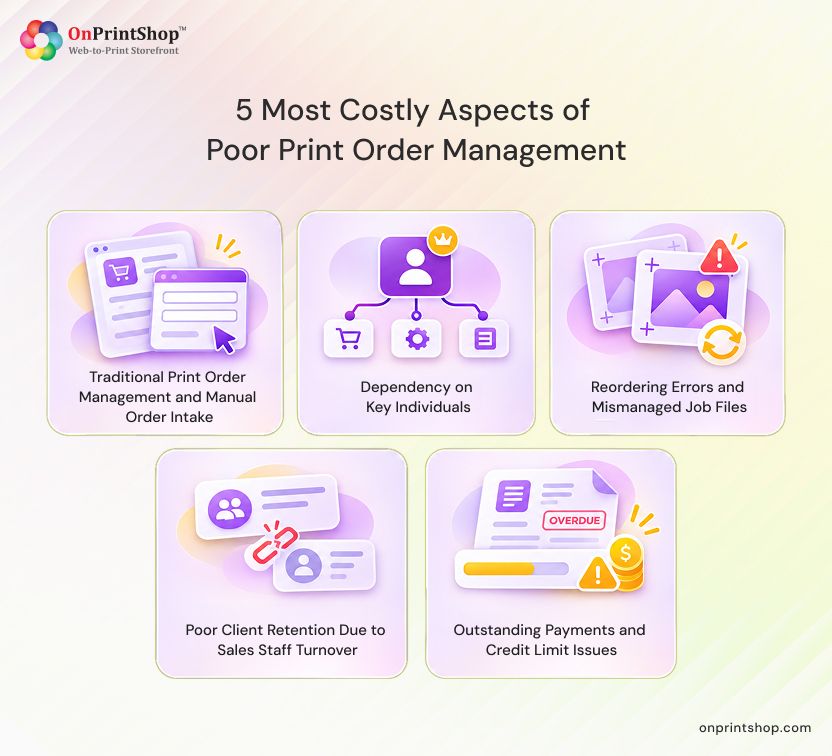
1. Traditional Print Order Management and Manual Order Intake
Traditional print order management relies on staff re-keying orders from email, phone calls, and walk-ins into separate tools. Every re-entry is a chance for a typo, a missed spec, or a delay. For PSPs, the cost shows up as rework, slower turnaround, and duplicated effort across the team.
Consider one B2B job. The request arrives by email, the client calls with a quantity change, and a revised file is dropped off at the counter. The order may be entered three times, once per channel, and each version can differ slightly.
The consequence is miscommunication and delayed processing. Production can start from the wrong version, and staff spend time reconciling what the client actually asked for. The problem grows with complex work such as managing bulk orders and customization requests, where every variation must be captured accurately.
2. Dependency on Key Individuals
Dependency on key individuals means orders move only when the owner or a senior team member reviews them. Without a structured approval system, requests queue up, departments work from different information, and fulfillment slows. The business becomes limited by one person's availability rather than by production capacity.
This often happens when approvals, pricing exceptions, and job sign-offs live in one person's inbox or memory. When that person is out, orders stall. Weak communication between sales, prepress, and production adds delays that clients notice.
3. Reordering Errors and Mismanaged Job Files
Reordering errors happen when a repeat order is produced from the wrong artwork. Design changes discussed by phone and a lack of version control make it easy to print an outdated or unapproved file. The result is reprints, wasted materials, lost time, and avoidable financial loss.
Repeat clients expect a reorder to match the last job, or to reflect agreed changes exactly. Business success through handling reorders from repeat customers depends on a defined process rather than memory or phone notes.
What a sound reorder process looks like:
- Retrieve the exact approved artwork from the original order.
- Keep version control so every revision is stored and identifiable.
- Record requested changes in writing instead of relying on phone instructions.
- Proof and approve the updated file before it goes to production.
4. Poor Client Retention Due to Sales Staff Turnover
In B2B print, clients are often tied to a specific sales representative. When that person leaves and the client history lived in their inbox or memory, the replacement starts from zero. Without a structured CRM, relationships weaken and clients become easier for competitors to win.
Past orders, pricing agreements, preferences, and communication history all leave with the departing rep. New staff must rebuild that context while the client waits, which erodes trust.
5. Outstanding Payments and Credit Limit Issues
Outstanding payment problems occur when clients buy on credit and no real-time tracking compares their balance with the agreed limit. Orders keep flowing even when earlier invoices are overdue. For PSPs, that means delayed payments, tied-up cash, and growing financial strain.
For example, a B2B client places bulk orders on credit with a payment due date. Without tracking, the client can keep ordering after missing that date, and the outstanding balance can climb past the agreed credit limit.

Which Print Order Management Costs Are Easiest to Measure?
Five KPIs make order management costs measurable: order error rate, reprint rate, order cycle time, days sales outstanding, and repeat-order rate. Each maps to one or more of the five factors above. Track them before and after process changes so improvement rests on your own data, not assumptions.
- Order error rate: the share of orders with an entry, specification, or file error found after intake. It reflects manual intake and reorder problems.
- Reprint rate: the share of jobs produced again because of an error, such as a wrong file or specification. It points to reorder and proofing gaps.
- Order cycle time: the time from order receipt to delivery. Longer cycles often trace back to re-keying and approval bottlenecks.
- Days sales outstanding (DSO): the average number of days it takes to collect payment after a sale. It reflects credit and invoicing discipline.
- Repeat-order rate: the share of clients who order again within a period you choose. It shows whether client relationships survive staff changes.
Set your own baseline for each KPI rather than borrowing outside targets. PSPs can review many of these numbers through an accurate reporting and analytics tool.
How Can PSPs Fix Costly Order Management Problems?
PSPs can fix costly order management problems by matching each cost factor to a specific control: centralized automated intake, approval workflows, design proofing with version control, CRM integration, and automated invoicing with credit tracking. Fixing the process, not just the symptoms, is what reduces avoidable cost.
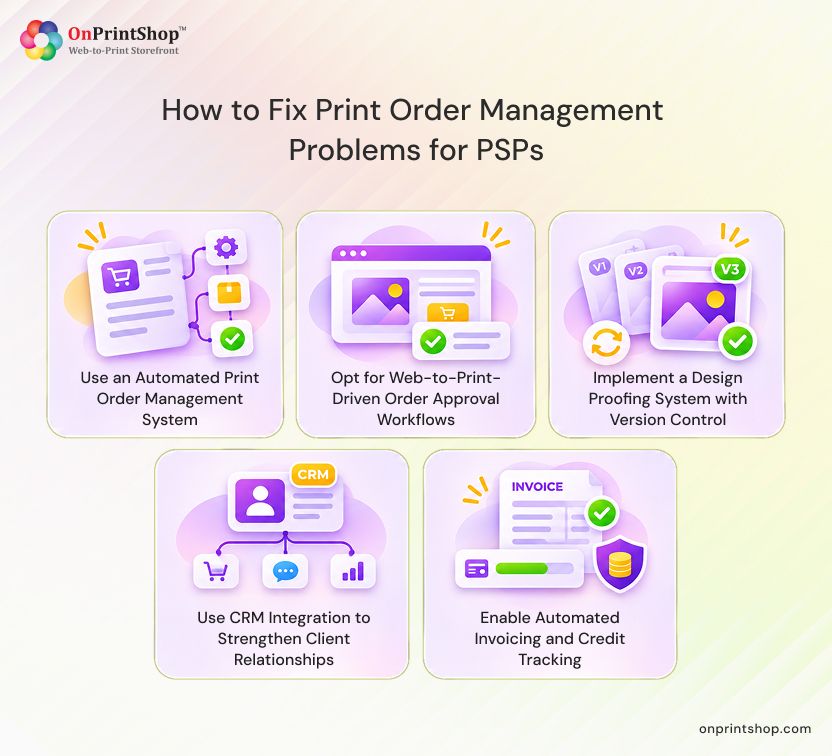
1. Use an Automated Print Order Management System
A modern print order management system centralizes orders from every sales channel in one platform. That reduces manual intervention and miscommunication, and gives the team a single record of each job. The practical benefit is smoother workflows, quicker order processing, and fewer entry errors to correct.
Orders from email, phone, and walk-ins enter one queue, so staff stop re-keying the same job. PSPs should know how to utilize an automated print management software with high scalability so the system keeps working as order volume grows.
2. Opt for Web-to-Print-Driven Order Approval Workflows
Web-to-print-driven order approval workflows route each order to the right person based on role, so approvals no longer depend on the owner or one senior employee. PSPs can set different approval paths, which improves collaboration across departments and keeps orders moving when key people are unavailable.
Role-based access controls who can review, approve, or edit an order, and customizable steps let sales, prepress, and production each see what they need. Pairing approvals with role-based print workflow automation software also gives managers one place to see where orders are waiting.
3. Implement a Design Proofing System with Version Control
A design proofing system with version control lets designers and customers review artwork in one place and keeps every iteration on record. Reorders then pull the exact approved file instead of relying on phone notes or old attachments. That helps PSPs avoid costly reprints and wasted material.
With collaborative design proofing software, the customer reviews the proof online, requested changes are recorded, and the approval is stored with the job. A later reorder starts from that approved version, which closes the gap that phone instructions leave open.
4. Use CRM Integration to Strengthen Client Relationships
CRM integration keeps client data in a shared system instead of in one sales rep's inbox. When staff change, new team members can see past orders, preferences, and communication history and offer consistent, personalized service. This protects relationships that would otherwise move to competitors.
PSPs should look for print CRM integration with platforms such as Zoho and Salesforce through third-party integrations, so client records stay with the business when people leave.
5. Enable Automated Invoicing and Credit Tracking
Automated invoicing and credit tracking compares each client's outstanding balance with their agreed credit limit in real time. PSPs can send automatic reminders for pending invoices and apply credit-hold rules when a limit or due date is exceeded. The aim is fewer overdue payments and steadier cash flow.
A practical credit-control setup:
- Assign each B2B client a credit limit and payment terms.
- Track open invoices against that limit as orders arrive.
- Send automated reminders for pending and overdue invoices.
- Apply a credit hold so new orders need review once the limit or due date is exceeded.
Connecting invoicing to accounting, for example through a W2P software integrated with QuickBooks, keeps balances consistent between systems.

Manual vs. Automated Order Management: What Changes?
Moving from manual to automated order management changes where work and risk sit. Manual processes depend on people re-keying, remembering, and chasing. Automated processes apply consistent rules, store records centrally, and flag exceptions. Automation reduces many errors but does not remove the need for human review.
How to Calculate the Cost of a Print Order Error
The cost of a print order error is the sum of materials, labor, shipping, and delay or credit cost. Adding all four shows the real price of one mistake, which is usually higher than the wasted material alone. Use the formula below with your own numbers.
Cost of an order error = materials + labor + shipping + delay/credit cost
Example: These values are made up to show the arithmetic and are not industry data.
- Materials: $320 to reprint the job
- Labor: $90 (3 hours at $30 per hour across prepress, press, and finishing)
- Shipping: $45 for the replacement delivery
- Delay/credit cost: $75 credit applied to the client's next invoice
Total: $320 + $90 + $45 + $75 = $530 for one error.
Delay and credit cost varies most. It can include late-delivery credits, expedited shipping, discounts offered to keep the client, and the risk of losing the account. If you cannot put a responsible number on it, record the other three costs and note the delay impact separately.

Self-Audit: 6 Signs Your Order Management Is Costing You Money
If several of the signs below sound familiar, your order management is probably costing you money. Use this checklist as a quick diagnostic, then match each sign to the related factor and fix above. Each item is something a PSP or print business owner can check this week.
- The same order is entered more than once. Count how many places a single job is keyed in, and aim for one entry point. (Factor 1)
- Orders stall when the owner or a senior person is out. List who must approve what, and define a backup for each approval. (Factor 2)
- Reorders rely on phone instructions or old email attachments. Trace one recent reorder and confirm which file version was used. (Factor 3)
- Client history leaves with a departing sales rep. Check whether a new rep could see past orders and preferences today. (Factor 4)
- Clients keep ordering with overdue invoices or balances over their limit. Compare open balances with agreed credit limits. (Factor 5)
- You cannot report your error rate, reprint rate, or DSO. Pick KPIs from the measurement section and start recording them. (All factors)
ConclusionManaging a high volume of print orders is demanding, but fixing the process with an AI-powered Web-to-Print software removes avoidable cost. Centralized intake reduces re-keying, approval workflows reduce dependence on key people, proofing and version control protect reorders, a shared CRM preserves customer knowledge, and credit tracking protects cash flow. Together, these changes help PSPs protect profitability.To see how these controls fit your workflow, schedule a demo with OnPrintShop. Start by tracking your order error rate and reprint rate for one month, then bring those numbers to the conversation.