



Blog Summary: Custom print orders bring more personalization, pricing variables, approvals, and channels into every job. Automation can turn those moving parts into repeatable workflows. This guide explains how to implement it and evaluate the right web-to-print platform.
Custom print orders rarely arrive as neat, repeatable transactions. One job may involve personalized artwork, several sizes or finishes, multiple approval rounds, and a tight delivery deadline. Meanwhile, the same team may be handling quotes, production coordination, and customer questions.
Manual intake and spreadsheet-based pricing can cope with a limited workload, but the cracks become obvious as volume and complexity rise. And that’s why the global business automation workflow market outlook reported at USD 7.84 billion in 2023 and is predicted to earn a revenue of USD 12.7 billion with a CAGR of 4.9%, by the end of 2033.
A practical custom web-to-print solution can connect personalization, pricing, order handling, and other steps instead of leaving each task to a separate manual process. This guide explains where to start, how to roll out automation, what to check when evaluating a platform, and what results to measure.
Why Is Print Automation No Longer Optional for Custom Print Businesses?
Print automation has become increasingly important because the custom print business challenges, like personalization, order complexity, and customer expectations can quickly overwhelm manual processes. A connected workflow gives teams a way to absorb that complexity without increasing staff at the same rate.
Growing Order Complexity and Personalization Demand
- Custom jobs can combine different sizes, materials, and finishing choices in a single order. Each variation can change the pricing and production path.
- Personalized logos, photos, names, and QR codes add design, proofing, and specification steps. Without standardized workflows, those details can be missed or handled differently from one job to the next.
- Customers increasingly expect ecommerce-style convenience, including immediate pricing, online proofing, and order tracking. Phone calls and long email chains make that experience harder to deliver.
Labor and Capacity Constraints
- Employment in printing and related support activities stood at roughly 339,000 workers as of July 2026, according to the U.S. Bureau of Labor Statistics. That makes simply adding staff a limited answer when a business wants to increase order volume.
- Re-entering customer information, calculating quotes, chasing approvals, and checking order details consume hours that could otherwise support production, design, or customer service.
- When storefront, phone, walk-in, and trade partner orders enter through different channels, staff often have to repeat the same work. Centralizing those orders removes that duplication.

What Are the Core Benefits of Print Automation?
The main benefits of print automation are quicker order handling, fewer avoidable mistakes, more productive use of staff time, and a better buying experience. For custom print businesses, those gains become more valuable as order variations and volume increase.
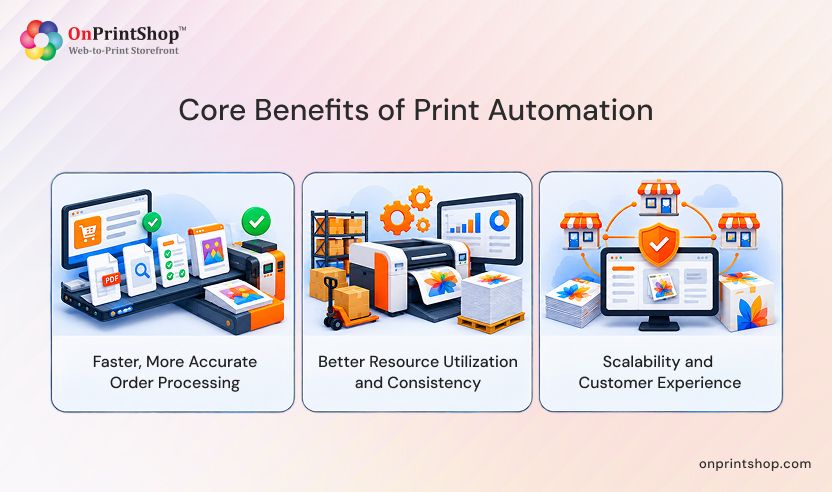
Faster, More Accurate Order Processing
Automated pricing can calculate estimates from variables such as size, quantity, sides, paper, and finishing, reducing the need for staff to build each quote manually.
Standardized proofing and approval steps give customers a clear path to sign off on custom work instead of leaving employees to manage every round through email.
Better Resource Utilization and Consistency
- When routine quoting and order intake take less staff time, employees can spend more attention on production, design, and customer relationships.
- Automation applies configured rules consistently. Pricing, order routing, and production instructions do not depend on which employee happens to process the job.
- Reporting and analytics make order volume, turnaround time, and workflow bottlenecks easier to see than they are in scattered spreadsheets.
Scalability and Customer Experience
- During peak periods, automation can help a print business absorb additional orders without requiring a proportional increase in headcount.
- Self-service design, real-time pricing, and order tracking give customers more control over the buying process and reduce the need for routine status questions.
- Consistent specifications and automated checks can also reduce material waste caused by errors that would otherwise lead to reprints.
How Do You Implement Print Automation Step by Step?
A phased rollout is usually the practical route to print automation. Start by understanding the current workflow, focus on the highest-impact bottlenecks, then configure, test, train, and expand the system.
- Audit your current workflow. Map the journey from order intake through delivery. Mark every point where employees re-enter information, calculate pricing, request approvals, or move job details between systems.
- Identify the biggest manual bottlenecks. Rank tasks by the time they consume and the errors they create. Do not try to automate every process simply because the technology allows it.
- Define goals and success metrics. Decide which outcomes matter most, such as turnaround time, order volume, or error rate. A baseline gives you something concrete to compare after launch.
- Prioritize workflows and products for automation. Start with high-volume or error-prone custom product lines. A focused first phase is easier to test and refine than a full catalog rollout.
- Evaluate automation platforms against your goals. Use a structured checklist instead of selecting a platform mainly because it has a familiar name or a low headline price.
- Plan integrations early. Identify the MIS, ERP, accounting, shipping, and payment systems that need to exchange information with the platform before configuration begins.
- Configure personalization, pricing, ordering, and approvals. Build templates, pricing rules, and approval paths around the way your team actually processes custom jobs.
- Test with real orders. Run a controlled set of live or representative orders through the new workflow. This helps expose gaps before you move the entire operation.
- Train staff and customers. Give employees hands-on practice and provide customer guidance for self-service features. Adoption matters as much as configuration.
- Launch, monitor, and optimize. Track the metrics defined at the beginning, then refine workflows, pricing rules, integrations, or templates based on actual order data.
One common mistake is attempting a full automation rollout before the business has proved a smaller workflow. Start with the bottleneck that creates the most operational drag. Centralizing orders early can also make later automation easier because the business begins working from a shared source of order information.

What Should You Look for When Choosing a Web-to-Print Automation Platform?
A suitable web-to-print automation platform should connect the customer-facing and operational parts of the print order, from personalization and pricing through order management, integrations, and reporting. Use the following checklist to compare platforms against the way your business actually works.
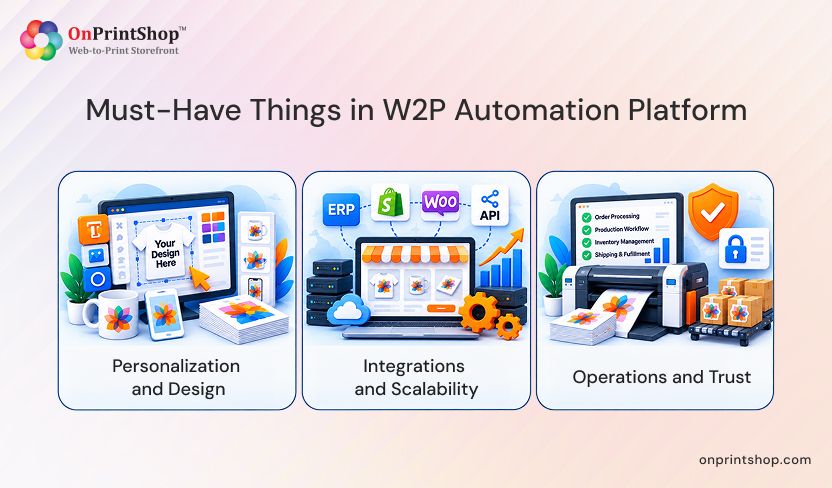
Personalization and Design
- Customization and personalization: Look for templates and editing tools for text, images, and clipart so customers can create personalized products without relying on design staff for every change.
- Online design tools: A browser-based design studio can let customers create and preview artwork before placing an order, reducing avoidable proofing rounds.
- Product and template management: Your team should be able to add, update, organize, and maintain templates as the product catalog grows.
- Pricing and Ordering
- Dynamic pricing and estimation: The platform should calculate pricing using variables such as size, quantity, sides, paper, and finishing, with rules that can be updated as costs change.
- Automated order management: Look for a centralized view of orders from storefronts, phone, email, and walk-in customers.
- Quote and approval workflows: Approved quotes should move into order processing without forcing staff to re-enter the same information.
- Multi-channel order handling: Online, offline, and trade or reseller orders should be manageable within a connected system.
Integrations and Scalability
- MIS/ERP integrations: Orders should be able to move into production systems without repeated manual re-keying.
- Workflow integrations: Connections with prepress, production, and finishing systems can reduce handoffs that slow custom jobs.
- Payment and shipping integrations: Connected payment gateways and carrier services help customers complete orders without leaving the workflow.
- Scalability: Check whether the platform can support more orders, products, and storefronts without forcing a migration.
- Multi-storefront support: This matters when one operation serves several brands, locations, or trade partner accounts from a shared back end.
Operations and Trust
- Reporting and analytics: Look for dashboards that show order volume, turnaround times, and bottlenecks so decisions can be based on operating data.
- User roles and permissions: Controls should define what employees, customers, and trade partners can access or change.
- Proofing and approval capabilities: Keeping design approval inside the platform can reduce dependence on email threads.
- Implementation and onboarding support: Setup guidance can matter as much as the feature list, especially for teams moving from manual processes.
- Security and reliability: Evaluate data protection and uptime commitments, particularly when the platform handles customer and payment information.
- API and integration capabilities: Open APIs can provide a path to connect systems that are not natively supported.
- Long-term extensibility: Make sure the platform can accommodate new products and sales channels as the business expands.
How Does OnPrintShop Power Custom Print Automation?
OnPrintShop brings print business personalization, online design, pricing, order management, and integrations into one web-to-print environment for custom and personalized print businesses. That connected approach addresses the points where manual handoffs often slow an order down.
Product Personalization
Customers can personalize products with templates, text, images, and clipart. OnPrintShop also offers custom logo design software for customers who need to create a logo without design skills, along with QR code personalization. 3D previews and room-view simulation help customers visualize the finished product before placing the order.
Online Design
The advanced web-to-print online designer gives customers a browser-based workspace for creating and editing designs. That self-service path can reduce the repeated email exchanges that often accompany custom design requests.
Price Estimation
Customers can view real-time pricing based on configured variables such as size, quantity, sides, paper type, and lamination. They can email an estimate or download it as a PDF through the built-in accurate print estimation tool. On the administrative side, bulk price updates allow owners to change pricing across products without editing every item individually.
Automated Order Management
OnPrintShop centralizes online, offline, and external-channel orders, including orders received by email, phone, or walk-in. Quote management keeps approval activity connected to the order process and can convert an approved quote into an order automatically. Multiple branches or storefronts can also be managed from a centralized platform.
Integrations and Workflow Automation
OnPrintShop connects with Print MIS, workflow, accounting, CRM, shipping, and payment systems. It also supports a direct 4over integration for businesses that source through that network. These connections can reduce manual re-entry and limit handoffs between order intake, prepress, and production.
AI as an Automation Enabler
AI adds another layer to the broader print automation workflow. It can support tasks such as AI-powered personalization and content generation, but it is not the foundation of the automation strategy. The connected workflows handle the core movement of orders, pricing, approvals, and production information.

What Results Can Custom Print Businesses Expect After Automating?
Automation can improve order processing, reduce avoidable errors, and support online sales, but the size of the result depends on the business's starting workflow, product mix, and implementation approach.
Print Charming, a full-service printer in McDonough, Georgia, offers offset and digital printing, wide-format signage, and custom finishing. The company moved from manual job intake, estimating, and proofing to OnPrintShop's automated web-to-print platform. It reported:
- 95% growth in online sales through branded storefronts
- 50% faster order processing through automated workflows
- 200% increase in repeat business through client portals
- 1,000% growth in new B2B clients
Those figures belong to Print Charming's specific implementation and starting point. They should not be treated as a guaranteed benchmark for every printer. What the Print Charming’s success story does show is that moving personalization, order management, and other manual activities into connected workflows can produce measurable changes in sales, processing speed, and repeat business.
ConclusionA modern custom web-to-print platform for print automation works best when it follows the realities of the business rather than forcing the business into a generic workflow. Start by mapping the current process, isolate the biggest bottleneck, define measurable goals, and evaluate platforms against those requirements before expanding the rollout.For custom and personalized printing, the platform should support the work customers and staff actually perform: templated personalization, dynamic pricing, centralized order management, proofing, and connected integrations. And if you want to build a personalized print automation platfrom for your print business, book a like demo today with OnPrintShop.