

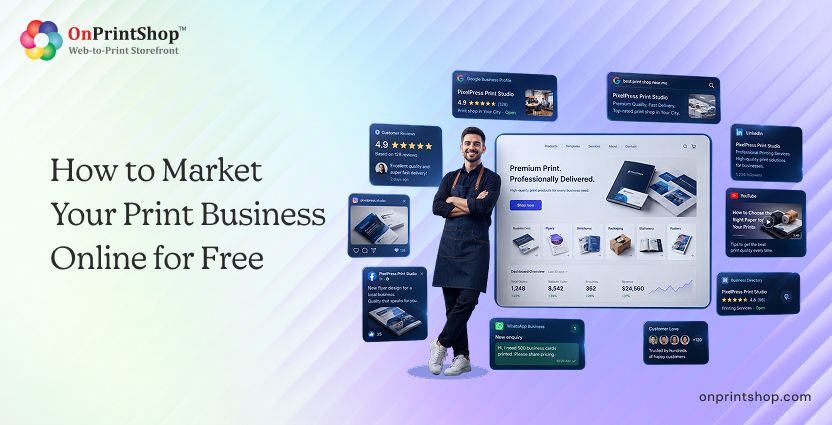
How to Grow Your Print Business Online for Free in 2026

Blog Summary: Most print shop owners believe building an online presence requires a significant budget. It does not. From Google Business Profile to a free web-to-print storefront, there are proven, zero-cost strategies that generate real orders. Read on to find out exactly how.
Print shop owners can grow their business online for free using a combination of Google Business Profile, social media, directory listings, customer reviews, and a web-to-print storefront. Knowing how to grow print business online no longer requires a large marketing budget, it requires the right tools and the right platforms.
Today's print buyers research, compare, and often complete orders entirely online. A 2025 industry report found that the global digital print market is worth $167.5 billion, reflecting a sustained shift toward online-first purchasing behavior in print. PSPs that lack an online presence are invisible to this growing buyer pool.
This guide covers nine free, actionable strategies to help you build your online presence for print business and shows how an AI-powered custom Web-to-Print storefront ties them all together into a complete growth engine.
What Does Online Presence Mean for a Print Business?
An online presence for a print business means being discoverable, credible, and transactable across digital channels. These three dimensions work together to move a potential buyer from awareness to a completed order.
Discoverability means buyers can find you when they search for printing services on Google, social platforms, or online directories.
Credibility means what they find. Your profile, reviews, and content, build enough trust to prompt further action.
Transactability means there is a clear, friction-free path for them to place an order directly online.
The transaction layer is where many print shops fall short. Social media and directories drive attention, but without a smart print ecommerce storefront, that attention has nowhere to convert. A web-to-print storefront gives buyers a place to browse products, customize artwork, upload files, and pay, all without a phone call or back-and-forth email.
Together, these three pillars form the foundation of sustainable online growth for any Print Service Provider (PSP).
9 Free Ways to Grow Your Print Business Online
These nine strategies are free to implement and cover the full buyer journey, from discovery to order. Each one works independently, but they compound when used together.
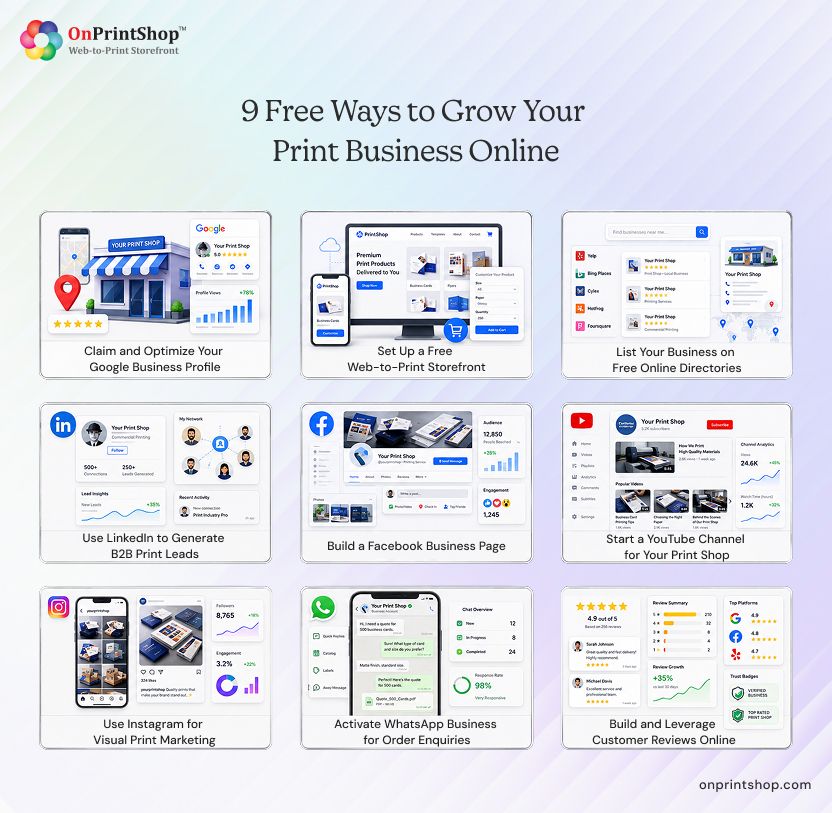
1. Claim and Optimize Your Google Business Profile
Google Business Profile (GBP) is the single most impactful free tool for local print shop visibility. When a buyer in your city searches "print shop near me" or "business card printing [city]," a well-optimized GBP listing is what puts your business in front of them, often before any website result.
Setting up and optimizing your GBP account:
- Claim and verify your business at business.google.com
- Fill in every section: name, address, phone number, service categories, and hours
- Add high-quality photos of your shop, equipment, and finished products
- Use the Products feature to showcase your core offerings (business cards, banners, signage, etc.)
- Enable the Q&A section and pre-populate it with answers to common buyer questions
- Post weekly updates about promotions, new products, or completed projects
Actionable tip: Ask every satisfied customer to leave a Google review immediately after their order is delivered. Businesses with 10 or more recent reviews consistently rank higher in local search results and generate more clicks. Respond to every review, positive or negative, within 48 hours to signal engagement to Google's algorithm.
2. Set Up a Free Web-to-Print Storefront
A web-to-print storefront is a fully functional online store purpose-built for print businesses. It enables buyers to browse your product catalog, customize designs using a built-in online designer, upload print-ready files, and complete checkout, all without your team needing to manually process each enquiry.
For a Print Service Provider (PSP), a custom-branded web-to-print storefront is the difference between having an online presence and having an online business. Social media and directories create awareness, but only a storefront generates actual orders.
Key capabilities to look for:
- Product catalog management with print-specific attributes (size, paper stock, finish, quantity)
- An AI-integrated web-to-print online designer so buyers can customize templates without needing design software
- Seamless file upload and preflight for print-ready artwork
- Pricing calculators that handle variable data, quantities, and turnaround times
- Support for both retail buyers and B2B accounts through a flexible commercial print storefront
Actionable tip: OnPrintShop offers a free demo experience so you can explore the storefront, designer, and workflow tools before committing. Use it to map your most common product types and decide which to launch first.

3. List Your Business on Free Online Directories
Free business directories extend your local print business visibility well beyond Google, placing your listing in front of buyers who use alternative search channels or comparison platforms. This is crucial, especially for retail print service providers.
Priority directories for print businesses:
- Yellow Pages: Still used by millions of buyers searching for local service businesses. Create a complete listing with photos, service descriptions, and a link to your storefront.
- Yelp: Especially effective for consumer-facing print shops. Yelp reviews influence buyer decisions significantly, and the platform surfaces local businesses prominently in mobile searches.
- Bing Places for Business: A frequently overlooked channel. Bing powers search results on Microsoft Edge, Cortana, and Yahoo Search, collectively a meaningful share of desktop search traffic.
Actionable tip: Keep your Name, Address, and Phone Number (NAP), along with the link to your advanced B2C web-to-print storefront, identical across every directory listing. Inconsistent NAP data creates confusion for search engine crawlers and can actively suppress your rankings in local search results.
4. Use LinkedIn to Generate B2B Print Leads
LinkedIn is the primary platform where corporate buyers, marketing managers, procurement officers, and brand teams look for an easy-to-use B2B web-to-print storefront. For print businesses targeting B2B clients, branded merchandise, corporate stationery, event signage, packaging, LinkedIn offers direct access to the decision-makers who control print budgets.
Strategies for B2B print lead generation on LinkedIn:
- Build a complete company page with a clear description of your services, a link to your storefront, and a branded cover image featuring your best print work
- Share case studies featuring real projects: the brief, the challenge, the production process, and the outcome
- Post samples of finished work consistently, wide-format graphics, packaging mock-ups, promotional materials, since print is inherently visual
- Engage directly with industry content and comment on posts from potential buyers in your target verticals
- Use LinkedIn's search to identify local businesses likely to need print services, then connect with a personalized message
Read our guides on how to grow your print business and improving print production and workflow management for deeper operational context you can reference in your LinkedIn content.
Actionable tip: Write one original LinkedIn post per week about a project you completed, a challenge you solved, or a trend in the print industry. Consistent, educational content builds authority and keeps your business visible to your network's broader connections.
5. Build a Facebook Business Page
Facebook remains the largest social media platform globally, and its business page functionality gives print shops a free, feature-rich channel to build community, showcase work, and generate enquiries from local buyers.
Setting up and using a Facebook Business Page effectively:
- Create your page and complete all sections: address, hours, services, website link, and a compelling "About" section that includes your key print services
- Use Facebook Reels to show behind-the-scenes footage of your production process, equipment in action, or before-and-after comparisons of raw files versus finished prints
- Enable and actively manage the Reviews section. Customer reviews on Facebook are highly visible and influence purchasing decisions across your entire local audience
- Create Facebook Events for open house days, seasonal promotions, or product launches
- Respond promptly to every message and comment, Facebook measures your response time and displays it publicly, and fast response rates build buyer confidence
Actionable tip: Post three to four times per week using a mix of content: one product showcase, one customer success story or review highlight, and one educational or behind-the-scenes post. By engaging with customers, you also get a chance to improve your print production and align it with customer expectations.
6. Start a YouTube Channel for Your Print Shop
YouTube is the world's second-largest search engine, and print businesses are uniquely positioned to create compelling video content. Buyers researching printing services often search for process videos, product demonstrations, and quality comparisons before making a decision, and a YouTube presence puts your business in front of them at the exact moment of consideration.
Video content ideas for print shop YouTube channels:
- Product showcases: Close-up videos of finished products, business cards, banners, packaging, promotional materials, highlighting quality, texture, and finish options
- Process videos: Walk buyers through your production workflow from file intake to delivery. Transparency builds trust and educates buyers about what they are actually purchasing.
- Customer success stories: Interview a satisfied business client about how your print work helped their event, campaign, or brand. These testimonials are highly persuasive and inherently shareable.
- Print tips and buyer guides: Short educational videos on topics like "how to prepare a print-ready file" or "how to choose the right paper stock" position your business as an expert resource
Actionable tip: Repurpose your YouTube content as short-form videos for Instagram Reels, Facebook Reels, and TikTok. A single three-minute process video can be edited into four or five short-form clips, multiplying your content output across every channel with minimal extra effort.
7. Use Instagram for Visual Print Marketing
Instagram's format is purpose-built for print businesses. The platform rewards high-quality visual content, and print, by its nature, produces visually compelling finished products that photograph exceptionally well.
Strategies for Instagram print marketing:
- Build a consistent visual portfolio by posting high-resolution photos of your finished products regularly. Use natural light or a lightbox setup for product photography, even with a smartphone.
- Use Instagram Reels to show the production process, time-lapses of large-format printing, or side-by-side comparisons of design concepts and finished prints
- Set up product tagging so buyers can tap a product in your post and go directly to your web-to-print storefront to place an order
- Use relevant, specific hashtags such as #printshop, #widtformatprinting, #businesscards, and location-specific tags to reach local buyers
- Build a highlights section organized by product category so profile visitors can browse your portfolio without scrolling through your full feed
Actionable tip: Dedicate one highlight reel to customer-submitted photos of your work in use, corporate events, retail displays, trade show booths. User-generated content is more persuasive than anything your shop produces directly, and tagging customers often drives profile visits and follows from their networks.
8. Activate WhatsApp Business for Order Enquiries
WhatsApp Business gives print shops a free, professional channel to manage buyer enquiries, share quotes, and communicate order status without relying on phone calls or email threads. For many buyers, particularly in South Asia, the Middle East, and parts of Europe and Latin America, WhatsApp is their preferred communication channel.
Setting up WhatsApp Business for a print shop:
- Create a business profile with your shop name, address, hours, website link, and a short description of your services
- Build a product Catalog featuring your most popular print products with descriptions, pricing, and images. Buyers can browse the catalog and initiate enquiries directly from it.
- Set up automated greeting messages and away messages so buyers receive an immediate response regardless of when they contact you
- Use Broadcast Lists to send promotions, new product announcements, or seasonal offers to opted-in customers
- Organize conversations using the Labels feature to track order stage: New Enquiry, Quote Sent, Order Confirmed, Dispatched
Actionable tip: Add your WhatsApp Business number as a visible contact option on your website, directory listings, and social media profiles. Include a direct WhatsApp link (wa.me/[your number]) so buyers on mobile can initiate a conversation with a single tap.
9. Build and Leverage Customer Reviews Online
Customer reviews are one of the most powerful growth levers available to a print business, and one of the most underused. Positive reviews improve your local search rankings, build credibility with new buyers who have no prior experience with your shop, and increasingly influence how AI-powered search tools surface and recommend businesses.
Platforms to prioritize for print business reviews:
- Google Reviews: The most impactful for local search visibility. Aim to maintain a rating above 4.5 stars with a consistent volume of new reviews each month.
- Trustpilot: Widely recognized as an independent review platform. A Trustpilot profile lends credibility to your web-to-print storefront when linked directly from your product pages.
- Facebook Reviews: Visible to your entire Facebook audience and their extended networks. Buyers who leave Facebook reviews often share the post, extending your reach organically.
A brief, easy-to-send review request works better than a long template. For example: "Hi [Name], thank you for your recent order. If you're happy with the results, we'd really appreciate a quick Google review, it takes less than two minutes and helps other businesses find us. Here's the link: [link]."
A consistent review generation process, even asking just two or three customers per week, compounds significantly over months. Beyond direct impact on buyers, reviews are increasingly used as trust signals by AI search engines and LLM-based tools that synthesize business recommendations. A print shop with strong, recent, and varied reviews is significantly more likely to be surfaced as a recommendation in AI-generated answers.
Actionable tip: Create a short review request message and save it as a template in WhatsApp Business, your email client, and your fully automated print order management software. Send it within 24 to 48 hours of delivery when the customer's satisfaction is highest.

How Web-to-Print Accelerates Your Online Presence
Social media, directories, and reviews build awareness and drive traffic, but awareness without a conversion mechanism does not generate orders. A Web-to-Print (W2P) platform is what converts that traffic into revenue.
When a buyer clicks through from your Google Business Profile, Instagram post, or LinkedIn page, they need to land somewhere that makes it easy to browse, customize, and buy. A B2B print storefront or B2C storefront handles this entire journey, from product discovery to payment, without requiring your team to manually process each enquiry.
Here is how the full ecosystem works:
- Traffic generation: Google Business Profile, social media platforms, and directory listings drive targeted buyers to your storefront
- Online ordering: Buyers browse your catalog, configure products, and complete purchase in a single session
- Design customization: The built-in designer studio lets buyers personalize templates or upload print-ready files, reducing back-and-forth communication with your team
- Workflow automation: Orders flow automatically from the storefront into production using robust print workflow automation software, eliminating manual re-entry and reducing production errors
- Centralized management: Print order management tools give your team real-time visibility into every order's status, from intake through dispatch
OnPrintShop brings 19+ years of web-to-print expertise and serves more than 2,000 print businesses across 50+ countries. The platform is purpose-built for PSPs of every size, from single-operator shops to large commercial printers, and is designed to grow alongside your business as your online presence scales.
ConclusionStart with the fundamentals: claim your Google Business Profile, activate your social media channels, and list your business on the major free directories. Build a review generation habit and stay consistent with content. Then ensure that every piece of online visibility you build points buyers toward an award-winning web-to-print storefront where they can browse, customize, and buy without friction.These nine strategies compound over time. A Google Business Profile optimized today will drive enquiries for years. Reviews collected this month will influence buyers next year. Consistent social media content builds an audience that grows with every post.If you are ready to add the transaction layer that turns online visibility into online revenue, book a free demo with OnPrintShop and see how the platform fits your existing workflow and growth goals.