


Blog Summary: In-plant print departments struggle with scattered print requests, brand inconsistency, and zero cost visibility across departments. This article breaks down exactly how OnPrintShop addresses these operational gaps with purpose-built tools for internal print management. If you run or manage an in-plant facility, keep reading.
Every week, in-plant print departments deal with the same friction: emails from 15 different departments, no standardized templates, approval requests buried in inboxes, and billing reconciliation that takes hours to sort out.
Internal customers don't behave like external buyers. They expect fast turnaround, institutional branding, and zero friction. But when the tools managing those requests were built for commercial print shops, the gaps show fast.
A recent Quocirca Print Industry Trends Report reveals that two-thirds of IT decision-makers expect document and data scanning volumes to surge as organizations aggressively digitize legacy, manual workflows. This trend highlights the increasing pressure on in-plant print departments to fully automate order ingestion and asset routing to eliminate operational bottlenecks.
OnPrintShop is purpose-built to address these operational realities for in-plant print departments. This article walks through exactly how it does that.
Why Generic Print Software Doesn't Work for In-Plants
In-plant print departments are not commercial print shops with a smaller client list. They operate under an entirely different set of constraints.
Internal Users, Not External Buyers
In-plant facilities serve employees, students, faculty, or government staff. These users need a self-service experience without the complexity of pricing negotiations or customer onboarding. Generic web-to-print software is typically designed for outbound sales, not internal service delivery.
Internal Billing, Not Invoicing
Commercial print shops generate customer invoices. In-plant departments allocate costs across cost centers, departments, or GL codes. These are fundamentally different billing structures that most off-the-shelf systems don't support natively.
Brand Compliance Is Non-Negotiable
A university can't have its communications office print one version of a flyer while a student department prints a different one with the wrong logo. Brand governance is a real operational requirement, not a nice-to-have.
Organizational Approval Structures
Corporate teams have multi-tier approvals. Government agencies have compliance sign-offs. Hospitals have regulatory review layers. A custom B2B storefront solution is perfect for print buying businesses, but it doesn’t support the kind of configurable approval logic that these organizations require.
Seasonal Volume Swings
Universities spike at enrollment season. Corporate offices spike at campaign launches. In-plant volumes fluctuate significantly, and the platform needs to handle that without manual intervention.
Most generic web-to-print solutions and MIS systems treat internal print departments like smaller versions of commercial shops. They aren't. A dedicated B2C storefront model focused on individual consumers doesn't map well to institutional print operations either. That mismatch is where the breakdowns happen.
How OnPrintShop Is Built for In-Plant Printing
In-plant operations have specific requirements that general-purpose print software simply isn't designed to meet. The capabilities below address the most common operational breakdowns, from brand governance to cost allocation, with each one built around how internal print departments actually work.
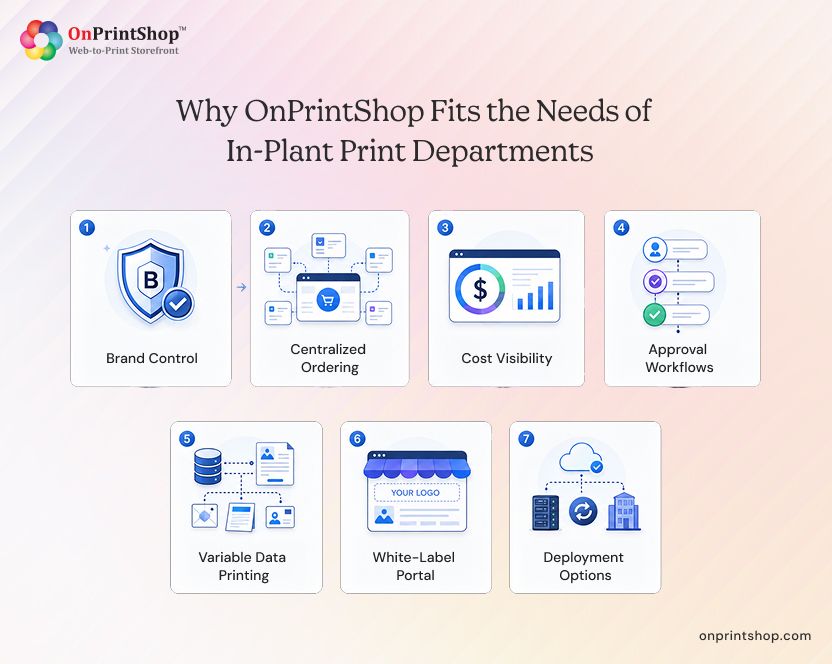
3.1 Brand Control
The problem: When distributed teams across campuses or regional offices create print materials independently, brand consistency collapses. Outdated logos, wrong color codes, and unapproved layouts become the norm.
The solution: Setting up in-plant printing software with OnPrintShop allows administrators to build locked templates where brand elements are fixed. Fonts, logos, color schemes, and layout structures stay protected. Editable fields are defined explicitly, so users can personalize content like names, dates, or department labels without touching anything that shouldn't change.
Real-world example: A university managing 45 active print templates, from event banners to ID cards, locks all brand elements centrally. Faculty and student departments can only edit the fields marked as open. Brand governance becomes automatic, not manual.
3.2 Centralized Ordering
The problem: Print requests arrive through email, WhatsApp messages, phone calls, and walk-ins. There's no audit trail, no status visibility, and no way to track what was ordered, when, or by whom.
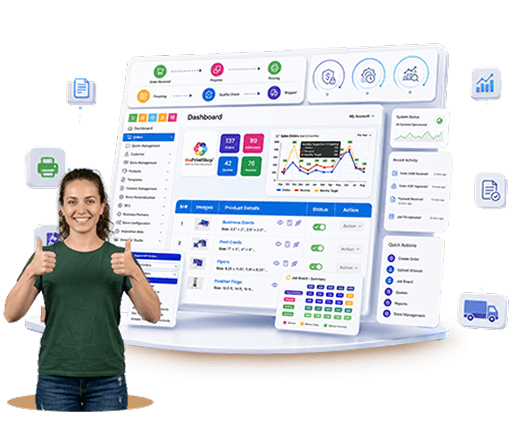
The solution: OnPrintShop replaces scattered communication with a self-service ordering portal. Department-specific catalogs show only the print products relevant to each team. Users place orders directly, track status in real time, and access their full order history through a centralized dashboard.
Administrators gain complete visibility into what's in queue, what's in production, and what's been fulfilled, without chasing anyone for updates.
Real-world example: A government ministry receiving 200-plus weekly print requests from 30 departments moves all requests into a single portal. Staff submit jobs online, managers track status without calling the print room, and the in-plant team processes jobs in a structured queue instead of a pile of emails.
For teams evaluating structured ordering systems, it helps to understand what a print order management system actually does and how to make the most out of it.
3.3 Cost Visibility
The problem: At the end of every month, finance teams ask the print department for a department-by-department cost breakdown. Without any tracking in the system, that report takes hours to produce, often from spreadsheets filled with guesses.
The solution: OnPrintShop assigns every order to a cost center at the point of submission. Budget thresholds trigger alerts before departments overspend. GL codes can be mapped to orders for ERP export. Department-level allocation reports are generated automatically.
Finance teams get the data they need without chasing the print room. Department heads can monitor spend in real time.
Real-world example: A corporate organization with 12 regional offices assigns each office its own cost center. Monthly print spend is tracked per location, exported to the ERP system, and reconciled in hours rather than days.
Accurate cost allocation is foundational to operational efficiency. The importance of cost estimation for print service providers applies just as directly to internal print departments managing budget accountability.
3.4 Approval Workflows
The problem: High-value or compliance-sensitive print jobs need sign-off from managers or legal teams before going to press. Without a structured workflow, those approvals happen informally, inconsistently, or not at all.
The solution: OnPrintShop supports configurable approval chains at multiple levels. Low-value routine orders can be set to auto-approve. Orders above a threshold or in specific categories route to the appropriate manager. Mobile-friendly approval interfaces mean approvers don't need to be at their desks. Every decision is logged with timestamps, creating a full audit trail.
Real-world example: A corporate in-plant sets up a three-tier approval structure. Standard stationery orders auto-approve. Marketing materials require department head sign-off. Externally distributed materials require an additional compliance review. Each tier is configured without custom development.
3.5 Variable Data Printing
The problem: Printing 2,000 personalized certificates or employee ID cards manually, one at a time, is not a viable process. Errors in names, ID numbers, or dates create costly reprints and delays.
The solution: OnPrintShop supports bulk CSV uploads for variable data jobs. Users upload a spreadsheet, map columns to template fields, and preview individual records before committing to print. Validation catches errors in the data before the job reaches production.
Real-world example: A university generates 2,000 graduation certificates by uploading a single CSV file. Each certificate is personalized with the graduate's name, degree, and date. Previews confirm accuracy before the job runs. What used to take days of manual production takes a few hours.
Understanding the nuances of variable data printing challenges is necessary in-plant teams plan for these workflows properly.
3.6 White-Label Portal
The problem: Generic software interfaces look generic. Internal users expect a tool that feels like it belongs to their institution, not a vendor's product.
The solution: OnPrintShop supports full white-labeling of the ordering portal. Custom domains, institutional branding, and color schemes make the platform feel like an in-house tool. SSO and LDAP integration mean users log in with their existing institutional credentials, eliminating separate password management.
A properly branded web-to-print storefront reduces adoption friction and builds internal trust in the system.
3.7 Deployment Options
The problem: Some organizations, particularly in government or regulated industries, cannot place sensitive print data on third-party cloud infrastructure. Procurement policies or data sovereignty rules may require local hosting.
The solution: OnPrintShop offers cloud SaaS deployment for organizations that prefer managed infrastructure, as well as on-premise and hybrid deployment options for those with stricter requirements. Government agencies, defense contractors, and healthcare organizations with data residency requirements can deploy within their own environment.
For teams that need a custom web-to-print solution with specific infrastructure requirements, deployment flexibility is built into the platform rather than treated as an exception.
Who Uses OnPrintShop for In-Plant Printing?
In-plant print facilities exist across nearly every large organization, but the day-to-day challenges vary by sector. Here's how different types of organizations are using OnPrintShop to bring structure and control to their internal print operations.
Corporate Businesses
Regional offices, HR teams, and marketing departments use OnPrintShop to order branded collateral, business cards, and internal communications materials. Cost center billing and multi-level approvals handle the governance complexity that corporate environments require. Web-to-print solutions for corporate print orders are increasingly standard for large organizations managing internal print at scale.
Educational Institutes
Universities and school districts use the platform for everything from enrollment brochures to event signage to graduation certificates. Variable data printing handles bulk personalized jobs. Brand-locked templates ensure consistency across departments and campuses.
Government Bodies
Ministries, local councils, and public agencies use OnPrintShop for internal forms, signage, and communications. On-premise deployment and SSO integration address data security and procurement requirements. Approval workflows support the sign-off chains that public sector operations require.
Healthcare Organizations
Hospitals and health systems print a high volume of compliance-sensitive materials: patient forms, wayfinding signage, internal communications. Approval workflows with audit logs support regulatory accountability. White-label portals present a professional, institutional interface to clinical and administrative staff.
Manufacturing Plants
Facilities teams and operations departments use in-plant print portals for safety signage, labels, and internal documentation. Centralized ordering replaces informal requests. Budget tracking keeps print spend visible across plant locations.
Feature Comparison Table
The table below maps the capabilities that matter most to in-plant print departments against what OnPrintShop delivers. Use it to assess fit against your current operational gaps or an existing vendor shortlist.
How to Get Started with OnPrintShop In-plant Printing Software
Most in-plant teams can be operational within two to four weeks. There is no requirement to replace existing print production infrastructure. OnPrintShop integrates with current workflows rather than displacing them.
The typical onboarding process:
1. Discovery call: Map existing workflows, identify pain points, and define department structure.
2. Workflow mapping: Define approval chains, cost center structure, and user roles.
3. Template preparation: Upload and configure existing brand templates with locked and editable fields.
4. SSO preparation: Coordinate with your IT team for identity management integration.
5. Deployment: Cloud setup is typically completed within days; on-premise timelines depend on infrastructure readiness.
6. Training and go-live: Admin training followed by a phased rollout to departments.
What You Need to Bring:
- Existing brand templates or print-ready design files
- Department and cost center list with budget thresholds
- Approval hierarchy documentation
- IT contact for SSO/LDAP configuration
- List of product types and typical order volumes

ConclusionMost in-plant print departments are running on workarounds: shared inboxes, manual spreadsheets, and informal approval conversations. The operational cost of those workarounds compounds over time in lost hours, budget errors, and brand failures.OnPrintShop is purpose-built AI-powered Web-to-print solution for the realities of in-plant print management. It handles multiple internal customers across departments without confusion. It enforces brand governance at the template level. It tracks billing by cost center with no manual reconciliation. It creates audit visibility across every order, approval, and budget allocation.For organizations evaluating a dedicated in-plant print management platform, the operational case is straightforward. The tools are purpose-built. The deployment is fast. The administrative overhead drops immediately. Schedule a demo to see how OnPrintShop works for your specific in-plant environment.