



Blog Summary: Managing print requests through email, spreadsheets, and walk-ins creates real operational pain, missed approvals, brand inconsistencies, and zero spend visibility. This guide walks you through exactly how to set up an internal print ordering portal for corporate, university, or government in-plant teams. Keep reading to build a smarter, more controlled print workflow.
Most internal print rooms are buried in operational chaos. Requests arrive by email, phone, and walk-in. Approvals stall in inboxes. Rebranded templates go out unchecked. Finance can't see who's spending what.
An internal print ordering portal solves this by centralizing every request, template, approval, and cost record in one place. It replaces manual handoffs with a structured, self-service workflow, one that works for corporate in-plants, university reprographics teams, and government print departments alike.
If your team is dealing with rising shadow print spend, brand compliance issues, or approval bottlenecks, a centralized, automated print workflow is no longer a nice-to-have. In fact, according to recent data, 66% of in-plant printing facilities are now actively pursuing workflow or equipment automation features, with 55% citing "improving productivity" as their primary driver.
The good news is that setting one up is far more straightforward than it used to be, especially with purpose-built in-plant printing solutions available today.
What Is an Internal Print Ordering Portal?
An internal print ordering portal is a private, branded web storefront used exclusively by employees, departments, or internal stakeholders to submit, approve, and track print requests. Unlike a commercial print shop's customer-facing site, an in-plant portal is designed specifically for internal workflows.
To understand the broader technology behind these portals, it helps to first explore what web to print is and how it works, the underlying framework that powers most modern in-plant solutions.
Core components of an internal print ordering portal:
- Branded internal storefront: A private portal that reflects your organization's identity, accessible only to authorized users.
- Brand-locked templates: Pre-approved designs that staff can personalize within defined limits, preventing off-brand output
- Role-based access: Different users (admin, manager, staff, finance) see only what's relevant to them
- Online proofing and approvals: Digital sign-off workflows that replace email chains
- Order tracking: Real-time visibility into job status from submission to delivery
- Cost center billing: Print spend allocated directly to departments or GL codes
- Reporting and analytics: Usage data, spend summaries, and volume trends by department
- Variable data support: Personalized output for ID cards, certificates, letters, and more
The key distinction from a commercial print shop is purpose. A commercial platform is built to serve external customers. An in-plant portal is built to serve your own organization, with tighter access controls, internal billing, and compliance requirements baked in.
Who Needs an In-Plant Print Ordering Portal?
Not every organization faces the same print challenges. Corporate offices, universities, and government departments each manage internal printing differently, which means their portal requirements, approval workflows, and access controls also vary significantly.
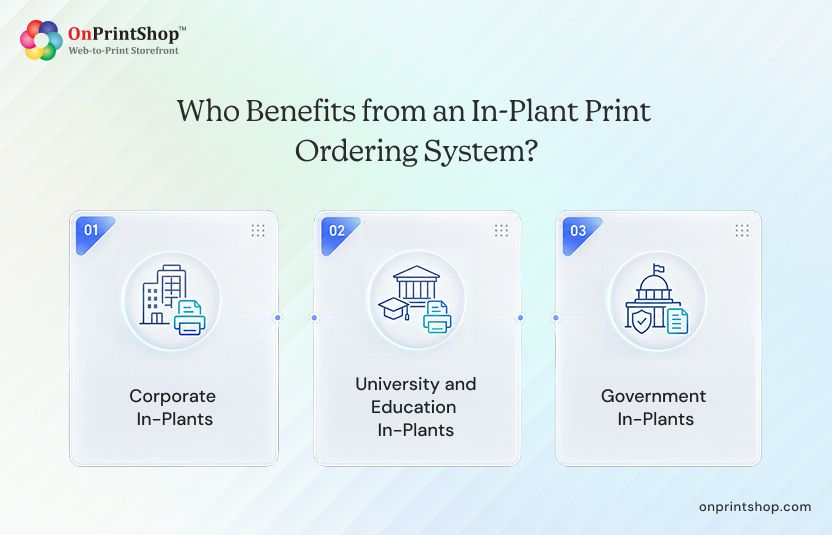
Corporate In-Plants
Multi-branch organizations face a specific problem: each office tends to develop its own print habits. Marketing materials get recreated from scratch, brand guidelines get ignored, and print spend happens outside any central oversight.
A corporate internal print portal addresses all of this directly. Branches submit requests through a single system. Templates are locked to brand standards. Every order is tied to a purchase order or department budget. Approval workflows ensure that high-value or brand-sensitive jobs get reviewed before they go to print.
Maximizing corporate orders with Web2Print results in less shadow spend, faster turnaround, and full visibility into what's being printed, where, and by whom.
University and Education In-Plants
Central reprographics departments in universities handle an enormous and unpredictable range of work. Exam season creates volume spikes. Departments need certificates, forms, event banners, and course materials, often urgently and simultaneously.
A print management portal built for education handles this without breaking down. It supports:
- Differentiated permissions for students, staff, and academic departments
- Semester-based budget allocation so departments can't overspend
- Certificate and ID card printing with personalization built into the template
- Exam paper workflows with restricted access and approval gates
For universities printing hundreds of personalized items, understanding the practical differences in variable data printing versus traditional printing helps clarify which jobs are best suited for automation.
Government In-Plants
Government print departments operate under different pressures than corporate or education environments. Compliance, security, and auditability aren't optional, they're mandated.
A government-grade in-plant portal needs to support:
- Full audit trails for every order, approval, and reprint
- Restricted user access by department, clearance level, or job function
- On-premise deployment options for sensitive environments where cloud hosting isn't permitted
- Compliance documentation tied to each print job
These requirements rule out most off-the-shelf print tools. Purpose-built in-plant platforms, however, are designed with exactly these constraints in mind.

Step-by-Step Internal Print Ordering Portal Setup
Setting up an internal print ordering portal isn't a one-afternoon project like implementing a web-to-print, but it's not a multi-year IT initiative either. With a structured approach, most organizations can go from audit to live rollout in six to twelve weeks.
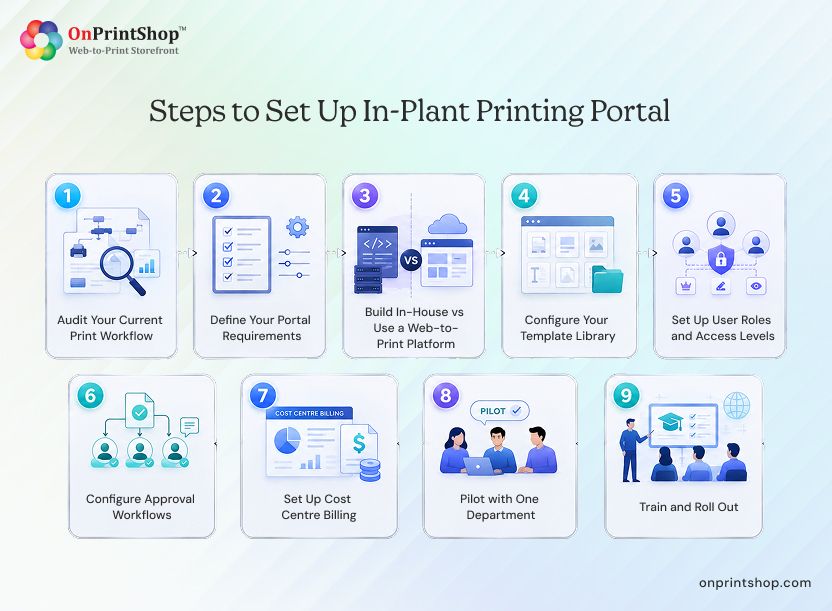
Here's how to do it step by step.
Step 1: Audit Your Current Print Workflow
Before you configure anything, document what's actually happening today. Most organizations discover that print requests arrive through multiple uncontrolled channels:
- Email (the most common, and the least trackable)
- Walk-ins to the print room
- Phone requests logged manually or not at all
Map out which departments generate the highest print volume. Identify where billing bottlenecks occur, jobs with no cost center assigned, or invoices that can't be matched to a requester. Find the approval gaps: jobs that go straight to production without any review.
This audit becomes the foundation for every configuration decision that follows, and a comprehensive print order management system can help you understand what a well-structured workflow looks like before you start mapping your own.
Step 2: Define Your Portal Requirements
With the audit complete, translate your findings into a requirements list. Key decisions at this stage include:
- Department count: how many teams will access the portal
- Approval levels: single-level, multi-level, or conditional based on budget thresholds
- Cost center billing: how departments are coded and how budgets are tracked
- Variable data printing: whether personalized output (IDs, certificates, letters) is needed
- Mobile access: whether staff need to submit requests from phones or tablets
- Cloud vs on-premise: driven by your IT and compliance requirements
- SSO/LDAP integration: so users log in with their existing credentials
- ERP integration: for organizations that need print billing to flow into finance systems
This is also the stage to assess how much automation your workflows need. Transforming your business with print workflow automation can eliminate most manual handoffs, routing jobs, triggering approvals, and updating order status without human intervention. Increasingly, AI-driven automation is making this even more capable: intelligent platforms can now predict demand, flag compliance issues, and optimize job scheduling automatically.

Step 3: Build In-House vs Use a Web-to-Print Platform
This is the decision most organizations wrestle with longest. Building a custom internal portal sounds appealing, until the real costs become clear.
For most in-plant teams, a purpose-built platform is the faster, lower-risk path. If you need a tailored solution that fits specific organizational constraints, a custom web to print solution can bridge the gap between out-of-the-box platforms and fully bespoke builds.
Step 4: Configure Your Template Library
Your template library is what makes the portal useful on day one. Build it out with the print items your departments use most:
- Business cards
- Certificates and diplomas
- ID cards
- Letterheads
- Standard forms
- Event banners and signage
Brand-lock every template so staff can only edit approved fields, names, dates, department labels, while keeping logos, colors, and layouts fixed. Assign templates to specific departments so the marketing team doesn't see finance forms, and students don't access staff certificate templates.
Variable data templates require particular attention. Common variable data printing challenges around data formatting, field mapping, and proof review are worth addressing in your template setup before you go live.
Step 5: Set Up User Roles and Access Levels
A well-configured portal has at least four user types:
- Print admin: full access to all jobs, templates, users, and reporting
- Department manager: can approve jobs within their department and view department spend
- Staff/student users: can browse their assigned templates and submit orders
- Finance users: read-only access to billing reports and cost center data
Multi-department print access control means a user in HR sees HR templates, HR budget data, and HR order history, nothing else. This separation reduces errors, prevents unauthorized orders, and makes reporting far cleaner.
Step 6: Configure Approval Workflows
Not every print job needs human review, and over-approving creates the same bottlenecks you're trying to eliminate. Configure approval logic based on real criteria:
- Auto-approval for standard, low-cost jobs submitted from locked templates
- Single-level approval for jobs above a defined budget threshold
- Multi-level approval for sensitive materials, high-volume runs, or custom designs
- Budget-triggered escalation when a request would exceed a department's remaining allocation
Online proofing tools let approvers review a digital proof before sign-off, reducing the back-and-forth that slows production. Structured print production and workflow management depends on getting these rules right at the configuration stage.
Step 7: Set Up Cost Centre Billing
Cost center billing is where an internal portal delivers some of its clearest operational value. Configure it to:
- Map every department to its GL code
- Set budget limits per cost center per period
- Trigger alerts when a department reaches 80% of its allocation
- Generate monthly or quarterly spend reports by department
- Give department managers real-time visibility into their own print spend
This replaces the end-of-month scramble to reconcile print invoices with the departments that generated them. Also, to turn billing from a reactive cleanup task into a proactive control mechanism, a properly configured print order management system is a fundamental necessity.
Step 8: Pilot with One Department
Resist the temptation to roll out to everyone at once. Choose one department that generates regular, predictable print volume, facilities, HR, or a single academic faculty are good candidates.
Run the pilot for two to four weeks. Gather structured feedback on:
- Ease of finding the right template
- Clarity of the approval process
- Accuracy of cost centre assignment
- Any jobs that fell outside the configured workflow
Use the feedback to adjust before the full rollout. Issues that are minor annoyances for one department become serious friction points when multiplied across thirty.
Step 9: Train and Roll Out
Training for a well-designed portal should take under an hour per user. Focus on:
- A short onboarding walkthrough (video or live session, under 20 minutes)
- Quick reference guides for the most common tasks (submit a job, check order status, request a new template)
- Designated portal champions in each department who can answer peer questions
- A clear escalation path for anything outside the standard workflow
Adoption accelerates when people see that the portal is faster than the old email process. Make that comparison explicit in your rollout communication.
Common Internal Print Portal Setup Mistakes That Create Workflow Problems
Even well-planned in-plant print ordering portal projects can fail if critical workflow and user experience details are overlooked early in the setup process. Identifying these common mistakes before rollout helps organizations avoid adoption issues, approval delays, and unnecessary print management complexity.
- Skipping the workflow audit: configuring a portal based on assumptions leads to a system that doesn't match how people actually work
- Overcomplicated approvals: too many approval levels create bottlenecks that push users back to email
- Unlocked templates: giving users too much editing freedom defeats the brand control purpose of the portal
- Ignoring mobile access: staff in facilities, events, and field roles often need to submit requests from their phones
- No reporting setup: a portal without reporting is a black box; usage data is how you justify the investment and identify inefficiencies
- No peak-season planning: university exam periods, government fiscal year-end, and corporate Q4 all create print volume spikes; configure your portal to handle them before they arrive

What to Look For in an In-Plant Print Ordering Platform
Use this checklist when evaluating platforms:
- Built for in-plant workflows, not adapted from commercial print tools
- Multi-department billing with GL code support
- Brand template lock with configurable editable fields
- Flexible approval workflows (auto, single, multi-level)
- Variable data printing for personalized output
- Reporting and analytics by department, user, and job type
- White-labeling for internal branding
- On-premise deployment option for security-sensitive environments
- SSO and LDAP integration
- ERP integration for finance system connectivity
ConclusionMost in-plant teams struggle with inconsistent approvals, disconnected ordering methods, and limited visibility into departmental print spending. A structured portal solves that by centralizing requests, enforcing brand control, and simplifying approvals across corporate, university, and government environments.The setup process is straightforward: audit workflows, define requirements, configure templates and permissions, then roll out gradually. With the right AI-powered Web-to-Print solution, teams can reduce manual effort and improve operational control without disrupting existing processes.If you want to streamline internal print operations and evaluate the right platform for your organization, book a demo with OnPrintShop today.