


Blog Summary: Most print professionals use the terms large format, wide format, and grand format every day, yet there's surprisingly little agreement on what each one actually means. Read on to learn the distinctions and how they can improve your print workflow.
A customer calls asking for a "large format" print. Your sales rep quotes it as wide format. Your production team prepares the file as if it's grand format. Nobody's technically wrong, but the mismatch costs time, and sometimes money, before the job even starts.
As demand for large format printing continues to rise, getting the terminology right matters more than ever. The large format printing market stood at USD 12.68 billion in 2025 and is forecast to reach USD 16.02 billion by 2030, growing at a CAGR of 4.78%, highlighting the growing demand for signage, graphics, and display applications.
This guide explains what large format, wide format, and grand format actually mean, how they differ, and how an advanced large format printing software platform can help standardize sizing, pricing, and file specifications for every order.
Large Format Is an Umbrella, Not a Specification
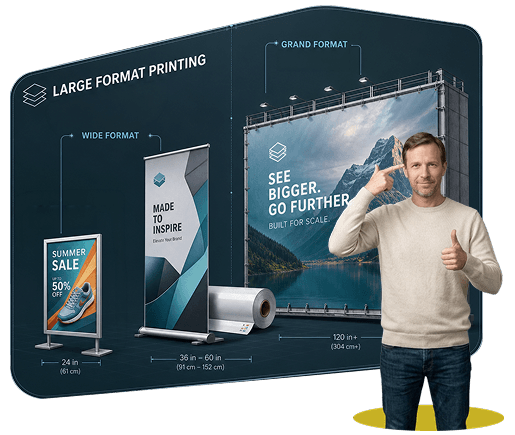
Large format printing refers to any print output wider than what a standard desktop or offset press can produce, typically anything above 17 to 18 inches. It isn't a specific size. It's a category that covers two distinct sub-types: wide format and grand format.
For your shop, this distinction matters more than it might seem. "We do large format" tells a customer almost nothing about what you can actually produce. Being specific about whether you handle wide format, grand format, or both is what sets accurate customer expectations and keeps your sales team from over-promising on jobs your equipment can't handle.
Wide Format Printing: What It Is and What It Takes to Offer It
Wide format printing refers to prints ranging from about 18 inches to 100 inches (roughly 45 cm to 2.5 meters) wide. It's the segment most sign shops and commercial printers already serve, and it covers the bulk of day-to-day walk-in and online order volume.
Common Wide Format Jobs Your Customers Will Request
- Retail banners, POS displays, and window graphics
- Trade show backdrops, pull-up banners, and exhibition panels
- Indoor wall graphics, fabric displays, and canvas prints
- Vehicle wraps and smaller outdoor signage installations
What Your Shop Needs to Deliver Wide Format Reliably
- Customers should be told to submit files at 150 to 300 DPI at final print size. Flagging low-resolution uploads before production saves reprints.
- Core materials to stock: vinyl, fabric, mesh, and self-adhesive film.
- Turnaround expectations to set with customers: 1 to 5 days is standard for most wide format work.
Since wide format makes up most of the large format demand your customers bring in, this is the segment where a self-serve ordering flow pays off fastest. Next-gen order management software for wide-format printing that handles custom sizing, material selection, and automated DPI checks reduces the back-and-forth your CSR team currently handles manually.
Grand Format Printing: What It Is and Whether You Should Offer It
Grand format printing refers to prints 100 inches (2.5 meters) wide and above. This is specialist territory. Not every shop offers it, and deciding whether to build this capability in-house or refer it out is a real business decision, not just a terminology one.
Common Grand Format Jobs
- Billboards and roadside hoardings
- Building wraps, scaffolding graphics, and wallscapes
- Stadium banners and large event backdrops
- Architectural murals and large-scale retail installations
What Offering Grand Format Actually Requires
- Equipment capable of handling rolls or panels beyond 100 inches, which is a significant capital investment beyond standard wide format printers.
- Files are typically accepted at 72 to 100 DPI, since these prints are viewed from a much greater distance than wide format work.
- Jobs are often printed in sections (tiling) and assembled on-site, which means your team needs installation capability or a reliable installation partner.
- Lead times run 1 to 3+ weeks, longer than wide format, so your quoting and scheduling systems need to account for that difference.
- Materials lean toward heavy-duty vinyl, wind-permeable mesh, or UV-resistant canvas, which carry different sourcing and storage needs than standard wide format stock.
If grand format volume is inconsistent, many shops choose to position themselves as a wide format specialist and partner with a grand format provider for overflow, rather than carrying the equipment cost year-round.

Side-by-Side Comparison: Positioning Your Shop by Format
Use this as a quick internal reference when training staff or updating your service pages.
Why the Terminology Gets Confusing (and How to Fix It Internally)
The inconsistency comes from who's using the term. Equipment manufacturers like Epson, Canon, and HP use "wide format" for machines that print up to roughly 64 inches. Industry events such as FESPA and PRINTING United use "grand format" to describe the high-end, large-scale equipment on their show floors. Customers, meanwhile, tend to use "large format" as a catch-all for anything bigger than standard print.
Your shop doesn't need to correct every customer's terminology. Your team needs to know how to use wide-format software consistently.
A Simple Fix for Internal Consistency
Train your sales and CSR staff to confirm every large format request by size and application, not by label. A quote script like "Just to confirm, that's a print 72 inches wide for an indoor trade show backdrop" removes ambiguity before the job hits production.
If you take orders online, build your product configurator around custom dimensions instead of a fixed list of preset sizes. It resolves the terminology problem before a human even has to.
Giving Customers a Self-Service Ordering Experience for Large Format
Customers increasingly expect to configure and price large format jobs themselves, without a phone call or an email quote request. Shops that offer this convert faster and free up staff time for the jobs that genuinely need a conversation.
What a Strong Self-Service Ordering Flow Should Include
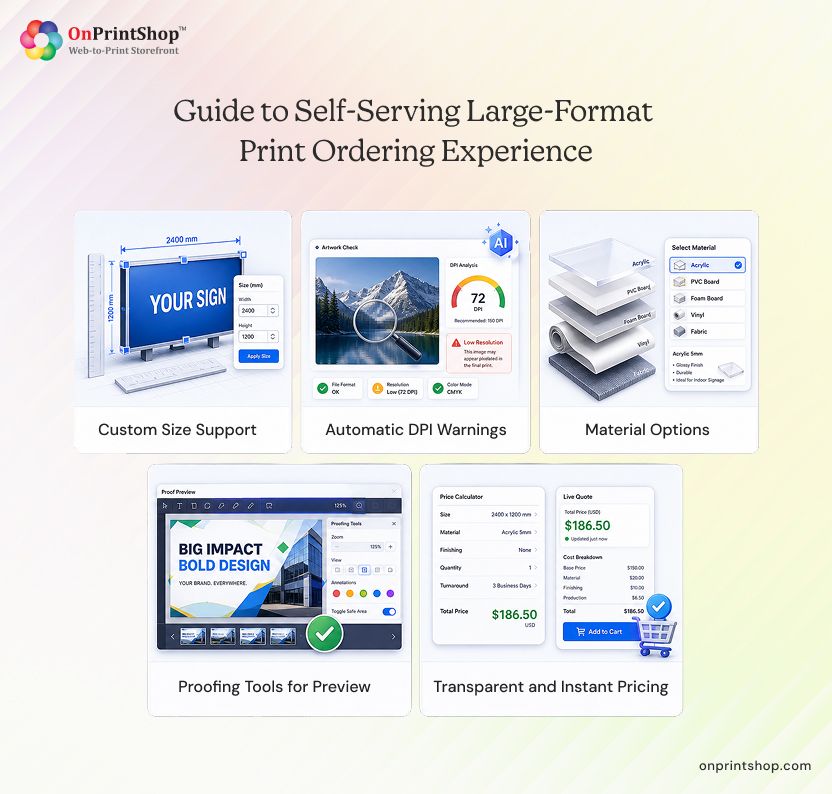
- The ability for customers to enter custom sizes instead of choosing from fixed templates only
- Automatic DPI or resolution warnings when a file is uploaded
- A material and finish selector covering vinyl, fabric, mesh, and lamination options
- Proofing tools that show customers a preview before they commit to an order
- Transparent, instant pricing based on size and quantity
Building this in-house from scratch is a heavy lift for most shops. A print storefront purpose-built for online large format ordering, rather than a general platform retrofitted for bigger sizes, gets this live faster and reduces the costly file errors that come from manual quoting.
ConclusionThe three-tier model simplifies a decision your shop faces daily. Large format is the umbrella term. Wide format covers roughly 18 to 100 inches and represents the bulk of everyday signage and display demand. Grand format covers 100 inches and above, and it's worth a hard look at whether your volume justifies the equipment or a partnership makes more sense. The practical takeaway for your team: standardize on size and application when quoting, not on label, and both your staff and your customers will move faster.Ready to standardize large-format ordering across your shop? An AI-powered web-to-print software platform lets you configure custom sizes, automate pricing, and give customers a self-service experience from one system. Schedule a demo to see how it works.