



Blog Summary: Educational institutions manage thousands of internal print requests each year across multiple departments, campuses, and schools. Learn how OnPrintShop centralizes ordering, approvals, production, and reporting to help schools and universities run efficient in-plant print operations. Read on to see exactly how it works.
Every semester, universities, colleges, and K-12 schools generate thousands of internal print requests. Admissions packets, exam materials, graduation programs, athletics schedules, wayfinding signage, and classroom handouts all flow through the in-plant printing operation. As many as 61% of teachers and 55% of students still prefer print study material over digital. When that operation runs on email threads and spreadsheets, bottlenecks are inevitable.
The advanced in-plant web-to-print platform by OnPrintShop is built to solve exactly that problem. It brings internal print ordering for schools and internal print ordering for universities into a single, structured environment: self-service ordering, brand control, configurable approvals, automated production, and cost-center reporting. For print managers evaluating how to modernize their in-plant printing operations, this guide covers what OnPrintShop does, how it maps to real education workflows, and what capabilities you should be comparing across platforms.
The Real Scale of Print Demand Inside Educational Institutions
The volume of print activity inside a mid-size university or school is routinely underestimated until someone tries to track it.
A large public university serves dozens of departments simultaneously. The admissions office needs brochures and information packs for prospective students. The registrar produces course packs, exam materials, and transcript covers. Facilities teams order wayfinding signage for new buildings and seasonal updates. The athletics department prints event programs, schedules, and promotional banners. Alumni communications require newsletters, event invitations, and giving-campaign collateral. Student unions produce flyers, posters, and event materials on short turnaround.
At the K12 school district level, the demand is equally broad. A school district with 20 schools and 15,000 students will push classroom materials, standardized test booklets, report card inserts, parent communication letters, and graduation materials through its print center every term. Each school is effectively its own ordering department, with its own deadlines, budgets, and approval requirements.
The numbers reflect the underlying preference: according to the Book Manufacturers Institute, 69% of K-12 parents prefer physical learning materials over digital. Print is not declining in education. It is evolving, and the operations infrastructure needs to keep pace.
When you add up admissions collateral, course packs, exam materials, graduation programs, wayfinding signage, athletics collateral, and alumni communications across a full academic year, the in-plant operation is running at commercial print volumes with institutional complexity layered on top.
Why Manual Processes Break Down at This Scale
Most education in-plant operations begin with good intentions and an email inbox. Over time, those inboxes become the single point of failure for the entire operation.
Email-based ordering creates ambiguity from the start. Job specifications arrive in inconsistent formats. Critical details such as paper stock, finishing requirements, quantity, and delivery location are missing or buried in threads.
Shared inbox chaos is the inevitable result. Multiple print center staff see the same requests, creating duplication. Jobs get missed during high-volume periods like semester starts, exam weeks, and graduation season. There is no single source of truth.
Missing approvals create compliance risk. When a faculty member emails a print request directly to the print center, it bypasses the department head and procurement approval that institutional policy requires. Unapproved jobs still get produced, and the spend is invisible until the end of the quarter.
Brand inconsistency compounds the problem. Without centralized templates, every department recreates its materials from scratch. Logos get stretched, brand colors drift, and official university communications arrive in inconsistent formats.
No spend visibility makes budget management reactive. Finance and procurement teams cannot see what departments are ordering, at what cost, or against which budget codes until the invoice arrives. There is no mechanism for real-time chargeback processing.
Off-contract purchasing is the downstream consequence. When the in-plant process is too slow or too complicated, departments bypass it entirely and send work to outside vendors at retail rates. The institution loses the cost benefit of in-house production.
Staff re-entering job details consumes significant time. Without a structured ordering system, every email-based request requires a staff member to manually enter job specifications into the production queue. For repeat jobs, this work is repeated from scratch every time.
These are not edge cases. They are the standard operating reality for in-plant operations running on manual processes. The cumulative cost in staff time, budget leakage, and brand risk is measurable.
How OnPrintShop Works for Education In-Plant Operations
OnPrintShop addresses each of these failure points through a connected set of capabilities built specifically for B2B and institutional print environments.
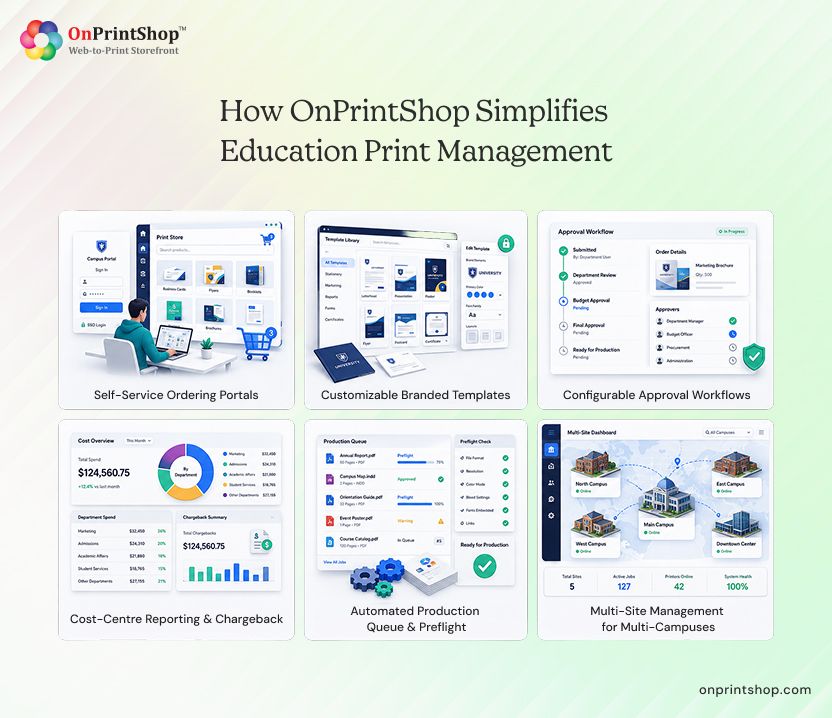
Self-Service Department Ordering Portals
OnPrintShop's next-gen B2B W2P storefront solution allows institutions to deploy department-level print ordering portals for every faculty, school, or administrative unit.
Each portal is configured independently. The biology department sees its approved products. The admissions office sees its own catalog. Facilities management accesses signage templates. Access is controlled by login credentials, so ordering is restricted to authorized staff within each department.
Portals are available 24/7. Staff place orders on their own schedule without waiting for the print center to open or a staff member to respond to an email. This eliminates the inbox bottleneck entirely and creates a structured, documented record of every request from the moment it is submitted.
For multi-campus universities, each school or campus can operate its own portal while rolling up to a centralized administration view. The features of an education print storefront like this are covered in detail in the must-have feature list of a B2B web2print storefront.

Brand-Locked Templates with Online Customization
OnPrintShop's Designer Studio allows the print center to publish pre-approved templates with locked brand elements. Logos, institutional colors, and approved fonts are locked at the template level and cannot be altered by the end user. Only designated editable fields are open for input.
This is how a university communications team can allow a faculty department to customize an event poster without ever touching a design file. The department head types in the event name, date, and location. The brand integrity is preserved automatically.
Practical applications across an education environment include:
- Event posters for student unions and departmental events
- Formal invitations for graduation ceremonies and alumni functions
- Faculty and staff handbooks and orientation guides
- Wayfinding signage with standardized visual identity
- Parent communication letters and school newsletters
The result is self-service customization within a defined brand framework. Design approval is only required when genuinely new assets are being created, not for every standard order.
Configurable Approval Workflows
OnPrintShop supports multi-level approval workflows that map to institutional approval structures without requiring custom development.
A typical university workflow might route an order from the submitting staff member to the department head for budget authorization, then to procurement for spend approval if the job exceeds a threshold, and finally to the print center for production scheduling. Each step is triggered automatically based on the rules configured during setup.
Automated routing removes the manual coordination that currently sits in email chains. Every approval action is timestamped and recorded, creating a complete audit trail for compliance and budget review purposes.
For K-12 school district admins, approval workflows can be configured at the school level or district level, allowing administration to maintain oversight while individual school coordinators manage day-to-day requests.
Cost-Centre Reporting and Chargeback
Every order placed through OnPrintShop is tagged to a department code, cost center, or budget line at the point of submission. This creates real-time spend visibility across the entire institution without any manual reconciliation.
Finance teams can pull reports by department, school, campus, time period, or product category. The data is structured and exportable, making it suitable for budget reviews, internal chargeback processing, and annual spend analysis.
Automated print cost reporting replaces the end-of-quarter scramble to reconstruct print spend from invoices and email records. The visibility exists from the moment an order is placed, not three weeks after the job is delivered.
This capability is particularly valuable for institutions operating under public procurement rules, where spend documentation and budget accountability are mandatory.
Automated Production Queue and Preflight
When an order is approved, OnPrintShop generates a job ticket automatically and routes it into the production queue. Print center staff see structured job information: specifications, quantities, delivery requirements, and any custom field inputs from the ordering department.
The automated print production workflow includes AI-powered preflight checks that validate files before they reach the press. DPI validation confirms that images meet resolution requirements for the intended output size. Color-space validation ensures that files are in the correct profile for the press configuration. Jobs that fail preflight are flagged for correction before they consume press time.
Queue management provides the print center with a real-time view of all active jobs, their status, and their scheduled completion. Staff can track job progress from submission through production to delivery. Ordering departments receive status updates without having to contact the print center directly.
That’s why an all-in-one workflow automation software solution significantly reduces the administrative load on print center staff, allowing them to focus on production rather than job coordination.
Multi-Site Management: Multi-Campus Schools and Universities
OnPrintShop supports centralized administration across multiple campuses, schools, or facilities from a single platform instance.
A school district with 25 schools can operate individual school storefronts while the print administrator maintains visibility across all of them. Budget allocation can be managed at the district level, with school-level constraints enforced automatically at the point of ordering. Consolidated reporting gives leadership a complete picture of print activity and spending across the entire system.
For multi-campus universities, the same model applies. Each campus operates independently through its own portal structure, while central administration and finance maintain oversight. Policy changes, template updates, and approval of structure adjustments can be applied centrally and rolled out across all sites simultaneously. And this is what makes OnPrintShop one of the best choice for businesses.
What OnPrintShop Enables: Use Cases by Institution Type
Universities and Colleges
Universities run some of the most varied and deadline-sensitive print operations of any institutional category.
Admissions produce high-volume, brand-critical materials on tight cycles tied to application rounds and open day events. Prospectuses, information packs, and acceptance letters need to be consistent, on-brand, and delivered on time.
Graduation is one of the highest-stakes production windows of the academic year. Programs, certificates, signage, and ceremony materials must be accurate, professionally finished, and delivered to multiple venues simultaneously.
Research publications require precise formatting, often with department-specific style requirements, across varying run lengths.
Athletics departments produce event programs, promotional banners, media guides, and fan materials on short turnaround cycles that track with the competition calendar.
Student unions operate like internal marketing agencies, producing event collateral, society materials, and campaign assets year-round.
Facilities teams manage wayfinding signage, safety notices, building directories, and seasonal signage that require consistent visual standards and periodic updates.
OnPrintShop connects all of these departments to a single in-plant operation through individual portals, without requiring the print center to manage a separate communication channel for each one.

K-12 School District
K-12 school districts operate under tighter budget constraints and require stronger centralized governance than most higher education environments.
District storefronts allow each school district to order from a centralized catalog of approved materials, ensuring that district-wide communications arrive in a consistent format regardless of which school produces them.
Budget controls enforced at the storefront level prevent individual schools from overspending their allocated print budgets. Orders that exceed budget thresholds are automatically routed to district administration for approval rather than being processed automatically.
Parent communications need to be brand-consistent and professionally produced. With locked templates, school district administrative staff can personalize letters and newsletters without introducing design errors.
Classroom materials and curriculum supplements are ordered by teachers through individual school portals, with delivery tracked back to the originating classroom or grade level.
Exam materials require strict handling, accurate quantities, and controlled delivery. Structured ordering and approval workflows reduce the risk of errors in high-stakes print runs.
School event materials for sports days, performances, and community events can be ordered through the same system, with consistent brand presentation and clear audit trails for spend tracking.
Educational institutions across the US, UK, and globally are adopting centralized print ordering systems to improve efficiency, governance, and budget accountability.

What to Look for in Internal Print Management Software for Schools and Universities
When evaluating internal print management software for schools and universities, institutions should prioritize the following capabilities:
- Department-level self-service ordering portals: Each department, school, or faculty unit should be able to place orders independently through a dedicated customized W2P storefront with its own product catalog and access controls, without routing requests through a central email inbox.
- Brand-locked Templates: Templates should allow authorized users to customize designated fields while locking institutional logos, colors, and fonts. This prevents brand inconsistency without requiring design approval on every standard order.
- Configurable Approval Workflows: The platform should support multi-level approvals mapped to institutional hierarchy, including department head, procurement, and finance sign-off at configurable spend thresholds.
- Cost-center Tagging and Reporting: Every order should be automatically tagged to a budget code or cost center at the point of submission, enabling real-time spend visibility across all departments and schools.
- Automated Chargeback Processing: The platform should generate chargeback data automatically based on order history, eliminating manual reconciliation, and enabling accurate internal billing between the print center and ordering departments.
- Automated Preflight Checks: Files should be validated for DPI, color space, bleed, and other press-ready requirements before entering the production queue, reducing press time lost to rework.
- Production Queue Automation: Job tickets should be generated automatically from approved orders and routed into the production queue with all required specifications, removing the need for manual data entry by print center staff.
- Multi-site Administration: The platform should support centralized governance across multiple campuses or schools, with consolidated reporting available to school district or university administration.
- Scalability During Peak Periods: The system should handle peak demand during semester starts, exam periods, and graduation without degradation of performance or ordering capability.
- Complete Audit Trails: Every order, approval action, and status change should be logged with timestamps and user attribution, supporting compliance reporting and budget accountability.
Why institutions choose OnPrintShop consistently comes down to the combination of these ten capabilities in a single integrated platform, without requiring separate systems for ordering, approval, production, and reporting.
ConclusionA modern education print center needs more than email chains and spreadsheets. As a leading AI-powered web-to-print software, OnPrintShop helps schools and universities centralize print ordering, enforce brand standards, automate approvals, and streamline production from a single platform.By giving departments a self-service ordering experience and providing administrators with greater visibility and control, institutions can reduce manual work, improve turnaround times, and manage print spend more effectively. Your print center should be producing, not processing emails. Book a demo with OnPrintShop today to see how it can transform your institution's print operations.