


Blog Summary: Corporate stationery orders eat up hours your team could spend on higher margin work. Learn how a self-service ordering portal with locked variable data templates turns repetitive business card and letterhead requests into a hands-off, recurring revenue stream for your print shop.
Every commercial printer has at least one corporate account where employees email in business card and letterhead requests one at a time. It is steady work, but it rarely scales, and margins shrink each time a designer has to touch a routine reorder. An advanced in-plant corporate stationery ordering portal changes that math. Instead of manual requests, employees log into a branded storefront, select a pre-approved template, and generate print-ready files themselves.
Corporate demand already accounts for the majority of stationery spending, and digital procurement adoption continues to climb. For print shops that have looked at OnPrintShop's dedicated in-plant printing solution, this portal model will feel familiar. It delivers the same centralized, role-based control an internal print department relies on, just packaged as a service you sell.
This guide walks through how to build one, step by step.
What a Corporate Stationery Ordering Portal Actually Does
A corporate stationery ordering portal is a private, branded storefront where a company's employees order personalized business cards, letterheads, and envelopes using templates the corporate client has already approved. It replaces email-based reorder requests with a self-service system the print shop manages behind the scenes.
Think about how a typical stationery account runs today. An employee emails a request. Someone on your team locates the old file, checks whether the title or phone number changed, adjusts the layout, and sends a proof. Multiply that by every new hire, promotion, and office move across a mid-sized company, and you have a steady drip of low-margin, high-friction work that never quite disappears.
A portal removes the manual steps from that cycle. The corporate client gets a login-protected site with their logo, their approved templates, and their own product catalog. Employees choose what they need, fill in a few personal fields, and place an order.
Why This Model Fits the In-Plant Framework
Setting up an in-plant print solution for corporates gives the organization more control over their print expenses. They give staff a job submission portal, route requests through approval, and track spend by department. This allows the corporate business to gain overall control over not just the print, but the data too. They do not need to send their data to any third-party print services.
How Variable Data Templates Power Employee Self-Service
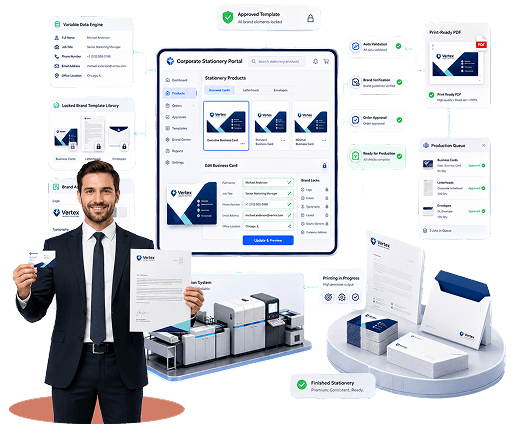
Variable data templates let one master design serve an entire organization by locking the brand elements and leaving only personal fields open for editing. An employee enters their name and title, and the system generates a print-ready file automatically, with zero design work required.
This is the mechanism that makes self-service possible in the first place. A traditional print file is static. If you want to reuse it for a different employee, someone has to open it, manually swap the text, and re-check the layout. A variable data template works differently and fixes all the variable data printing challenges at once. The logo position, color palette, typography, and card dimensions are fixed by the designer and cannot be touched by the employees. Fields like name, job title, direct line, and email address are left open, tied to a data structure the platform reads when generating the output.
With a robust variable data printing software foundation, a single business card template can produce a correctly branded card for a five-person office or a five-thousand-person enterprise. The template does not change. Only the data does.
What Stays Locked vs. What Employees Can Edit
- Locked by the designer: logo placement, brand colors, fonts, card stock and finish, layout grid, legal disclaimers
- Open to the employee: name, job title, department, direct phone number, email address, office location
This split is what protects brand consistency while still giving employees a genuine self-service experience. Nobody is designing a card from scratch, and nobody is waiting on a designer to swap three fields either.
Building the Employee Self-Service Flow: Step by Step
The employee self-service flow moves an order from login to production without a single email exchange. It typically runs through five stages: access, template selection, personalization, review, and submission to your production queue.
Setting this up correctly the first time saves you from support tickets later. Here is how the flow generally comes together on a web-to-print platform.
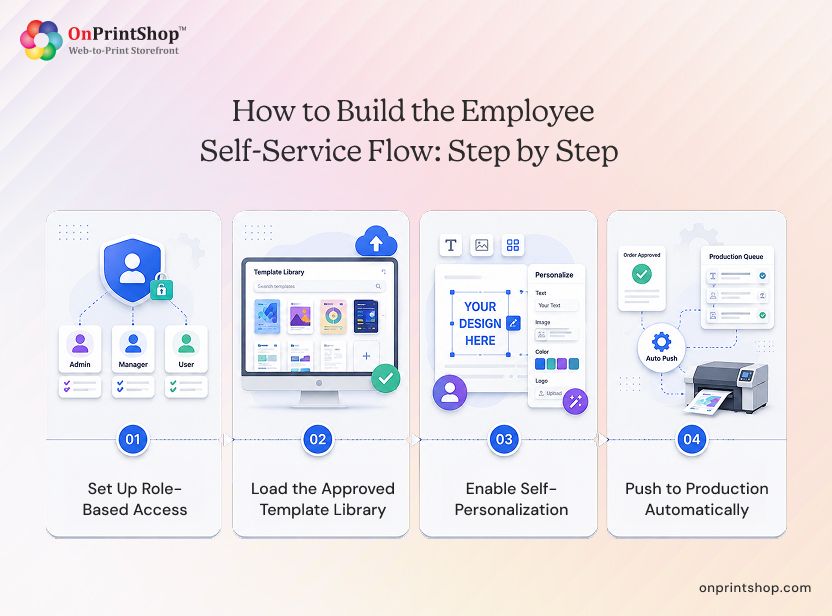
Step 1: Set Up Role-Based Access
Every employee gets a login tied to their department and permission level. A junior employee might only see business cards. A department head might see the full catalog, including letterhead and envelope orders for their team.
Step 2: Load the Approved Template Library
Your design team builds the master templates once, using an intuitive web-to-print online designer to define which fields are locked and which are open. This is the step corporate clients care about most, since it is where brand governance actually gets enforced.
Step 3: Enable Self-Personalization
The employee logs in, picks a template, and fills in their own details. A live preview shows the finished card before they commit to anything.
Step 4: Push to Production Automatically
Once approved, the order lands directly in your production queue as a print-ready file. No re-keying, no manual file prep, no back-and-forth proofing on routine reorders.
Managing Brand Consistency Across Departments and Locations
Brand consistency across a multi-location or multi-department account depends on locking design elements at the template level, not on trusting individual employees to follow a style guide. A locked template makes off-brand output structurally impossible rather than merely discouraged.
This matters more than it might seem. A regional sales office and a corporate headquarters rarely have the same instincts about spacing, color accuracy, or which logo version to use. If employees are working from old files or exported PDFs, drift happens quietly over months. Nobody notices until a client points out that two offices have different business cards.
Common Brand Drift Scenarios and How Templates Prevent Them
A dedicated in-plant printing solution built for education, healthcare, and government organizations solves this exact problem internally.
Template version control also solves the rebrand problem specifically. When a company updates its logo or color palette, the template updates once at the platform level. Every future print reflects the change automatically. Nobody has to track down and replace old files across a dozen departments.
How OnPrintShop Powers Corporate Stationery Portals for Commercial Printers
OnPrintShop gives corporate businesses the platform to build and run a private stationery portal without having to piece together separate tools for design, ordering, approvals, and reporting. The core building blocks are variable data templates, role-based storefronts, and automated workflow routing, all managed from one admin dashboard.
Locking Brand Control at the Template Level
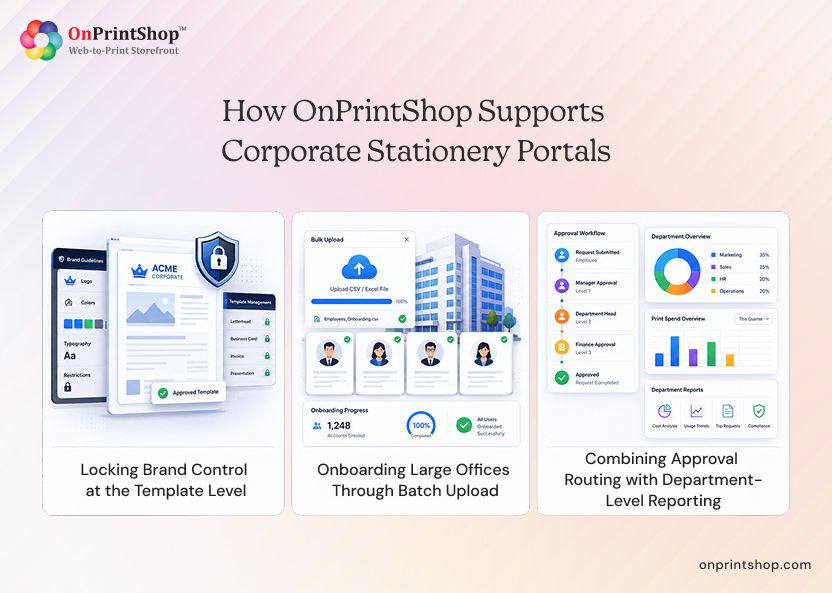
The platform's Designer Studio lets your team lock and unlock individual fields on a stationery template natively, so brand governance is enforced at the design level rather than through policy alone. Once a template is set, an employee simply cannot touch the logo, colors, or layout, regardless of how the order is placed.
Onboarding Large Offices Through Batch Upload
When a corporate client needs to onboard a large office at once, a CSV batch upload generates hundreds of personalized, print-ready files in a single admin action instead of one order at a time. This turns a task that would normally take days of manual file prep into something your team finishes in one sitting.
Combining Approval Routing with Department-Level Reporting
Built-in approval routing and department-level reporting run natively on the platform, without a third-party add-on. Combine the two, and a printer gets the same operational depth an in-plant department has internally, minus the cost of running one.
Conclusion: The In-Plant Model, Delivered by Your Print ShopWhat was once only a commercial printer can now offer is something available inside every corporate department because of the AI-powered web-to-print solution by OnPrintShop. A corporate stationery ordering portal built on variable data templates gives employees a self-service experience, gives brand managers a locked, drift-proof template system, and gives procurement teams the approval chains and spend reporting they need to sign off on the relationship.Start with your largest stationery-requiring department, move it onto a dedicated in-plant printing solution portal. Book a free live demo with OnPrintShop today and see how it can your stationery printing can be internalized.