




In my 2-decade journey in print domain I have seen this a lot. Ask any print business owner about their software and they'll praise it. Then ask them what happened when they opened their second location.
The platform that ran the first shop flawlessly suddenly starts to resist. Someone has to rebuild the catalog by hand for the new store. Pricing drifts between locations. A manager at one branch can see orders that belong to another. The logo sits a few pixels off on half the storefronts.
None of this is a bug. It is the architecture doing exactly what it was designed to do, which was to run one store well. That gap between running one store and running many is where a lot of growth stalls. And it is almost never closed by adding another feature.
The Hidden Cost of Single-Store Thinking
Most web-to-print platforms were built for a single storefront. Multi-store support arrived later, bolted onto a foundation that assumed one catalog, one price list, one set of users, one brand. On the surface, the feature checkbox gets ticked. Underneath, every new location inherits a set of compromises.
Catalogs get copied instead of inherited, so a single product change has to be repeated across every store. Permissions stay coarse, so giving someone access to their own branch often means exposing the whole network. Reporting lives in silos, so headquarters ends up exporting spreadsheets to answer a simple question about total volume. Each of these is survivable with one or two locations. At eight, or at thirty, they compound into a tax that grows with every store you add.
The worst part is that none of it is visible on day one. A single-store platform demos beautifully, onboards quickly, and runs the first shop without complaint. The cost is deferred, not avoided. It arrives later, as friction, when the business has already committed and switching is expensive.
I want to be precise here. This is not a claim that other platforms cannot scale. It is that most were not designed for this from day one, and retrofitting scale into a single-store model leaves seams. Those seams show up exactly when a business is trying to move fast.
What “Designed for Scale” Actually Means
Scaling a print business is usually described as an operations problem. Hire more people, tighten the process, open another location. I see it differently. Past a certain point it becomes an architecture problem, and it has to be solved at the level of how the product is built, not at the level of workarounds layered on top.
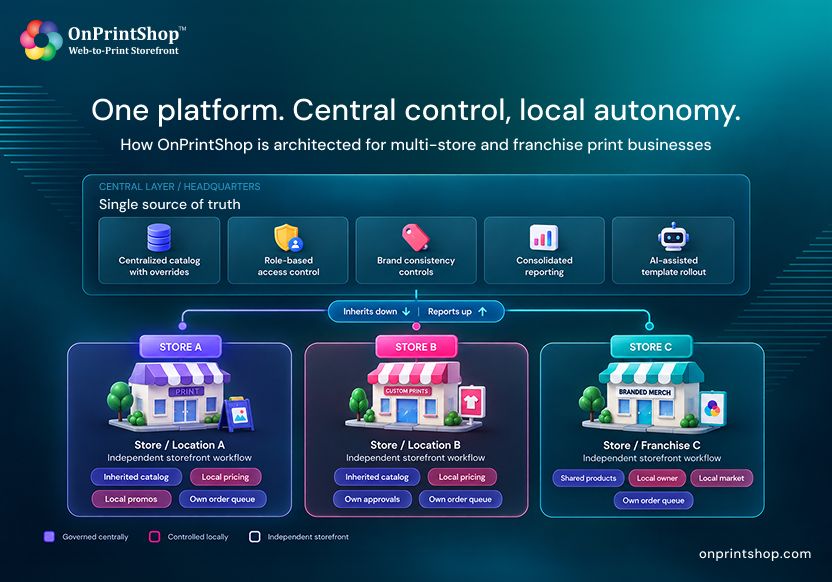
The core of that architecture is a single tension: centralized control versus local autonomy. Headquarters needs one source of truth, consistent branding, and visibility across the network. Each location needs room to price for its own market, run its own promotions, and serve its own customers without asking permission for every change. A platform designed for scale does not force a choice between the two. It holds both at once, in the data model itself.
The Architectural Pillars That Make it Work
When we designed OnPrintShop as a multi-store web-to-print platform, we built around a handful of decisions that only start to matter once a business has more than one location.
The first is a centralized catalog with store-level overrides. Products, pricing, and templates live in one place and flow down to every store. A location can override what it needs to, a regional price or a local product, without breaking the link to the parent catalog. Change something at the center and it updates everywhere it should, automatically.
The second is genuine role-based access control. Access scopes to the location, the brand, and the function. A branch manager sees their branch. A production lead sees the queue. Headquarters sees everything. Nobody sees what they should not.
The third is brand consistency by default. Templates, themes, and design rules are governed centrally, so a storefront in one city looks like it belongs to the same company as a storefront in another. This is also where AI has started to earn its place in the workflow. AI-assisted template generation lets a network roll out on-brand designs across dozens of stores in a fraction of the time it used to take, without a designer rebuilding each one by hand.
The fourth is consolidated reporting. Because orders, customers, and production data share one backbone, our print order management software can report across the whole network and drill into a single store in the same view. No exports, no stitching spreadsheets together at month end.
The fifth is independent storefront workflows. Each online print storefront can run its own ordering flow, its own approvals, and its own automation, while still reporting up to the same center. Local autonomy and central visibility stop being a contradiction.
Franchise Networks and Multi-Branch PSPs are Not the Same Problem
It is tempting to treat every multi-location business as one use case. They are not, and the difference matters when you architect for them.
A franchise network is many owners operating under one brand system. Take Fortusis, the US parent behind brands like Kwik Kopy and Franklin’s Printing, running a network of around thirty franchisees. The challenge there is governance with independence.
Corporate needs brand control and the ability to share a proven product setup outward, while each franchise owner runs their own business. On OnPrintShop, a centralized dashboard gives Fortusis oversight of every location, and product sharing lets a successful storefront be replicated to a new franchise instead of rebuilt from scratch. Their web-to-print for franchise businesses setup turned rollout into a repeatable step rather than a project, and consistent online sales growth followed.
A multi-branch PSP is usually one owner running many locations, and often several brands. Print2Go in Canada grew to eight locations and launched three distinct brands on a single platform, including a dedicated signage storefront and a banner storefront. Here the priority is central control and efficiency across branches the owner fully controls.
Centralized multi-location order management let them run all eight stores from one place and cut errors by seventy-five percent. Just as important, they did not have to compromise on how they already worked. The platform absorbed their existing workflow rather than forcing them to bend around it, which is usually what makes a new brand or location feel like a switch instead of a project.
Same architecture, different balance point. One leans toward autonomy under shared rules. The other leans toward tight central operation. A platform that only supports one of these was designed for a narrower world than the one your business actually lives in.
How to Tell if a Platform is Actually Ready for Multi-Store Growth
If you are evaluating platforms for growth, the demo will always look clean with one store. The real questions surface at the second location and the twentieth.
Ask whether the catalog inherits or copies. If adding a product means repeating the work per location, you have found a single-store model wearing a multi-store label. Ask whether permissions scope to a location and a role, or whether access is all or nothing. Ask whether reporting is consolidated natively, or whether the network view is really a stack of exports. Ask whether you can launch a new store as a configuration step, or whether each one is a fresh build. And ask what happens to branding when you are not watching, because consistency that depends on manual discipline will not survive your tenth location.
These are the questions a print shop management software guide rarely leads with, and they are the ones that decide whether growth feels like a setting you turn on or a wall you keep hitting. For franchise operators specifically, a solid guide to web-to-print for franchise businesses is worth reading before you commit, because the franchise model asks more of the permission and brand-governance layers than a single-owner network does.
Scale Should Be a Setting, Not a RebuildThe businesses that scale well are not the ones that work hardest around their software. They are the ones whose software assumed growth from the start. When the catalog inherits, when permissions respect structure, when reporting sees the whole network, and when each new location is a switch rather than a project, expansion stops being a risk and becomes a decision.Scale should be a setting you turn on, not a wall you keep hitting.That is the standard we hold ourselves to. We did not add multi-store as a feature. We built the platform so that the second store, and the fiftieth, run on the same foundation as the first. If that is the kind of growth you are planning, book a demo and bring your hardest scaling question. Those are the ones we built this for.