


Blog Summary: Every wide format job that arrives in a non-standard size still requires a manual quote at most print shops. This article walks through exactly how OnPrintShop handles custom-size ordering and per-square-meter pricing, from the customer entry point to the production queue. Keep reading to see the configuration behind it.
A customer requests a 1,400 x 3,600 mm banner. Another requests a 2.2 m x 0.8 m vinyl graphic. Each job triggers the same back-and-forth: measure, price, email, wait. Multiply that across 20 requests a day, and manual quoting becomes the single biggest constraint on your wide format operation.
The pressure to fix this is coming from the buyer side too. According to a 2024 Gartner survey, 61% of B2B buyers would rather complete a purchase without talking to a sales rep. For wide format PSPs still quoting custom sizes by hand, that means a majority of potential buyers are already expecting a self-serve price before they pick up the phone.
Custom size ordering in a wide format print storefront solves this entirely when the platform is built for it. This article covers exactly how wide format printing software from OnPrintShop handles variable-dimension products, with area-based pricing calculated live.
Why Custom-Size Ordering Is Non-Negotiable for Wide Format PSPs
Wide-format print is inherently variable. Unlike commercial print, where A4, SRA3, and standard sheet sizes define the product, wide format customers almost always need a specific dimension. A contractor ordering site hoardings, a retailer commissioning window graphics, a venue manager buying fabric displays: none of them are selecting from a fixed size menu.
When a shop cannot return an instant price for a custom width and height, two things happen. First, the customer waits, and waiting increases the chance they source elsewhere. Second, the sales or ops team spends time on a quote that could have been automated.
Wide format print buyers increasingly expect to configure, price, and order without sales contact. B2B procurement teams in particular treat online self-service as a baseline requirement, not a feature. A shop without it is harder to work with. The guide to large format printing software covers how software selection affects this operational gap in more detail.
Wide format print buyers increasingly expect to configure, price, and order without sales contact. B2B procurement teams in particular treat online self-service as a baseline requirement, not a feature. A shop without it is harder to work with. Without the right solution print businesses start losing print jobs right at the estimate stage. That is how the large format printing software selection affects the business.
Manual quoting for custom sizes also introduces pricing inconsistency. Different staff members price the same job differently. Volume discount logic is applied unevenly. Per-sqm rates drift between quotes. Automating the calculation through a configured storefront removes all of that variability.
How Custom-Size Product Configuration Works in OnPrintShop
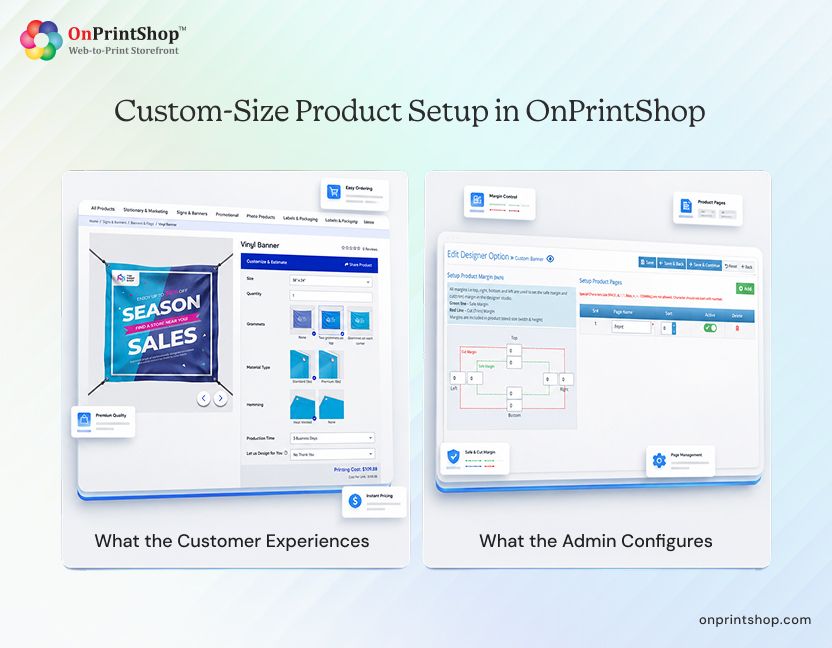
What the Customer Experiences
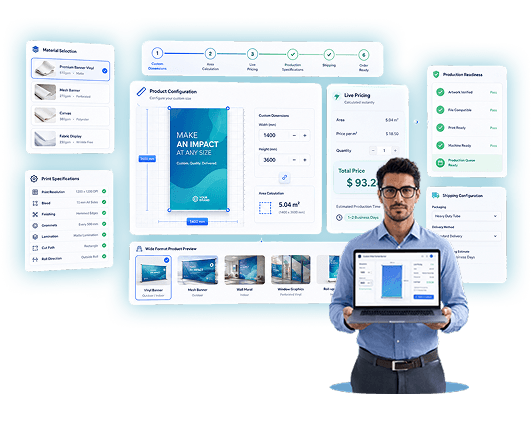
On a correctly configured OnPrintShop storefront, the ordering experience for a variable-dimension product works as follows:
The customer lands on a product page, for example PVC Banner, Mesh Banner, or Vinyl Wrap.
They enter a custom width and height directly into the dimension fields. Admin-defined minimum and maximum bounds are enforced in real time, so out-of-range entries trigger an immediate error rather than passing through to the quote stage.
The price updates live as dimensions change. There is no submit action required; the pricing engine recalculates on each input change.
If the customer is designing online, the design tool canvas adjusts automatically to match the dimensions entered. The customer designs at the exact output size.
Large artwork files can be uploaded directly. OnPrintShop supports high-resolution file uploads suited to wide format and grand format products.
The customer adds the product to cart and checks out. The completed order captures the exact width, height, material, finish, and quantity entered.
What the Admin Configures
In OnPrintShop's admin panel, setting up an online print storefront with custom dimensions follows a clear path:
- Navigate to Admin Panel, then Products, then Printing Products.
- Click Add and enter product details: name, internal title, URL, and categories.
- Set the Price Defining Method to Size Based on Price (Dynamic Size). This is the setting that enables true area-based pricing rather than a fixed size-tier lookup.
- Select the measurement unit: millimeters, centimeters, inches, or meters. The storefront displays dimensions in whichever unit is configured here. Customers can also be given a unit-selection dropdown at the front end if the admin enables that setting.
- Configure product pages, safe margins, and cut margins for the product.
- Set minimum and maximum dimension bounds under Restrict Size settings. These prevent orders arriving outside the shop's production capability.
This configuration does not require developer involvement. Every step sits within the admin panel UI.
Setting Up Per-Square-Meter Pricing in OnPrintShop
OnPrintShop calculates custom-size product prices using the exact dimensions customers enter and the pricing rules configured by the admin. The pricing model supports area-based rates, quantity tiers, material pricing, and additional options for accurate, real-time estimates.
How Area-Based Pricing Is Calculated
OnPrintShop Dynamic Size pricing uses the dimensions the customer enters to calculate the order price in real time. The core formula is straightforward:
Area = Width x Height
The system multiplies that area figure by the price-per-unit-area rate configured by the admin. A rate of £8.50 per sqm on a 2 m x 1.5 m PVC banner returns a price of £25.50 instantly. No manual quote is required at any point.
Two area lookup modes are available:
- Area only (Height x Width): The system looks up the price based on the calculated area and multiplies by quantity to return the final price.
- Area x Quantity (Height x Width x Quantity): The system uses the combined area-quantity figure as the lookup key. Useful where price per unit area decreases at larger combined volumes.
Minimum Orders and Dimension Restrictions
Shops can configure minimum dimension values to prevent unprofitable micro-jobs from reaching the production queue. A banner product might have a minimum width of 300 mm and a minimum height of 500 mm. Orders entered below those values are blocked at the storefront with an error message.
A minimum price floor can also be applied, ensuring that very small area calculations do not return a price that does not cover setup or handling costs.
Quantity-Based and Volume Pricing
The Dynamic Size pricing configuration supports quantity-based price tiers. The admin sets price ranges per size band, then adds separate quantity-based pricing for each size. When both are configured, the quantity-based price takes precedence. When no quantity-based price is set for a particular combination, the system falls back to the area-wise configured rate.
Material-Based Pricing and Additional Options
Different substrates can carry different per-sqm base rates under the same product configurator. A PVC banner and a mesh banner can be the same product with different material attributes, each priced at its own rate per square meter.
Additional options such as lamination, grommets, and hemming can each carry their own price calculation logic:
- Multiply with Area (H x W): Suitable for surface-applied finishes such as lamination.
- Multiply with Perimeter (2 x (W + H)): Suitable for edging and hemming.
- Multiply with Width: Suitable for scroll products.
- Multiply with Height: Suitable for pole banners.
- Fixed Price: Suitable for set-cost add-ons such as eyelets at a fixed count.
Vendor Pricing Sheet Calculation
For PSPs running nesting or gang run operations, the Vendor Pricing Sheet Calculation method prices based on the number of printed sheets rather than pure area. This applies where substrate utilization drives the cost model rather than the customer-facing area alone.

How OnPrintShop Handles Imposition, Shipping, and Production Specs for Custom-Size Orders
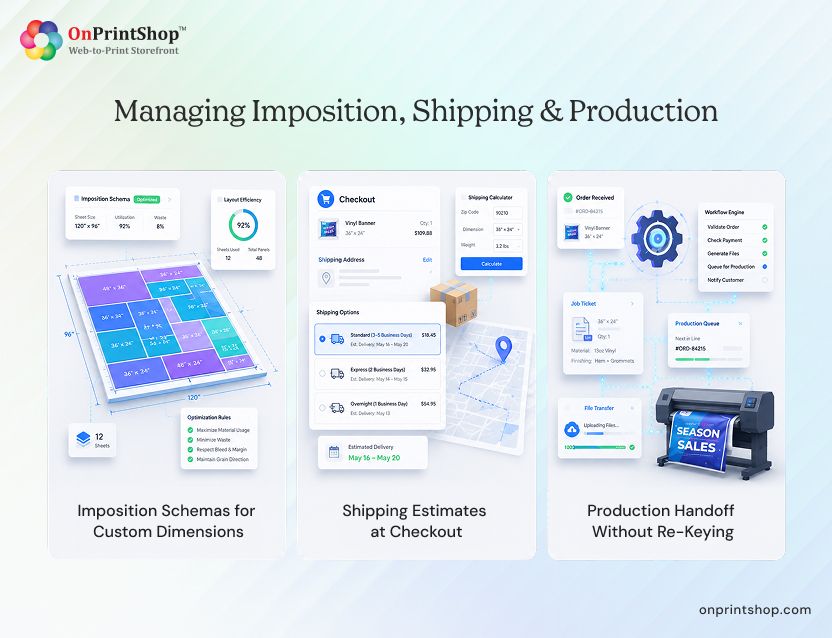
Imposition Schemas for Custom Dimensions
Custom-sized products in OnPrintShop support multiple imposition schemas assigned per product. When an order is placed, the system evaluates all schemas assigned to that product and automatically selects the most suitable one based on the customer's entered dimensions.
This automatic selection ensures efficient substrate utilization across variable sizes without the operator having to calculate or specify the layout manually for each job. Reduced waste on expensive, wide-format media has a direct impact on material cost per job.
Shipping Estimates at Checkout
The OnPrintShop shipping module integrates with the product's custom dimensions. Packaging configuration accounts for whether the product ships rolled or folded and applies the correct physical dimensions to the shipping calculation.
Customers see accurate shipping estimates at checkout based on the actual size of the product they have configured. There is no need for the admin to manually override or adjust shipping costs for non-standard sizes after the order arrives.
Production Handoff Without Re-Keying
The completed order carries the exact width, height, material specification, finishing options, and quantity through to the production queue. No one in the shop needs to transcribe dimensions from an email or re-enter specifications from a quote document.
This matters particularly for wide-format operations where custom jobs are the norm rather than the exception. Every manual re-key step is a potential source of size error on a product that may be 3 m wide.
Wide Format Products OnPrintShop Can Configure with Custom Dimensions
The Custom Size Product configuration in OnPrintShop applies across the range of products a typical wide format or large format print shop runs:
Each of these product types can be configured independently with its own dimension bounds, per-sqm rate, material options, and finishing add-ons. A single OnPrintShop storefront can carry all of them without any product type interfering with another's pricing logic.
What Self-Serve Custom Size Ordering Means for Your Wide Format Business
Once the product is live, the operational impact is straightforward:
- Every custom-size job that self-serves through the storefront is a manual quote the team did not have to write.
- Customers get an instant price at any time, including outside business hours, with no wait for a response.
- Pricing is consistent. The configured rate applies to every order placed, with no variation between staff members or shifts.
- Repeat orders are frictionless. A returning customer enters their dimensions, confirms the price, and checks out without contacting the shop.
- B2B clients, agencies, contractors, and retail chains can be given private storefronts through the dedicated B2B print storefront capability with pre-agreed per-sqm rates loaded at the account level. Touch time per order drops to near zero for established accounts.
The result is not just faster quoting. It is a shop that can take on higher order volumes without proportionally increasing the admin burden. Print shop automation at the storefront level is where that capacity expansion begins.

ConclusionThe custom-size product configuration by the leading AI-powered web-to-print solution, OnPrintShop, gives wide format PSPs a complete path from storefront entry to production handoff for any variable-dimension job. Customers enter their width and height, receive a live per-square-meter price, design at the correct canvas size, and check out. The order arrives in the production queue with accurate specifications and no manual intervention required at any stage.The configuration covers the full stack: dimension bounds, area-based pricing rates, material differentiation, finishing add-on pricing, imposition schema selection, shipping estimation, and B2B private storefront rates. Every element is set up through the admin panel without developer involvement.For shops that currently quote every variable-size job by hand, this is where that process ends. Explore large format printing software to see the full capability set, or book a demo to walk through the custom size and per-sqm pricing configuration for your specific product range.