



Blog Summary: Managing merchandise through scattered one-off requests can consume your team's time and make client spending difficult to track. This guide walks PSPs through six practical steps for building an online branded merchandise catalogue, plus the platform capabilities worth evaluating. Keep reading to build a stronger recurring program.
Corporate buyers are moving beyond occasional branded merchandise purchases so much so that the global licensed merchandise market size was valued at USD 355.4 billion in 2025. And that's not all; reports by Grand View Research predict it to get to USD 613.5 billion by 2033. It has now become a structured program where you can build a business out of it over time. Yet many PSPs still handle these programs through email requests, inconsistent artwork, and disconnected ordering processes, losing enormous revenue opportunities.
An online branded merchandise catalogue brings approved products, pricing, and brand requirements into one controlled experience. Running that experience through an AI-powered B2B web-to-print storefront can turn one-time buyers into a repeat customer. This guide outlines a six-step approach and a platform checklist for PSPs serving corporate print buyers.
What Is an Online Branded Merchandise Catalogue?
An online branded merchandise catalogue is a curated digital collection of branded products created for a specific corporate client. Employees, departments, or teams can order from it while the PSP applies predefined brand rules, pricing, and approval requirements. The PSP manages the program so orders continue to follow the client's agreed standards.
The same model may be described as a corporate merchandise portal, a company store for corporate clients, or a private corporate storefront. In the United States, "catalog" is also commonly used instead of "catalogue," so a branded merchandise catalog refers to the same concept. The key difference between a branded store and a basic online store is the level of control. A PSP can determine which products users can access, what they can personalize, and how much they can spend.
How Does It Differ from Other Online Stores?
Three common models serve different purposes. A managed corporate merchandise catalogue is designed specifically for an ongoing program where products, users, brand standards, spending, and approvals need to be controlled.
Who Uses a Corporate Merchandise Catalogue?
A managed catalogue supports several groups within the same corporate account. Each stakeholder uses the program for a different reason:
- Procurement: needs visibility into spending, approved suppliers, and organized purchase records.
- Marketing: needs every branded item to follow approved visual standards.
- HR: needs an easy way to order onboarding kits and employee rewards.
- Regional teams: need to place local orders while staying within central brand requirements.
Why Do Corporate Clients Want a Managed Catalogue Instead of One-Off Orders?
A managed catalogue gives corporate clients one controlled route for merchandise ordering instead of relying on scattered email conversations. It supports consistent branding, clearer spending controls, and a more convenient ordering process. For PSPs, it also creates an opportunity to build recurring program revenue rather than repeatedly pursuing individual projects.
- Brand consistency: Approved logos, colors, and templates can be applied across departments and locations.
- Spend control: Budgets and approval rules help keep purchases aligned with company policy.
- Faster ordering: Employees can choose from an approved product range without starting a new quote request.
- Fewer emails and manual requests: Orders, proofs, and approvals can follow a defined workflow instead of being chased manually.
- Procurement reporting: Procurement teams can review who ordered, what was purchased, and how much was spent.
- Recurring program revenue: A standing catalogue encourages repeat purchases within an established client relationship.
For procurement teams, design approval control matters the most. An order that falls within a user's permitted budget can move forward, while a purchase that exceeds the threshold can be routed to a manager or budget owner. The resulting record also gives finance a clearer trail of who approved each purchase.
For the PSP, the bigger opportunity is client retention. A customer whose teams use the catalogue regularly has an ongoing reason to stay engaged. The same catalogue can also provide a structured way to introduce additional products as the program develops.

How Can Print Businesses Manage Branded Merchandise Catalogue Online for Corporate Clients
Print service providers can easily manage their multiple branded catalogues for various corporate clients online on a single dashboard with a smart web-to-print solution built for B2B storefronts. Here are the steps for launching a private corporate catalogue online from scratch.
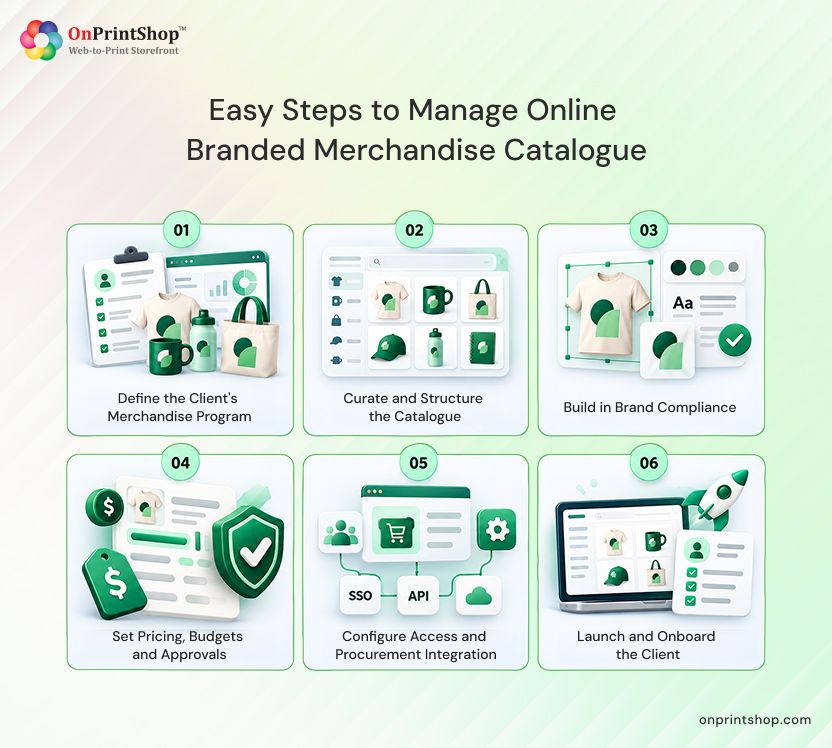
Step 1: Define the Client's Merchandise Program
Before building anything, document who will use the program, what they need to order, and which rules govern those purchases. A one-page program brief should capture stakeholders, use cases, budgets, brand guidelines, expected volumes, and locations. Establishing this scope upfront helps prevent costly changes later.
What to do
- Identify stakeholders across marketing, HR, procurement, and regional leadership, and establish who has final approval authority.
- Document the main use cases, such as onboarding kits, events, sales gifts, employee rewards, and franchise or branch locations.
- Capture spending rules, including who can purchase, applicable limits, and the party responsible for payment.
- Gather brand guidelines along with approved logo files, colors, and fonts.
- Estimate expected order volumes and document every location included in the program.
Bring the findings together in a single-page brief. It gives the client something concrete to review and gives the PSP team a shared reference during setup. A downloadable program brief or checklist can also serve as a useful companion asset. Keep the document current when the client adds a department, location, or new use case.
Step 2: Curate and Structure the Catalogue
Catalogue curation should begin with customer use cases rather than a supplier's entire product assortment. Organize the range of printed products that you can offer into intuitive categories, create useful bundles or kits, and determine which items will be decorated internally, sourced from suppliers, or handled through both approaches. A focused initial range is simpler to manage and easier for employees to use.
What to do
- Select products according to the use cases documented in the program brief.
- Arrange categories around the ways employees are likely to shop, such as onboarding, events, and rewards.
- Develop relevant bundles and kits, such as a new-hire welcome kit.
- Choose the sourcing approach: in-house decorated products, supplier catalogue products, or a combination.
- Control visibility at the client level so each user group sees only approved products.
- Begin with a focused selection instead of hundreds of SKUs, then expand based on actual ordering behavior.
Supplier data synchronization can keep product information, pricing, and availability current without requiring constant manual maintenance. PromoStandards provides an industry standard for exchanging product, inventory, and order information with promotional product suppliers.
A PromoStandards-integrated web-to-print workflow can use those standards to reduce manual maintenance. Detailed implementation is outside the scope of this guide, so first determine which suppliers support the standard. Also assign someone on the client side to approve products that should be added or removed after launch.
Step 3: Build in Brand Compliance
Brand compliance should be built into the ordering experience rather than left to employees' memory. Locked templates, approved asset libraries, and artwork approval controls can allow users to personalize merchandise without altering protected logos, colors, or layouts.
What to do
- Create locked, rule-based templates with fixed positions for logos, layouts, and colors.
- Populate names, titles, and locations automatically from user profiles or order information.
- Maintain approved libraries for logos, colors, and fonts.
- Limit editable areas to fields that users are permitted to change.
- Add an artwork approval stage for products that require review before production.
- Save reusable personalization positions, so repeat orders do not require the same information to be entered again.
- For multi-location organizations, use central brand control with local ordering, allowing headquarters to establish standards while branches place their own orders.
Treat brand rules as part of the product experience itself. When a template blocks an incorrect logo or unapproved color before production, the PSP spends less time fixing artwork and the client's marketing team has greater confidence in every order.
Step 4: Set Pricing, Budgets and Approvals
Pricing, budgets, and approvals establish who is allowed to purchase which products, at what cost, and under what approval conditions. Begin with markup rules, quantity breaks, and decoration charges. Then configure departmental budgets, cost-center billing, and approval levels so the ordering process reflects the client's procurement policies.
What to do
- Establish markup rules and quantity breaks for each product category.
- Define decoration charges, including setup fees and per-location imprint costs.
- Assign departmental budgets and connect purchases to the appropriate cost centers.
- Create approval hierarchies, such as requiring manager approval when an order exceeds a defined amount.
- Confirm payment responsibility and applicable credit terms.
- Match the catalogue controls to the client's existing procurement policy to limit unauthorized purchases.
Keep the initial configuration manageable. Start with the rules the client already follows offline, then adjust them as real order data becomes available. Pricing strategy deserves its own detailed treatment, so use an automatic online print price estimation tool rather than turning this section into a pricing formula guide.

Step 5: Configure Access and Procurement Integration
Access controls determine who can enter a corporate catalogue, and which actions each user can perform. Use a secure private client portal with role-based permissions, then consider SSO or punchout when the client's technology and procurement requirements call for them. Typical roles include admin, approver, buyer, and viewer.
What to do
- Create a private portal that is available only to authorized client users.
- Assign permissions according to each user's role.
- Determine whether the client uses SSO so employees can authenticate with their existing corporate credentials.
- Confirm whether the procurement team needs punchout or another eProcurement connection.
What Are the Four Standard User Roles?
- Admin: controls users, catalogue settings, and budgets.
- Approver: reviews orders and artwork before they move forward.
- Buyer: searches the catalogue and submits orders.
- Viewer: can browse products but cannot place orders.
What Is Punchout?
Punchout is a procurement approach that allows an employee to access a supplier's catalogue from within the company's eProcurement platform, such as Coupa or SAP Ariba. The employee selects products in the supplier catalogue, then sends the completed cart back to the procurement system for approval and purchase order processing.
For PSPs, punchout can make a corporate catalogue much easier for procurement teams to adopt because buyers can remain within their existing purchasing environment. Since implementation depends on the client's procurement setup, confirm the technical requirements with the client's IT contact and the relevant platform provider before committing to a configuration.
Step 6: Launch and Onboard the Client
A successful catalogue launch requires more than making the storefront available. Test the complete ordering journey, prepare users for their roles, and introduce the program in stages. A pilot with one department lets the PSP gather feedback and correct issues before extending the catalogue across the wider organization.
What to do
- Run test orders to verify pricing, budgets, and approval routing.
- Check the proofing process and confirm shipping rules for every applicable location.
- Train administrators, approvers, and buyers on their respective responsibilities.
- Start with a soft launch involving a pilot department.
- Gather feedback and update products, templates, or approval rules where necessary.
- Expand the program to the broader organization after the pilot is stable.
- Provide a launch message containing a quick-start guide and a clearly identified support contact.
A pilot department provides a controlled environment for finding real-world issues. HR may be a useful pilot group when onboarding kits are a major use case because it can provide frequent ordering activity and practical feedback. Resolve the issues found during the pilot before expanding and communicate improvements to later users.
How Do You Manage the Catalogue Over Time?
A corporate merchandise catalogue needs attention well after its initial launch. A quarterly review is a useful recommended cadence, although the ideal schedule depends on the client and program. Regular reviews create opportunities to remove weak products, introduce seasonal items, refresh the catalogue, and discuss program performance with the client.
Which Tasks Belong in a Catalogue Review?
- Retire products with little or no ordering activity.
- Add seasonal products before relevant demand periods.
- Update product imagery to keep the catalogue current.
- Verify supplier synchronization for changes to pricing and availability.
- Monitor inventory and establish reorder points where appropriate.
Which Reports Should You Share with the Client?
- Top products: identifies the items employees purchase most often.
- Spend by department: shows how different teams are using their allocated budgets.
- Reorder rates: highlights products that generate recurring demand.
Use these reports during client business reviews. A promotional product catalog software platform that can produce these reports reduces the need for manually maintained spreadsheets. The information can also support renewal and expansion discussions, including adding departments, locations, or product categories.
What Are the Most Common Catalogue Mistakes?
Many catalogue issues come from a small number of preventable decisions. These common mistakes print shops make while going online affect a single-department corporate swag store as well as larger programs spanning multiple locations. Identifying them early gives PSPs an opportunity to address them before launching or during a regular program review.
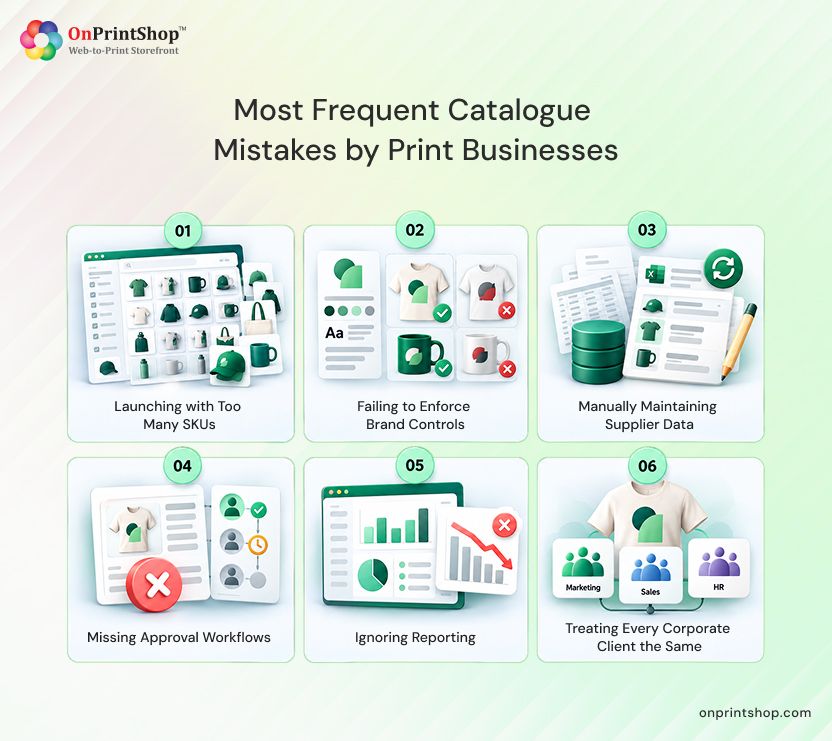
Launching with Too Many SKUs
A large selection can overwhelm users and make approvals harder to manage.
Fix: Begin with a focused range and use order data to determine what should be added.
Failing to Enforce Brand Controls
Unrestricted editing can result in merchandise that does not meet brand standards.
Fix: Use locked templates and approved asset libraries.
Manually Maintaining Supplier Data
Repeated manual updates can lead to outdated pricing and inventory information.
Fix: Synchronize supplier information wherever the supplier supports it.
Missing Approval Workflows
Without defined approval paths, purchases may fall outside company policy.
Fix: Connect approval levels to the client's budget structure before launch.
Ignoring Reporting
Without order data, it is harder to demonstrate program value or identify expansion opportunities.
Fix: Schedule recurring reports and review them with the client.
Treating Every Corporate Client the Same
Stakeholders, brand requirements, budgets, and ordering patterns vary from client to client.
Fix: Create a client-specific program brief at the start of every engagement.
Build vs Buy: What Should Your Platform Support?
The platform you choose affects how much manual effort your team must repeat for every corporate account. Use the following requirements to assess a platform whether you build a customized platform or purchase a generic one. The final column maps the requirements to OnPrintShop's published product information.
When comparing platforms, ask vendors to demonstrate each requirement using a realistic client scenario rather than relying only on presentation slides. Pay particular attention to SSO and punchout because both depend on the client's IT environment. Supplier synchronization also deserves close review because it affects day-to-day catalogue maintenance.

How OnPrintShop Supports Corporate Merchandise Catalogues
OnPrintShop provides private web-to-print platforms with the top B2B W2P ordering portal features like separate catalogue, pricing, and access settings. Personalization controls can protect logos, fonts, colors, and layouts while leaving approved fields available for changes.
PromoStandards integration connects supplier product information, pricing markups, and live inventory with the storefront. PSPs managing branch-based programs can create separate storefronts by location and administer them from a central panel. The B2B storefront feature set also includes budgets, approval routing, SSO, and punchout, allowing PSPs to accommodate different corporate procurement requirements. The exact configuration depends on the client's program and setup.
ConclusionA managed corporate merchandise catalogue gives corporate clients a consistent way to order branded products while helping PSPs move from isolated projects toward an ongoing program relationship. The six-step process with the leading B2B web-to-print storefront covers the full setup: define the program, organize the catalogue, enforce brand compliance, establish pricing and approvals, configure access and procurement, and launch through a pilot.Without using technology, you are not losing just the business opportunity; you are losing your market presence. So, if you want more corporate print buyers that are loyal to your print store, book OnPrintShop demo today, and experience the ease of automated print workflows for your business.